
ALVAO Review 2027: Pricing, Features, Pros & Cons, Ratings & More

Co-Founder and Chief Data Scientist

ALVAO Service Desk: Top IT Service Management Tools
4.55 / 5
Featured IT Service Management Tools Alternatives for ALVAO Service Desk

By quote
14 days
automated software patching, ticketing, reporting
Editor's Take
NinjaOne is an all-in-one IT management platform designed to streamline and automate IT operations for managed service providers (MSPs) and internal IT teams. Known for its user-friendly interface and powerful remote monitoring capabilities, NinjaOne offers a suite of tools that support device management, patching, remote access, backup, and ticketing—all within a single, cloud-based solution.
With NinjaOne, IT teams can monitor and manage all devices in real time, automate software patching, and resolve issues remotely, enhancing efficiency and minimizing downtime. The platform’s ticketing and documentation features enable teams to handle support requests seamlessly, while detailed reporting and analytics offer insights into IT performance and asset health. Integrations with popular tools like ConnectWise, Autotask, and Slack make NinjaOne adaptable to existing workflows, providing a flexible solution for IT operations. For businesses seeking to improve IT efficiency, security, and response times, NinjaOne delivers a robust, scalable platform that keeps IT environments running smoothly.
Expert Score
In evaluating SaaS software, a comprehensive and structured methodology ensures a fair and accurate comparison across key metrics. This approach focuses on the most critical aspects that affect user experience, functionality, and business value. The following metrics—general features, cost, customer service, integrations, and mobile support—are evaluated to provide a holistic view of each software solution’s strengths and weaknesses. These metrics are selected based on their direct impact on software usability, scalability, and long-term effectiveness for businesses.
1. General Features - scoring weight 40%
This metric evaluates the core functionalities and tools the software offers. It involves assessing the comprehensiveness of the features, their relevance to the target users, and the ease of use. This is important because robust and well-designed features determine the software's overall utility and efficiency in solving user problems.
2. Cost - scoring weight 15%
Cost analysis focuses on pricing models, value for money, and scalability. It's crucial to evaluate whether the software’s features justify its price, considering different plans for small and large organizations. This is vital for businesses to ensure they invest in cost-effective solutions that fit their budget.
3. Customer Service - scoring weight 15%
This evaluates the responsiveness, quality, and availability of customer support, including channels like chat, email, or phone. Good customer service is essential for troubleshooting and ensuring smooth software usage, which reduces downtime and frustration for users.
4. Integrations - scoring weight 15%
This examines how well the software integrates with third-party tools (e.g., CRM, payment systems, collaboration apps). Seamless integrations are key for creating a unified workflow and enhancing productivity by connecting multiple systems, which is crucial for operational efficiency.
5. Mobile Support - scoring weight 15%
Mobile support assesses the software’s functionality and performance on mobile devices, including apps and mobile web versions. With increasing remote work and on-the-go usage, strong mobile support is critical to ensure users can access and utilize the software effectively, regardless of location.

$19 per agent per month
Yes
Ticketing, multi-channel support, automation
Editor's Take
Zendesk is a customer service and engagement platform designed to help businesses deliver exceptional support experiences across multiple channels. It provides a unified solution for managing customer inquiries, tracking support tickets, and providing real-time assistance through a variety of touchpoints, including email, chat, phone, social media, and web forms. With its focus on improving customer satisfaction, Zendesk helps organizations streamline support workflows, enhance communication, and drive more personalized service.
One of Zendesk's standout features is its ticketing system, which enables support teams to manage, track, and prioritize customer requests. When a customer submits an inquiry, it automatically creates a ticket, which can be assigned to the appropriate team member for resolution. Zendesk's automation and workflows features help streamline processes by assigning tickets, sending automatic responses, and setting up reminders to ensure that no request goes unaddressed.
Zendesk also offers powerful multi-channel support, allowing businesses to interact with customers via email, live chat, phone calls, social media, and even messaging platforms like WhatsApp. This ensures that customers can reach out through their preferred method, and support teams can engage across various channels in one centralized platform.
For businesses looking to provide self-service options, Zendesk includes a knowledge base and help center feature, where users can search for articles, FAQs, and solutions to common problems. This reduces the volume of support tickets and empowers customers to find answers quickly and independently.
In addition to its customer support capabilities, Zendesk provides powerful analytics and reporting tools that give businesses insights into support team performance, ticket resolution times, customer satisfaction, and more. This data helps companies optimize their support processes and make data-driven decisions.
Expert Score
In evaluating SaaS software, a comprehensive and structured methodology ensures a fair and accurate comparison across key metrics. This approach focuses on the most critical aspects that affect user experience, functionality, and business value. The following metrics—general features, cost, customer service, integrations, and mobile support—are evaluated to provide a holistic view of each software solution’s strengths and weaknesses. These metrics are selected based on their direct impact on software usability, scalability, and long-term effectiveness for businesses.
1. General Features - scoring weight 40%
This metric evaluates the core functionalities and tools the software offers. It involves assessing the comprehensiveness of the features, their relevance to the target users, and the ease of use. This is important because robust and well-designed features determine the software's overall utility and efficiency in solving user problems.
2. Cost - scoring weight 15%
Cost analysis focuses on pricing models, value for money, and scalability. It's crucial to evaluate whether the software’s features justify its price, considering different plans for small and large organizations. This is vital for businesses to ensure they invest in cost-effective solutions that fit their budget.
3. Customer Service - scoring weight 15%
This evaluates the responsiveness, quality, and availability of customer support, including channels like chat, email, or phone. Good customer service is essential for troubleshooting and ensuring smooth software usage, which reduces downtime and frustration for users.
4. Integrations - scoring weight 15%
This examines how well the software integrates with third-party tools (e.g., CRM, payment systems, collaboration apps). Seamless integrations are key for creating a unified workflow and enhancing productivity by connecting multiple systems, which is crucial for operational efficiency.
5. Mobile Support - scoring weight 15%
Mobile support assesses the software’s functionality and performance on mobile devices, including apps and mobile web versions. With increasing remote work and on-the-go usage, strong mobile support is critical to ensure users can access and utilize the software effectively, regardless of location.

$49/agent/month, billed annually
14 days
incident management, asset managemen, automated workflows
Editor's Take
Freshservice is a cloud-based IT service management (ITSM) platform designed to help organizations streamline IT operations, automate workflows, and enhance service delivery. Known for its user-friendly interface and ease of deployment, Freshservice provides comprehensive tools for incident management, asset management, change management, and problem resolution, making it an ideal solution for IT teams looking to improve efficiency and support.
The platform’s intuitive ticketing system allows teams to track and prioritize issues efficiently, while its automation capabilities—like automated workflows, self-service portals, and AI-powered insights—reduce manual tasks and enhance productivity. Freshservice includes an asset management module that enables teams to track hardware and software assets, monitor lifecycle changes, and manage compliance. With built-in reporting and analytics, Freshservice provides valuable insights into IT performance, helping organizations make data-driven improvements. Designed to support both growing and established IT departments, Freshservice is a scalable solution that simplifies IT service management and optimizes user support.
Expert Score
In evaluating SaaS software, a comprehensive and structured methodology ensures a fair and accurate comparison across key metrics. This approach focuses on the most critical aspects that affect user experience, functionality, and business value. The following metrics—general features, cost, customer service, integrations, and mobile support—are evaluated to provide a holistic view of each software solution’s strengths and weaknesses. These metrics are selected based on their direct impact on software usability, scalability, and long-term effectiveness for businesses.
1. General Features - scoring weight 40%
This metric evaluates the core functionalities and tools the software offers. It involves assessing the comprehensiveness of the features, their relevance to the target users, and the ease of use. This is important because robust and well-designed features determine the software’s overall utility and efficiency in solving user problems.
2. Cost - scoring weight 15%
Cost analysis focuses on pricing models, value for money, and scalability. It’s crucial to evaluate whether the software’s features justify its price, considering different plans for small and large organizations. This is vital for businesses to ensure they invest in cost-effective solutions that fit their budget.
3. Customer Service - scoring weight 15%
This evaluates the responsiveness, quality, and availability of customer support, including channels like chat, email, or phone. Good customer service is essential for troubleshooting and ensuring smooth software usage, which reduces downtime and frustration for users.
4. Integrations - scoring weight 15%
This examines how well the software integrates with third-party tools (e.g., CRM, payment systems, collaboration apps). Seamless integrations are key for creating a unified workflow and enhancing productivity by connecting multiple systems, which is crucial for operational efficiency.
5. Mobile Support - scoring weight 15%
Mobile support assesses the software’s functionality and performance on mobile devices, including apps and mobile web versions. With increasing remote work and on-the-go usage, strong mobile support is critical to ensure users can access and utilize the software effectively, regardless of location.
ALVAO Service Desk Review
What is ALVAO?
ALVAO is an IT service management (ITSM) platform designed specifically to integrate seamlessly with Microsoft environments, offering a comprehensive solution for organizations seeking to optimize their IT operations and support services. The platform enables IT teams to manage incidents, requests, changes, and assets with greater efficiency, while leveraging the familiar Microsoft ecosystem for enhanced collaboration and user experience.
Our research team has observed that ALVAO focuses on simplifying ITSM workflows through automation, customizable processes, and real-time analytics. By aligning with Microsoft technologies such as Azure Active Directory, Microsoft Teams, and SharePoint, ALVAO ensures smooth integration, which reduces the learning curve for users and supports better cross-departmental communication. This focus makes ALVAO particularly appealing to enterprises already invested in Microsoft’s technology stack.
ALVAO’s modular architecture allows organizations to tailor the platform to their unique IT service needs, supporting both ITIL-compliant processes and flexible workflows. Its cloud-based and on-premises deployment options provide scalability and control, accommodating businesses ranging from mid-sized companies to large enterprises.
What’s New in ALVAO?
In 2025, ALVAO continues to expand its capabilities with significant enhancements aimed at improving integration, automation, and reporting. The platform has introduced deeper Microsoft Teams integration, enabling IT teams to receive real-time notifications, collaborate on incident resolution, and automate ticket updates directly within Teams channels. This integration streamlines communication and accelerates issue resolution workflows.
Additionally, ALVAO has enhanced its automation engine with new no-code workflow builders, allowing IT administrators to design custom process automations that reduce manual tasks and improve service consistency. These workflow improvements facilitate faster onboarding and more agile IT service delivery.
ALVAO’s analytics and reporting suite has also been upgraded to offer more customizable dashboards and predictive insights. These tools enable IT managers to proactively monitor service performance, anticipate bottlenecks, and optimize resource allocation effectively. These updates demonstrate ALVAO’s commitment to delivering an ITSM platform that supports modern digital workplaces with Microsoft-centric environments.
Featured IT Service Management Tools
By quote
14 days
automated software patching, ticketing, reporting
Editor's Take
NinjaOne is an all-in-one IT management platform designed to streamline and automate IT operations for managed service providers (MSPs) and internal IT teams. Known for its user-friendly interface and powerful remote monitoring capabilities, NinjaOne offers a suite of tools that support device management, patching, remote access, backup, and ticketing—all within a single, cloud-based solution.
With NinjaOne, IT teams can monitor and manage all devices in real time, automate software patching, and resolve issues remotely, enhancing efficiency and minimizing downtime. The platform’s ticketing and documentation features enable teams to handle support requests seamlessly, while detailed reporting and analytics offer insights into IT performance and asset health. Integrations with popular tools like ConnectWise, Autotask, and Slack make NinjaOne adaptable to existing workflows, providing a flexible solution for IT operations. For businesses seeking to improve IT efficiency, security, and response times, NinjaOne delivers a robust, scalable platform that keeps IT environments running smoothly.
Expert Score
In evaluating SaaS software, a comprehensive and structured methodology ensures a fair and accurate comparison across key metrics. This approach focuses on the most critical aspects that affect user experience, functionality, and business value. The following metrics—general features, cost, customer service, integrations, and mobile support—are evaluated to provide a holistic view of each software solution’s strengths and weaknesses. These metrics are selected based on their direct impact on software usability, scalability, and long-term effectiveness for businesses.
1. General Features - scoring weight 40%
This metric evaluates the core functionalities and tools the software offers. It involves assessing the comprehensiveness of the features, their relevance to the target users, and the ease of use. This is important because robust and well-designed features determine the software's overall utility and efficiency in solving user problems.
2. Cost - scoring weight 15%
Cost analysis focuses on pricing models, value for money, and scalability. It's crucial to evaluate whether the software’s features justify its price, considering different plans for small and large organizations. This is vital for businesses to ensure they invest in cost-effective solutions that fit their budget.
3. Customer Service - scoring weight 15%
This evaluates the responsiveness, quality, and availability of customer support, including channels like chat, email, or phone. Good customer service is essential for troubleshooting and ensuring smooth software usage, which reduces downtime and frustration for users.
4. Integrations - scoring weight 15%
This examines how well the software integrates with third-party tools (e.g., CRM, payment systems, collaboration apps). Seamless integrations are key for creating a unified workflow and enhancing productivity by connecting multiple systems, which is crucial for operational efficiency.
5. Mobile Support - scoring weight 15%
Mobile support assesses the software’s functionality and performance on mobile devices, including apps and mobile web versions. With increasing remote work and on-the-go usage, strong mobile support is critical to ensure users can access and utilize the software effectively, regardless of location.
$19 per agent per month
Yes
Ticketing, multi-channel support, automation
Editor's Take
Zendesk is a customer service and engagement platform designed to help businesses deliver exceptional support experiences across multiple channels. It provides a unified solution for managing customer inquiries, tracking support tickets, and providing real-time assistance through a variety of touchpoints, including email, chat, phone, social media, and web forms. With its focus on improving customer satisfaction, Zendesk helps organizations streamline support workflows, enhance communication, and drive more personalized service.
One of Zendesk's standout features is its ticketing system, which enables support teams to manage, track, and prioritize customer requests. When a customer submits an inquiry, it automatically creates a ticket, which can be assigned to the appropriate team member for resolution. Zendesk's automation and workflows features help streamline processes by assigning tickets, sending automatic responses, and setting up reminders to ensure that no request goes unaddressed.
Zendesk also offers powerful multi-channel support, allowing businesses to interact with customers via email, live chat, phone calls, social media, and even messaging platforms like WhatsApp. This ensures that customers can reach out through their preferred method, and support teams can engage across various channels in one centralized platform.
For businesses looking to provide self-service options, Zendesk includes a knowledge base and help center feature, where users can search for articles, FAQs, and solutions to common problems. This reduces the volume of support tickets and empowers customers to find answers quickly and independently.
In addition to its customer support capabilities, Zendesk provides powerful analytics and reporting tools that give businesses insights into support team performance, ticket resolution times, customer satisfaction, and more. This data helps companies optimize their support processes and make data-driven decisions.
Expert Score
In evaluating SaaS software, a comprehensive and structured methodology ensures a fair and accurate comparison across key metrics. This approach focuses on the most critical aspects that affect user experience, functionality, and business value. The following metrics—general features, cost, customer service, integrations, and mobile support—are evaluated to provide a holistic view of each software solution’s strengths and weaknesses. These metrics are selected based on their direct impact on software usability, scalability, and long-term effectiveness for businesses.
1. General Features - scoring weight 40%
This metric evaluates the core functionalities and tools the software offers. It involves assessing the comprehensiveness of the features, their relevance to the target users, and the ease of use. This is important because robust and well-designed features determine the software's overall utility and efficiency in solving user problems.
2. Cost - scoring weight 15%
Cost analysis focuses on pricing models, value for money, and scalability. It's crucial to evaluate whether the software’s features justify its price, considering different plans for small and large organizations. This is vital for businesses to ensure they invest in cost-effective solutions that fit their budget.
3. Customer Service - scoring weight 15%
This evaluates the responsiveness, quality, and availability of customer support, including channels like chat, email, or phone. Good customer service is essential for troubleshooting and ensuring smooth software usage, which reduces downtime and frustration for users.
4. Integrations - scoring weight 15%
This examines how well the software integrates with third-party tools (e.g., CRM, payment systems, collaboration apps). Seamless integrations are key for creating a unified workflow and enhancing productivity by connecting multiple systems, which is crucial for operational efficiency.
5. Mobile Support - scoring weight 15%
Mobile support assesses the software’s functionality and performance on mobile devices, including apps and mobile web versions. With increasing remote work and on-the-go usage, strong mobile support is critical to ensure users can access and utilize the software effectively, regardless of location.
$49/agent/month, billed annually
14 days
incident management, asset managemen, automated workflows
Editor's Take
Freshservice is a cloud-based IT service management (ITSM) platform designed to help organizations streamline IT operations, automate workflows, and enhance service delivery. Known for its user-friendly interface and ease of deployment, Freshservice provides comprehensive tools for incident management, asset management, change management, and problem resolution, making it an ideal solution for IT teams looking to improve efficiency and support.
The platform’s intuitive ticketing system allows teams to track and prioritize issues efficiently, while its automation capabilities—like automated workflows, self-service portals, and AI-powered insights—reduce manual tasks and enhance productivity. Freshservice includes an asset management module that enables teams to track hardware and software assets, monitor lifecycle changes, and manage compliance. With built-in reporting and analytics, Freshservice provides valuable insights into IT performance, helping organizations make data-driven improvements. Designed to support both growing and established IT departments, Freshservice is a scalable solution that simplifies IT service management and optimizes user support.
Expert Score
In evaluating SaaS software, a comprehensive and structured methodology ensures a fair and accurate comparison across key metrics. This approach focuses on the most critical aspects that affect user experience, functionality, and business value. The following metrics—general features, cost, customer service, integrations, and mobile support—are evaluated to provide a holistic view of each software solution’s strengths and weaknesses. These metrics are selected based on their direct impact on software usability, scalability, and long-term effectiveness for businesses.
1. General Features - scoring weight 40%
This metric evaluates the core functionalities and tools the software offers. It involves assessing the comprehensiveness of the features, their relevance to the target users, and the ease of use. This is important because robust and well-designed features determine the software’s overall utility and efficiency in solving user problems.
2. Cost - scoring weight 15%
Cost analysis focuses on pricing models, value for money, and scalability. It’s crucial to evaluate whether the software’s features justify its price, considering different plans for small and large organizations. This is vital for businesses to ensure they invest in cost-effective solutions that fit their budget.
3. Customer Service - scoring weight 15%
This evaluates the responsiveness, quality, and availability of customer support, including channels like chat, email, or phone. Good customer service is essential for troubleshooting and ensuring smooth software usage, which reduces downtime and frustration for users.
4. Integrations - scoring weight 15%
This examines how well the software integrates with third-party tools (e.g., CRM, payment systems, collaboration apps). Seamless integrations are key for creating a unified workflow and enhancing productivity by connecting multiple systems, which is crucial for operational efficiency.
5. Mobile Support - scoring weight 15%
Mobile support assesses the software’s functionality and performance on mobile devices, including apps and mobile web versions. With increasing remote work and on-the-go usage, strong mobile support is critical to ensure users can access and utilize the software effectively, regardless of location.
How Much Does ALVAO Cost?
ALVAO Service Desk: Top IT Service Management Tools
4.55 / 5
ALVAO offers customized pricing tailored to the specific needs of each organization, reflecting factors such as user count, selected modules, deployment type, and level of support required. Because ALVAO’s solutions are highly configurable, pricing is generally provided through direct consultation with the sales team to ensure an optimal fit for your IT environment.
Start Package - $36/agent/month, billed annually
- Core features including Service Catalog, SLA Management, Ticket Prioritization, and Entra ID Integration
Standard Package - $54/agent/month, billed annually
- Everything from Start
- Offers advanced automation features such as ALVAO for Outlook, ALVAO for Teams, Customer Satisfaction Survey, Advanced Workflows, Power BI Integration, and Microsoft Copilot Integration
Professional Package - $63/agent/month, billed annually
- Everything from Standard
- Offers advanced automation features, asset management, enhanced analytics, and priority support for growing IT teams
Enterprise Package - $84/agent/month, billed annually
- Everything from Professional
- Provides full platform access including multi-tenant support, custom SLAs, advanced security controls, and comprehensive Microsoft ecosystem integration
ALVAO typically targets medium to large enterprises, and pricing will reflect this scale and complexity. Prospective customers are encouraged to request a demo and personalized quote to better understand investment requirements.
What Sets ALVAO Apart?
ALVAO stands out in the ITSM market due to its deep integration with Microsoft ecosystems, enabling organizations to leverage familiar tools like Teams and Azure Active Directory within their IT service workflows. This integration reduces friction for IT teams and end-users alike, promoting adoption and streamlining communication.
The platform’s no-code automation capabilities empower IT administrators to tailor processes without heavy reliance on developers, enhancing agility and operational efficiency. ALVAO’s commitment to modularity and customization ensures that organizations can adapt the system to evolving IT service demands and compliance requirements.
Moreover, ALVAO offers flexible deployment options—cloud, on-premises, or hybrid—which provides organizations with control over data security and regulatory compliance. The platform’s predictive analytics and enhanced reporting empower proactive IT management, helping businesses reduce downtime and improve user satisfaction.
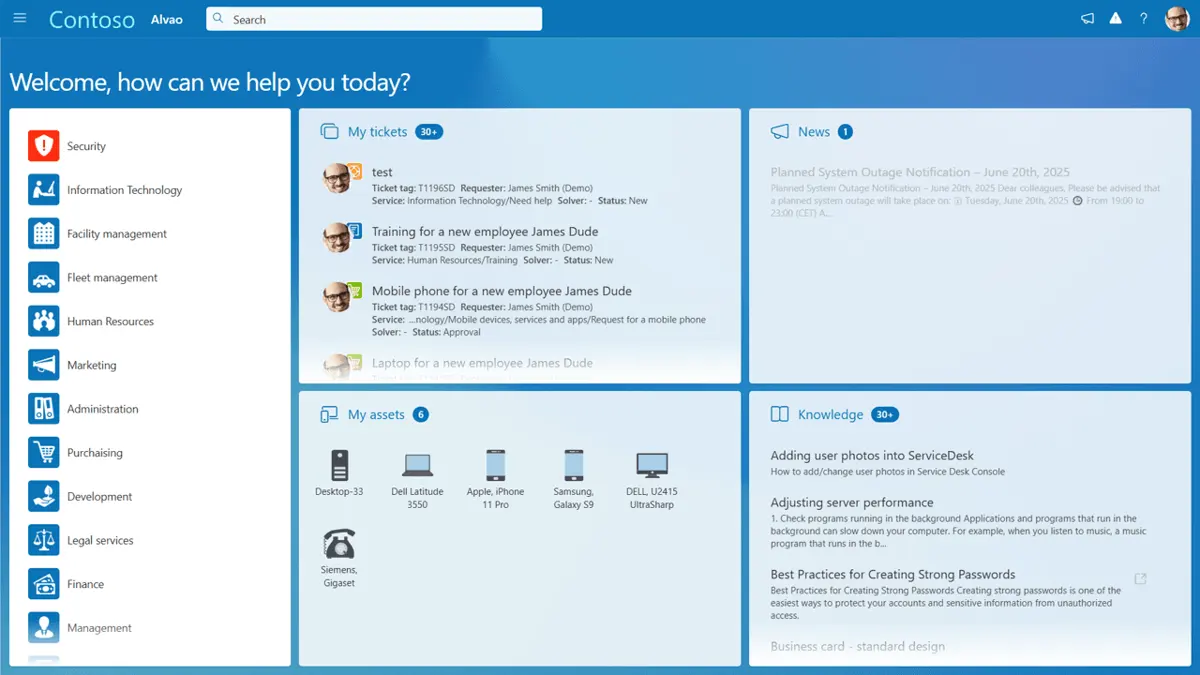
ALVAO Pros
Seamless Microsoft Integration. Deep connections with Microsoft Teams, Azure AD, and SharePoint streamline workflows and user experience.
No-Code Workflow Automation. Enables IT teams to design and deploy automated processes quickly without coding expertise.
Modular and Customizable. Supports ITIL processes with flexible modules that fit diverse organizational needs.
Deployment Flexibility. Offers cloud, on-premises, and hybrid deployment options to meet security and compliance demands.
Advanced Analytics. Predictive insights and customizable dashboards help optimize IT service delivery and resource allocation.
ALVAO Cons
Pricing Transparency. Customized pricing means prospective customers must contact sales for detailed quotes, which may slow decision-making.
Learning Curve. While integration with Microsoft products is smooth, mastering ALVAO’s full feature set may require training.
ALVAO Core Features
ALVAO Service Desk: Top IT Service Management Tools
4.55 / 5
ALVAO offers a rich set of core features designed to streamline and enhance IT service management processes within Microsoft-centric environments. The platform combines essential ITIL-based modules such as incident, problem, change, and asset management with powerful automation tools and deep integrations into Microsoft Teams and Azure Active Directory. These capabilities empower IT teams to deliver efficient, consistent, and collaborative service experiences while maintaining full control over their IT operations.
Ticket AI Assistant. Analyzes customer sentiment and data from various sources to assess the potential risk of major incidents and suggest the best possible solutions.
Knowledge Base AI Assistant. Identifies patterns in your tickets and drafts Knowledge Base articles for you. Keep your documentation automatically updated and save hours of manual work.
Incident and Problem Management. Manage IT incidents efficiently with ticketing, prioritization, escalation, and root cause analysis to minimize downtime.
Request Fulfillment. Streamline service requests with automated workflows, approvals, and fulfillment tracking to improve end-user satisfaction.
Change and Release Management. Control IT changes and releases with structured processes that reduce risk and ensure compliance.
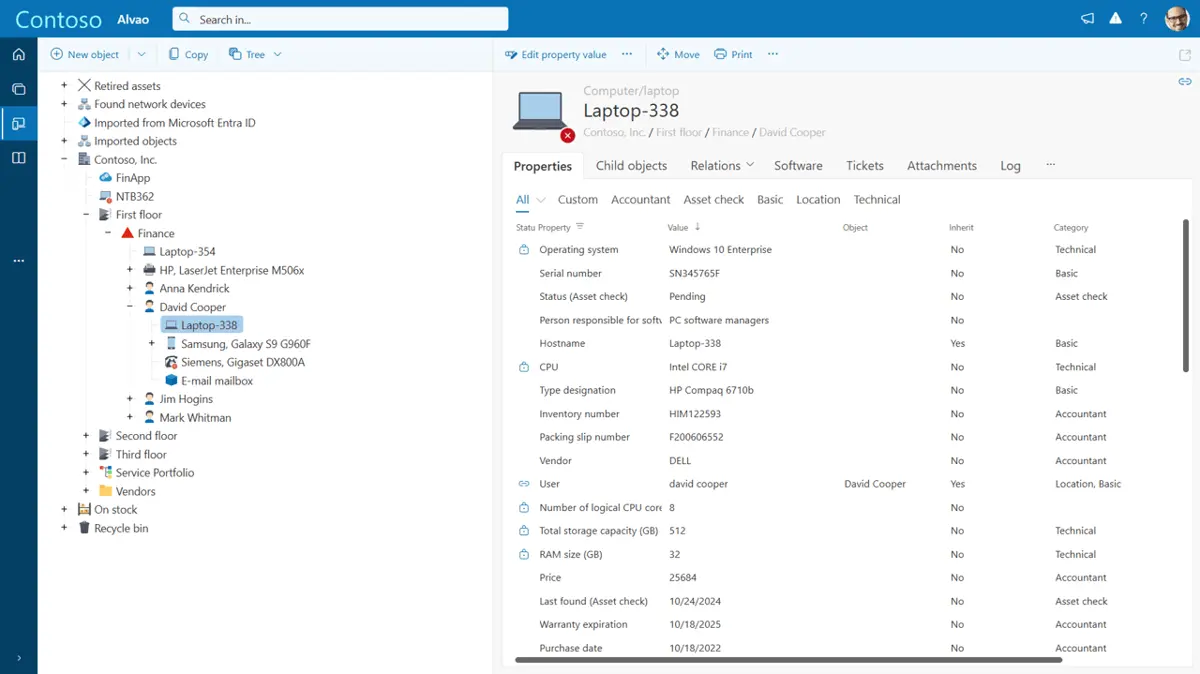
Asset and Configuration Management. Track hardware and software assets across the enterprise, linking configurations to service impacts for better decision-making.
Microsoft Teams Integration. Collaborate within Teams for ticket updates, notifications, and approvals, reducing context switching.
No-Code Workflow Builder. Design custom automated workflows for IT processes without programming, accelerating response times.
Advanced Analytics and Reporting. Access customizable dashboards and predictive analytics to monitor performance and optimize operations.
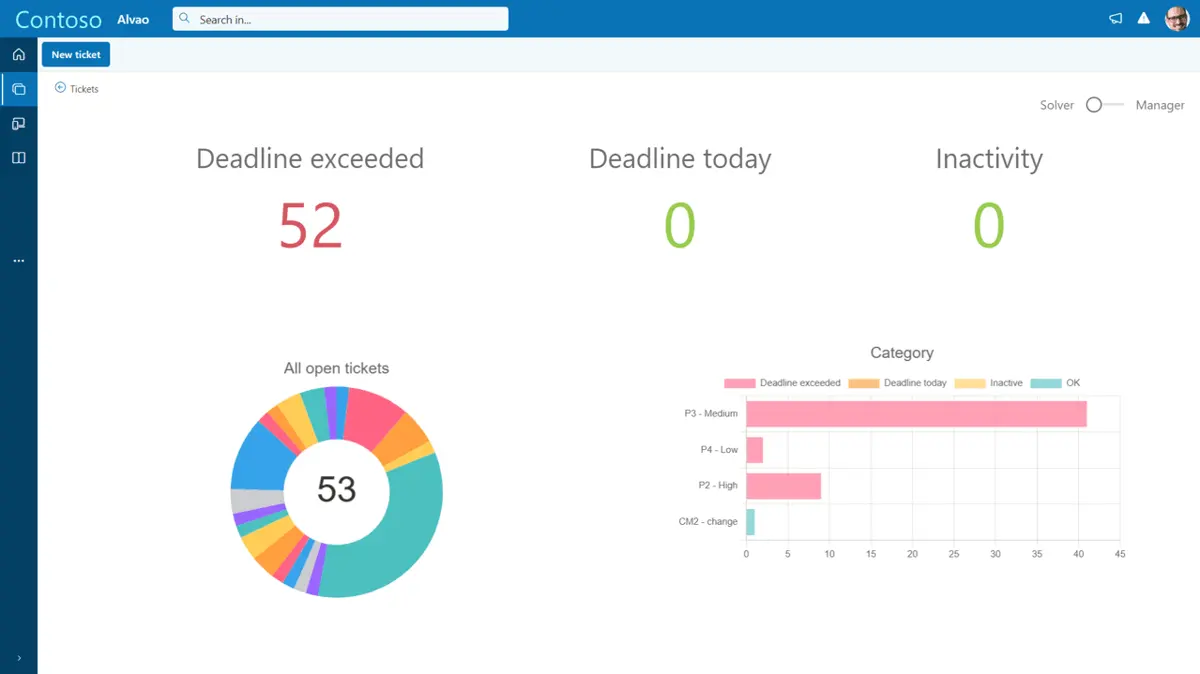
Benefits of Using ALVAO
Implementing ALVAO provides organizations with numerous benefits that improve IT service delivery and operational efficiency. Its seamless Microsoft integrations promote better collaboration and faster issue resolution, while no-code automation reduces manual workloads and accelerates service processes. Additionally, ALVAO’s advanced analytics enable data-driven decision-making, helping IT leaders anticipate challenges, optimize resources, and demonstrate value to the wider business.
Enhanced Collaboration. ALVAO’s deep Microsoft Teams integration fosters seamless communication between IT and business units, accelerating issue resolution and improving service quality.
Increased Operational Efficiency. No-code automation reduces manual tasks, streamlines workflows, and enables IT teams to focus on strategic initiatives.
Improved IT Service Delivery. Modular ITIL-based processes and real-time analytics allow organizations to standardize services, reduce downtime, and enhance user satisfaction.
Scalable and Flexible Deployment. Whether cloud or on-premises, ALVAO adapts to organizational needs, ensuring compliance with industry standards and regulations.
Data-Driven Decision Making. Predictive analytics and reporting empower IT leaders to anticipate issues, allocate resources effectively, and demonstrate IT’s value to the business.
What Business Types Use ALVAO?
ALVAO is utilized across various industries that rely heavily on Microsoft technology and require robust IT service management, including:
- Financial Services: Managing compliance-heavy environments with strict security and audit requirements.
- Healthcare: Supporting critical IT infrastructure and ensuring continuous service availability.
- Manufacturing: Streamlining IT operations across multiple sites and complex asset networks.
- Education: Facilitating IT support in campuses and multi-location institutions.
- Government and Public Sector: Meeting stringent regulatory and data sovereignty requirements.
- Technology Firms: Enhancing agile IT service delivery in fast-paced environments.
What Are the Top 5 Alternatives to ALVAO?
While ALVAO provides a robust ITSM platform with deep Microsoft integration and flexible automation capabilities, there are several other notable IT service management solutions in the market. These alternatives vary in their approach to ITIL compliance, automation, scalability, and ecosystem integration. Exploring these options can help organizations identify the best fit based on their size, industry, and specific IT service management requirements.
1. ServiceNow
ServiceNow is a leading enterprise ITSM platform known for its extensive capabilities, scalability, and AI-powered automation. Compared to ALVAO, ServiceNow offers broader industry support but with higher complexity and cost, making it suitable for large global enterprises.
2. BMC Helix ITSM
BMC Helix ITSM provides robust IT service management with a focus on automation and cognitive capabilities. While ALVAO integrates deeply with Microsoft, BMC Helix offers wider platform support and comprehensive ITOM tools.
3. Freshservice
Freshservice is a cloud-based ITSM solution favored for its ease of use and fast deployment. It is less specialized in Microsoft integration than ALVAO but appeals to organizations seeking a quick-to-implement, user-friendly platform.
4. Ivanti Neurons
Ivanti Neurons for ITSM focuses on intelligent automation and unified endpoint management. Compared to ALVAO, Ivanti provides broader asset management features but may require more complex implementation.
5. ManageEngine ServiceDesk Plus
ManageEngine ServiceDesk Plus offers an affordable ITSM suite with solid ticketing and asset management. It is ideal for small to mid-sized businesses but lacks ALVAO’s advanced Microsoft ecosystem integrations.
Frequently Asked Questions (FAQs)
Yes, ALVAO offers flexible deployment options including cloud, on-premises, and hybrid models to meet various organizational needs.
Absolutely. ALVAO is designed to integrate deeply with Microsoft Teams, Azure Active Directory, SharePoint, and other Microsoft products.
In 2026, ALVAO is particularly advantageous for industries such as IT services, healthcare, education, and government sectors. Its robust ITIL-aligned features, flexible deployment options, and seamless integrations make it a great fit for organizations in these fields seeking efficient service management solutions. **Question** Does ALVAO support cloud and on-premises deployment? **Answer** Yes, ALVAO offers both cloud and on-premises deployment options in 2026, providing flexibility to organizations based on their specific infrastructure needs and policies, while ensuring the security and availability of their service management solutions. **Question** Can ALVAO integrate with Microsoft Teams and Azure AD? **Answer** In 2026, ALVAO seamlessly integrates with Microsoft Teams and Azure Active Directory, allowing organizations to enhance their communication and identity management while maintaining streamlined workflows and improving collaboration across teams. **Question** What are the key features of automation in ALVAO? **Answer** The 2026 version of ALVAO boasts powerful automation features such as automated ticket routing, service request management, and workflow automation. These features reduce manual tasks, enhance efficiency, and ensure consistent service delivery within organizations. **Question** How does ALVAO support ITIL compliance? **Answer** ALVAO supports ITIL compliance in 2026 by offering comprehensive modules for incident, problem, and change management, among others. This ensures that organizations can implement best practices in IT service management, improving overall service quality and aligning with industry standards.
ALVAO offers automation features designed to enhance efficiency through customizable workflows, task scheduling, and rule-based triggers. These allow users to automate routine IT processes effortlessly, ensuring tasks are completed promptly without needing extensive manual intervention or programming knowledge.
ALVAO supports ITIL best practices across incident, problem, change, and asset management modules to ensure structured and compliant IT service delivery.


