
BambooHR Review 2027: Pricing, Features, Pros & Cons, Ratings & More

Co-Founder and Chief Data Scientist

BambooHR: Top HR Software
4.25 / 5
Featured HR Software Alternatives for BambooHR

$9 per seat per month
Zoom, Google Docs, Salesforce, Slack and more
Document collaboration and comments
Editor's Take
monday.com is a Work Operating System (Work OS) that enables teams to plan, organize, and manage tasks efficiently. Known for its customizable interface, it allows users to tailor workflows to suit specific needs, whether for task management or complex projects. The software’s automation features help reduce manual work by automating repetitive tasks based on set triggers. monday.com also fosters team collaboration through real-time updates, file sharing, and discussion threads, making it easier for teams to stay aligned and productive. Additionally, it integrates with popular tools like Slack, Google Drive, and Zoom to streamline operations across platforms.
Expert Score
In evaluating SaaS software, a comprehensive and structured methodology ensures a fair and accurate comparison across key metrics. This approach focuses on the most critical aspects that affect user experience, functionality, and business value. The following metrics—general features, cost, customer service, integrations, and mobile support—are evaluated to provide a holistic view of each software solution’s strengths and weaknesses. These metrics are selected based on their direct impact on software usability, scalability, and long-term effectiveness for businesses.
1. General Features - scoring weight 40%
This metric evaluates the core functionalities and tools the software offers. It involves assessing the comprehensiveness of the features, their relevance to the target users, and the ease of use. This is important because robust and well-designed features determine the software's overall utility and efficiency in solving user problems.
2. Cost - scoring weight 15%
Cost analysis focuses on pricing models, value for money, and scalability. It's crucial to evaluate whether the software’s features justify its price, considering different plans for small and large organizations. This is vital for businesses to ensure they invest in cost-effective solutions that fit their budget.
3. Customer Service - scoring weight 15%
This evaluates the responsiveness, quality, and availability of customer support, including channels like chat, email, or phone. Good customer service is essential for troubleshooting and ensuring smooth software usage, which reduces downtime and frustration for users.
4. Integrations - scoring weight 15%
This examines how well the software integrates with third-party tools (e.g., CRM, payment systems, collaboration apps). Seamless integrations are key for creating a unified workflow and enhancing productivity by connecting multiple systems, which is crucial for operational efficiency.
5. Mobile Support - scoring weight 15%
Mobile support assesses the software’s functionality and performance on mobile devices, including apps and mobile web versions. With increasing remote work and on-the-go usage, strong mobile support is critical to ensure users can access and utilize the software effectively, regardless of location.

Quote-based
14 days
Payroll Processing, Time Tracking, Employee Records
Editor's Take
TalentHR is a user-friendly human resource management system tailored for small to mid-sized businesses. It simplifies HR processes such as employee onboarding, performance tracking, and payroll management. The platform offers centralized employee records and tools for managing leave, attendance, and compliance. TalentHR’s intuitive dashboard provides actionable insights and analytics to support decision-making. Designed to save time and reduce administrative burdens, it enables HR teams to focus on strategic initiatives while ensuring accurate and efficient operations.
Expert Score
In evaluating SaaS software, a comprehensive and structured methodology ensures a fair and accurate comparison across key metrics. This approach focuses on the most critical aspects that affect user experience, functionality, and business value. The following metrics—general features, cost, customer service, integrations, and mobile support—are evaluated to provide a holistic view of each software solution’s strengths and weaknesses. These metrics are selected based on their direct impact on software usability, scalability, and long-term effectiveness for businesses.
1. General Features - scoring weight 40%
This metric evaluates the core functionalities and tools the software offers. It involves assessing the comprehensiveness of the features, their relevance to the target users, and the ease of use. This is important because robust and well-designed features determine the software's overall utility and efficiency in solving user problems.
2. Cost - scoring weight 15%
Cost analysis focuses on pricing models, value for money, and scalability. It's crucial to evaluate whether the software’s features justify its price, considering different plans for small and large organizations. This is vital for businesses to ensure thhey invest in cost-effective solutions that fit their budget.
3. Customer Service - scoring weight 15%
This evaluates the responsiveness, quality, and availability of customer support, including channels like chat, email, or phone. Good customer service is essential for troubleshooting and ensuring smooth software usage, which reduces downtime and frustration for users.
4. Integrations - scoring weight 15%
This examines how well the software integrates with third-party tools (e.g., CRM, payment systems, collaboration apps). Seamless integrations are key for creating a unified workflow and enhancing productivity by connecting multiple systems, which is crucial for operational efficiency.
5. Mobile Support - scoring weight 15%
Mobile support assesses the software’s functionality and performance on mobile devices, including apps and mobile web versions. With increasing remote work and on-the-go usage, strong mobile support is critical to ensure users can access and utilize the software effectively, regardless of location.

Up to $29/Montn
No
- Active compliance
- Multi-currency
- Automated filings
Editor's Take
Deel is a global HR, payroll, and compliance platform designed to help companies hire and manage talent anywhere in the world. It enables organizations to onboard employees or contractors, generate compliant contracts, and handle localized payroll and benefits across multiple countries. Deel automates tax documentation, streamlines international payments, and centralizes workforce data to reduce administrative overhead. With built-in compliance tools and access to local legal expertise, it helps businesses navigate complex labor regulations. Overall, Deel simplifies global hiring, ensures accuracy in cross-border payroll, and provides a scalable solution for companies expanding their international workforce.
Expert Score
In evaluating SaaS software, a comprehensive and structured methodology ensures a fair and accurate comparison across key metrics. This approach focuses on the most critical aspects that affect user experience, functionality, and business value. The following metrics—general features, cost, customer service, integrations, and mobile support—are evaluated to provide a holistic view of each software solution’s strengths and weaknesses. These metrics are selected based on their direct impact on software usability, scalability, and long-term effectiveness for businesses.
1. General Features - scoring weight 40%
This metric evaluates the core functionalities and tools the software offers. It involves assessing the comprehensiveness of the features, their relevance to the target users, and the ease of use. This is important because robust and well-designed features determine the software’s overall utility and efficiency in solving user problems.
2. Cost - scoring weight 15%
Cost analysis focuses on pricing models, value for money, and scalability. It’s crucial to evaluate whether the software’s features justify its price, considering different plans for small and large organizations. This is vital for businesses to ensure they invest in cost-effective solutions that fit their budget.
3. Customer Service - scoring weight 15%
This evaluates the responsiveness, quality, and availability of customer support, including channels like chat, email, or phone. Good customer service is essential for troubleshooting and ensuring smooth software usage, which reduces downtime and frustration for users.
4. Integrations - scoring weight 15%
This examines how well the software integrates with third-party tools (e.g., CRM, payment systems, collaboration apps). Seamless integrations are key for creating a unified workflow and enhancing productivity by connecting multiple systems, which is crucial for operational efficiency.
5. Mobile Support - scoring weight 15%
Mobile support assesses the software’s functionality and performance on mobile devices, including apps and mobile web versions. With increasing remote work and on-the-go usage, strong mobile support is critical to ensure users can access and utilize the software effectively, regardless of location.
BambooHR Review
What is BambooHR?
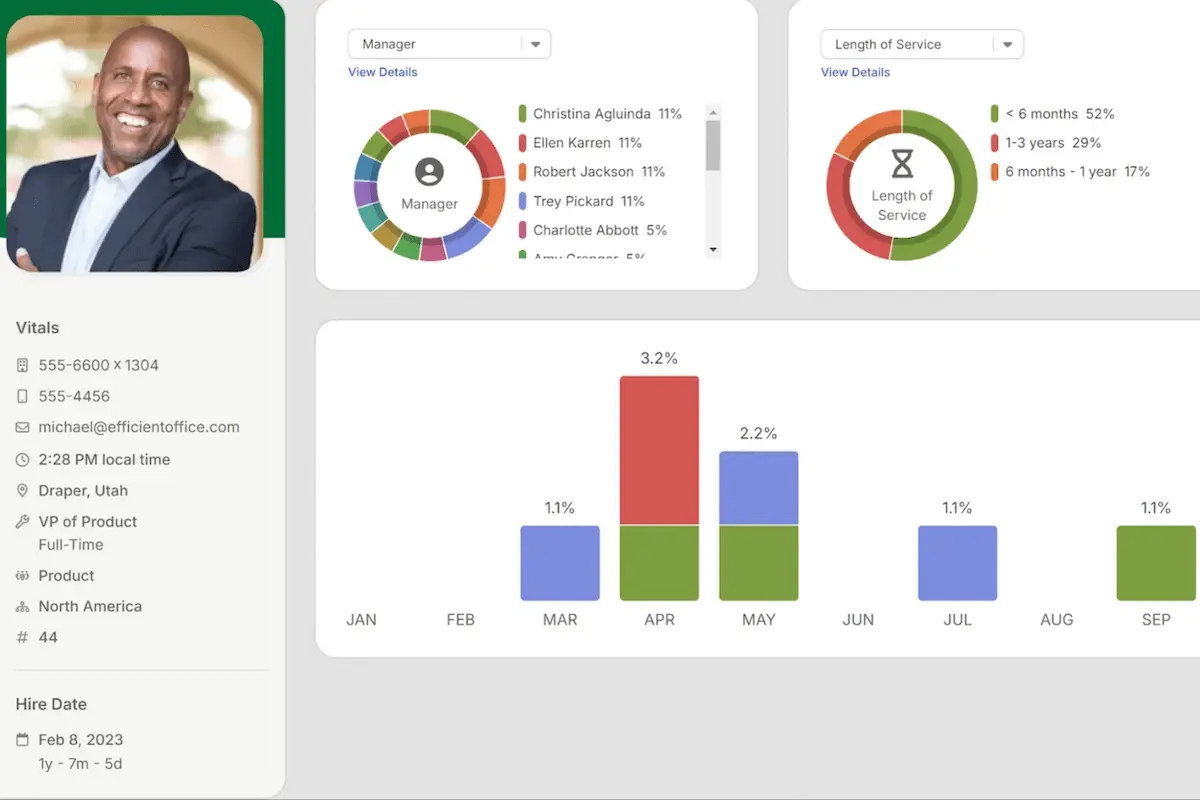
BambooHR is a comprehensive HR management software designed to simplify human resource tasks and streamline HR processes. With its user-friendly platform, BambooHR helps businesses manage critical HR functions such as employee data tracking, time-off management, performance reviews, and onboarding. This powerful tool is particularly popular among small to medium-sized businesses for its ease of use and robust features.
Our BambooHR review reveals that the software goes beyond essential HR functions by offering advanced capabilities like applicant tracking, payroll integration, and reporting tools. These features provide HR teams valuable insights into workforce metrics, aiding in better decision-making. BambooHR’s intuitive design ensures seamless navigation for HR teams and employees, enhancing engagement and productivity. It also supports a cloud-based system, allowing users to access HR information securely from anywhere.
What’s New in BambooHR?
This BambooHR review will explore the latest updates that enhance the software's functionality and user experience. BambooHR is constantly evolving to support HR teams better and streamline workflow and business process management. From new user interface changes to advanced tools like the AI-powered assistant, BambooHR continues to add value for its users. The most recent features focus on improving access management, enhancing payroll capabilities, and adding better shift tracking.
- Adjust Deduction Start and End Dates During a Payroll Run: Released on November 26, 2024, this update makes payroll deduction management more flexible. HR administrators can start or end deductions early, reactivate recent deductions, or pull deductions from the current year into payroll runs. The new "Upcoming Changes to Deductions" table provides clear visibility and quick actions to start or end deductions with a single click, simplifying payroll processing.
- Better Access Level Assignment: On November 21, 2024, BambooHR introduced improvements for user access management. Now, admins can assign and adjust user access directly from the Settings or employee profile, with three options: preview, manage/edit, and send a password reset email. These tools make it easier to control who sees what and manage permissions efficiently. This update ensures that managing employee access is more streamlined and clear-cut.
- Mobile Shift Differentials: With the November 18, 2024 update, BambooHR added the ability to view shift differentials on employee timesheets via the mobile app. This enhancement allows HR teams to easily track and manage shift-based pay adjustments, ensuring accurate compensation for hourly employees working at different times or days.
- Different Company Contributions for Employee and Dependent Cost (Age-Banded Medical Plans): The update released on November 11, 2024, supports more granular cost management for age-banded medical plans. Administrators can now designate different company contributions for employee versus dependent coverage. This change improves the rate calculator's flexibility, allowing for precise and automated cost assessments tailored to various needs.
- New User Interface: The October 23, 2024 update brought a fresh, modern look to the BambooHR platform. While maintaining its core functionality, the user interface was redesigned for a more cohesive experience. The navigation bar was moved to the left side of the screen to align with industry trends, ensuring that HR teams have an intuitive and updated workspace.
- Ask BambooHR - AI Assistant: Also released on October 23, 2024, the AI-powered Ask BambooHR chat tool helps reduce HR workload by providing employees with reliable answers to common questions. Drawing from data like HRIS records, company policies, and more, Ask BambooHR ensures that employees receive accurate information, improving response times and allowing HR teams to focus on strategic initiatives. Available on desktop, mobile, and soon through Slack, this tool offers 24/7 assistance, even outside office hours.
How Can You Integrate BambooHR With Other Essential Business Tools?
BambooHR provides robust integration capabilities that enable organizations to connect HR functions with other specialized business systems. Its API and configurable data fields allow for seamless data synchronization with software used in project and financial management. For example, companies operating within the construction sector can enhance their workflow by linking BambooHR with construction estimating software, thereby aligning employee management with project budgeting and scheduling. This integration facilitates holistic visibility across departments and streamlines processes without redundant data entry.
Featured HR Software Products
$9 per seat per month
Zoom, Google Docs, Salesforce, Slack and more
Document collaboration and comments
Editor's Take
monday.com is a Work Operating System (Work OS) that enables teams to plan, organize, and manage tasks efficiently. Known for its customizable interface, it allows users to tailor workflows to suit specific needs, whether for task management or complex projects. The software’s automation features help reduce manual work by automating repetitive tasks based on set triggers. monday.com also fosters team collaboration through real-time updates, file sharing, and discussion threads, making it easier for teams to stay aligned and productive. Additionally, it integrates with popular tools like Slack, Google Drive, and Zoom to streamline operations across platforms.
Expert Score
In evaluating SaaS software, a comprehensive and structured methodology ensures a fair and accurate comparison across key metrics. This approach focuses on the most critical aspects that affect user experience, functionality, and business value. The following metrics—general features, cost, customer service, integrations, and mobile support—are evaluated to provide a holistic view of each software solution’s strengths and weaknesses. These metrics are selected based on their direct impact on software usability, scalability, and long-term effectiveness for businesses.
1. General Features - scoring weight 40%
This metric evaluates the core functionalities and tools the software offers. It involves assessing the comprehensiveness of the features, their relevance to the target users, and the ease of use. This is important because robust and well-designed features determine the software's overall utility and efficiency in solving user problems.
2. Cost - scoring weight 15%
Cost analysis focuses on pricing models, value for money, and scalability. It's crucial to evaluate whether the software’s features justify its price, considering different plans for small and large organizations. This is vital for businesses to ensure they invest in cost-effective solutions that fit their budget.
3. Customer Service - scoring weight 15%
This evaluates the responsiveness, quality, and availability of customer support, including channels like chat, email, or phone. Good customer service is essential for troubleshooting and ensuring smooth software usage, which reduces downtime and frustration for users.
4. Integrations - scoring weight 15%
This examines how well the software integrates with third-party tools (e.g., CRM, payment systems, collaboration apps). Seamless integrations are key for creating a unified workflow and enhancing productivity by connecting multiple systems, which is crucial for operational efficiency.
5. Mobile Support - scoring weight 15%
Mobile support assesses the software’s functionality and performance on mobile devices, including apps and mobile web versions. With increasing remote work and on-the-go usage, strong mobile support is critical to ensure users can access and utilize the software effectively, regardless of location.
Quote-based
14 days
Payroll Processing, Time Tracking, Employee Records
Editor's Take
TalentHR is a user-friendly human resource management system tailored for small to mid-sized businesses. It simplifies HR processes such as employee onboarding, performance tracking, and payroll management. The platform offers centralized employee records and tools for managing leave, attendance, and compliance. TalentHR’s intuitive dashboard provides actionable insights and analytics to support decision-making. Designed to save time and reduce administrative burdens, it enables HR teams to focus on strategic initiatives while ensuring accurate and efficient operations.
Expert Score
In evaluating SaaS software, a comprehensive and structured methodology ensures a fair and accurate comparison across key metrics. This approach focuses on the most critical aspects that affect user experience, functionality, and business value. The following metrics—general features, cost, customer service, integrations, and mobile support—are evaluated to provide a holistic view of each software solution’s strengths and weaknesses. These metrics are selected based on their direct impact on software usability, scalability, and long-term effectiveness for businesses.
1. General Features - scoring weight 40%
This metric evaluates the core functionalities and tools the software offers. It involves assessing the comprehensiveness of the features, their relevance to the target users, and the ease of use. This is important because robust and well-designed features determine the software's overall utility and efficiency in solving user problems.
2. Cost - scoring weight 15%
Cost analysis focuses on pricing models, value for money, and scalability. It's crucial to evaluate whether the software’s features justify its price, considering different plans for small and large organizations. This is vital for businesses to ensure thhey invest in cost-effective solutions that fit their budget.
3. Customer Service - scoring weight 15%
This evaluates the responsiveness, quality, and availability of customer support, including channels like chat, email, or phone. Good customer service is essential for troubleshooting and ensuring smooth software usage, which reduces downtime and frustration for users.
4. Integrations - scoring weight 15%
This examines how well the software integrates with third-party tools (e.g., CRM, payment systems, collaboration apps). Seamless integrations are key for creating a unified workflow and enhancing productivity by connecting multiple systems, which is crucial for operational efficiency.
5. Mobile Support - scoring weight 15%
Mobile support assesses the software’s functionality and performance on mobile devices, including apps and mobile web versions. With increasing remote work and on-the-go usage, strong mobile support is critical to ensure users can access and utilize the software effectively, regardless of location.
Up to $29/Montn
No
- Active compliance
- Multi-currency
- Automated filings
Editor's Take
Deel is a global HR, payroll, and compliance platform designed to help companies hire and manage talent anywhere in the world. It enables organizations to onboard employees or contractors, generate compliant contracts, and handle localized payroll and benefits across multiple countries. Deel automates tax documentation, streamlines international payments, and centralizes workforce data to reduce administrative overhead. With built-in compliance tools and access to local legal expertise, it helps businesses navigate complex labor regulations. Overall, Deel simplifies global hiring, ensures accuracy in cross-border payroll, and provides a scalable solution for companies expanding their international workforce.
Expert Score
In evaluating SaaS software, a comprehensive and structured methodology ensures a fair and accurate comparison across key metrics. This approach focuses on the most critical aspects that affect user experience, functionality, and business value. The following metrics—general features, cost, customer service, integrations, and mobile support—are evaluated to provide a holistic view of each software solution’s strengths and weaknesses. These metrics are selected based on their direct impact on software usability, scalability, and long-term effectiveness for businesses.
1. General Features - scoring weight 40%
This metric evaluates the core functionalities and tools the software offers. It involves assessing the comprehensiveness of the features, their relevance to the target users, and the ease of use. This is important because robust and well-designed features determine the software’s overall utility and efficiency in solving user problems.
2. Cost - scoring weight 15%
Cost analysis focuses on pricing models, value for money, and scalability. It’s crucial to evaluate whether the software’s features justify its price, considering different plans for small and large organizations. This is vital for businesses to ensure they invest in cost-effective solutions that fit their budget.
3. Customer Service - scoring weight 15%
This evaluates the responsiveness, quality, and availability of customer support, including channels like chat, email, or phone. Good customer service is essential for troubleshooting and ensuring smooth software usage, which reduces downtime and frustration for users.
4. Integrations - scoring weight 15%
This examines how well the software integrates with third-party tools (e.g., CRM, payment systems, collaboration apps). Seamless integrations are key for creating a unified workflow and enhancing productivity by connecting multiple systems, which is crucial for operational efficiency.
5. Mobile Support - scoring weight 15%
Mobile support assesses the software’s functionality and performance on mobile devices, including apps and mobile web versions. With increasing remote work and on-the-go usage, strong mobile support is critical to ensure users can access and utilize the software effectively, regardless of location.

Quote-based
No
Applicant Tracking, Interview Scheduling, Analytics Tools
Editor's Take
Greenhouse is a leading applicant tracking system (ATS) and recruitment platform designed to streamline hiring processes. It helps businesses attract, evaluate, and onboard top talent through robust tools for job posting, interview scheduling, and candidate tracking. The platform offers advanced analytics to optimize hiring strategies and ensure a consistent candidate experience. With seamless integrations with HR tools and an intuitive interface, Greenhouse empowers hiring teams to make data-driven decisions and scale recruitment efforts effectively.
Expert Score
In evaluating SaaS software, a comprehensive and structured methodology ensures a fair and accurate comparison across key metrics. This approach focuses on the most critical aspects that affect user experience, functionality, and business value. The following metrics—general features, cost, customer service, integrations, and mobile support—are evaluated to provide a holistic view of each software solution’s strengths and weaknesses. These metrics are selected based on their direct impact on software usability, scalability, and long-term effectiveness for businesses.
1. General Features - scoring weight 40%
This metric evaluates the core functionalities and tools the software offers. It involves assessing the comprehensiveness of the features, their relevance to the target users, and the ease of use. This is important because robust and well-designed features determine the software’s overall utility and efficiency in solving user problems.
2. Cost - scoring weight 15%
Cost analysis focuses on pricing models, value for money, and scalability. It’s crucial to evaluate whether the software’s features justify its price, considering different plans for small and large organizations. This is vital for businesses to ensure they invest in cost-effective solutions that fit their budget.
3. Customer Service - scoring weight 15%
This evaluates the responsiveness, quality, and availability of customer support, including channels like chat, email, or phone. Good customer service is essential for troubleshooting and ensuring smooth software usage, which reduces downtime and frustration for users.
4. Integrations - scoring weight 15%
This examines how well the software integrates with third-party tools (e.g., CRM, payment systems, collaboration apps). Seamless integrations are key for creating a unified workflow and enhancing productivity by connecting multiple systems, which is crucial for operational efficiency.
5. Mobile Support - scoring weight 15%
Mobile support assesses the software’s functionality and performance on mobile devices, including apps and mobile web versions. With increasing remote work and on-the-go usage, strong mobile support is critical to ensure users can access and utilize the software effectively, regardless of location.

Custom
No
Payroll processing, HR management, analytics
Editor's Take
Paylocity is a comprehensive cloud-based software solution designed to streamline and enhance human resource and payroll management for businesses of all sizes. As an all-in-one platform, it caters to the evolving needs of HR professionals by offering a suite of tools that cover payroll processing, benefits administration, talent management, workforce management, and employee engagement. Its user-friendly interface and automation capabilities aim to reduce manual tasks, ensuring greater accuracy and efficiency in day-to-day operations.
One of Paylocity's standout features is its ability to integrate seamlessly with other software systems, providing businesses with the flexibility to customize their workflows. Its payroll processing tool is particularly robust, offering automated tax filing, compliance management, and real-time reporting to minimize errors and save time. Additionally, its talent management module supports recruitment, onboarding, performance tracking, and employee development, making it a valuable tool for organizations focused on growth and retention.
Employee engagement is a key focus of Paylocity, reflected in its modern tools like peer recognition, surveys, and an intuitive self-service portal. These features foster better communication and collaboration, helping businesses build a more connected and motivated workforce. The platform also offers advanced analytics and reporting capabilities, enabling HR teams to make data-driven decisions to support strategic initiatives.
Paylocity is known for its customer support and commitment to innovation, regularly introducing new features to stay ahead of market trends. While the platform is designed for scalability, some smaller businesses may find the breadth of its features overwhelming or more suitable for mid-sized and larger organizations. Nevertheless, Paylocity remains a leading choice for businesses seeking a comprehensive, integrated, and customizable solution for managing HR and payroll functions.
Expert Score
In evaluating SaaS software, a comprehensive and structured methodology ensures a fair and accurate comparison across key metrics. This approach focuses on the most critical aspects that affect user experience, functionality, and business value. The following metrics—general features, cost, customer service, integrations, and mobile support—are evaluated to provide a holistic view of each software solution’s strengths and weaknesses. These metrics are selected based on their direct impact on software usability, scalability, and long-term effectiveness for businesses.
1. General Features - scoring weight 40%
This metric evaluates the core functionalities and tools the software offers. It involves assessing the comprehensiveness of the features, their relevance to the target users, and the ease of use. This is important because robust and well-designed features determine the software’s overall utility and efficiency in solving user problems.
2. Cost - scoring weight 15%
Cost analysis focuses on pricing models, value for money, and scalability. It’s crucial to evaluate whether the software’s features justify its price, considering different plans for small and large organizations. This is vital for businesses to ensure they invest in cost-effective solutions that fit their budget.
3. Customer Service - scoring weight 15%
This evaluates the responsiveness, quality, and availability of customer support, including channels like chat, email, or phone. Good customer service is essential for troubleshooting and ensuring smooth software usage, which reduces downtime and frustration for users.
4. Integrations - scoring weight 15%
This examines how well the software integrates with third-party tools (e.g., CRM, payment systems, collaboration apps). Seamless integrations are key for creating a unified workflow and enhancing productivity by connecting multiple systems, which is crucial for operational efficiency.
5. Mobile Support - scoring weight 15%
Mobile support assesses the software’s functionality and performance on mobile devices, including apps and mobile web versions. With increasing remote work and on-the-go usage, strong mobile support is critical to ensure users can access and utilize the software effectively, regardless of location.
How Much Does BambooHR Cost?
BambooHR: Top HR Software
4.25 / 5
BambooHR is priced per employee, per month. Companies with more than 25 employees are billed at that per-employee rate; companies with 25 or fewer employees pay a flat monthly rate starting at $250/month. Volume and non-profit discounts are available.
Core — $10/employee/month
- Foundational HR automation and insights
- HR data and reporting
- Hiring and onboarding
- Time off and benefits tracking
- Employee experience tools
- Compliance intelligence
- 1 compliance training course
- AI assistant
Pro — $17/employee/month
- Everything in Core plan
- Performance management
- Employee community
- 15 compliance training courses
- An upgraded AI assistant
Elite — $25/employee/month (NEW)
- Everything in Pro
- Compensation management
- Custom dashboards and analytics
- HR benchmarks
- Premium services
- 300+ compliance training courses
- Advanced AI assistant
Add-Ons:
Additional capabilities are available à la carte:
- Payroll: direct deposit, flexible pay schedules, federal/state tax filing, specialized support
- Benefits Administration: open enrollment, carrier connections, election review
- Time Tracking: meal/rest breaks, project tracking, overtime calculations, iPad apps
- Employer of Record powered by Remote: global hiring, managed payroll and benefits
- Bundle deal: Combining Payroll and Benefits Administration with any plan saves 15% (U.S. employees only).
BambooHR Pros
- Intuitive Design: The user-friendly dashboard and navigation make it simple to manage HR tasks.
- Streamlined Onboarding: Automated onboarding processes, including digital documents and e-signatures, save time.
- Time Tracking and PTO Management: Automates tracking of working hours, timecards, and leave requests.
- Cross-Platform Login: Seamless access from any operating system, ensuring convenience.
- Feature-Rich Payroll: Offers features like Google Calendar integration for PTO requests.
- Cost-Effective: Ideal for small to mid-sized businesses looking for affordable HR solutions.
BambooHR Cons
- Limited Customization: Reporting tools and payroll settings lack flexibility for complex requirements.
- Navigation Challenges: Some functions are buried within menus, making them harder to find.
- Integration Issues: Third-party integrations could be improved for smoother operations.
- Support Limitations: Customer support can be slow, often requiring cases to be escalated for resolution.
- Regional Focus: BambooHR's features are heavily tailored to US-based businesses, which may not suit global teams.
BambooHR Core Features
BambooHR: Top HR Software
4.25 / 5
BambooHR offers many features to simplify HR tasks, save time, and improve the employee experience. This BambooHR review will explore the core features that set this software apart and why businesses rely on it. From powerful data management tools to seamless payroll and onboarding, BambooHR features cater to businesses of all sizes. Here’s an overview of its standout capabilities.
- HR Data & Reporting: BambooHR makes managing employee data and generating reports effortlessly. HR professionals can safely store and access sensitive information with a secure database. Its 49 built-in reports allow organizations to quickly uncover insights and make strategic decisions. The mobile app adds convenience, enabling on-the-go access to records and analytics. As noted in BambooHR reviews, these tools save significant time and reduce manual effort.
- Hiring & Onboarding: Finding and onboarding the right talent is seamless with BambooHR’s integrated applicant tracking system (ATS) tools. From posting jobs to managing applications, it speeds up the hiring process. The onboarding tools set new employees up for success with digital forms and e-signatures. Additionally, BambooHR simplifies offboarding, ensuring smooth transitions.
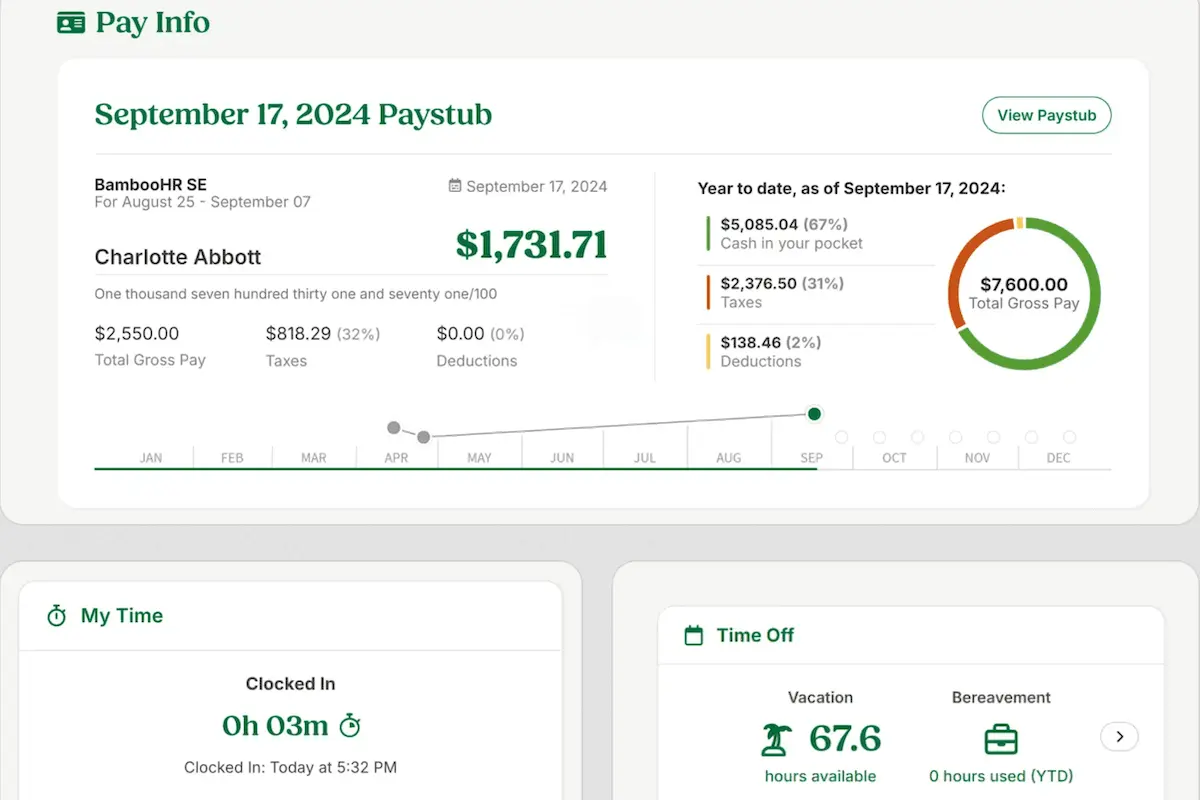
- Payroll, Time, & Benefits: BambooHR is a single platform that integrates payroll, time tracking, and benefits management. This integration eliminates double data entry and streamlines approvals. Employees can clock in, request time off, and review benefits all in one place. Payroll processing is accurate and stress-free, a highlight of our BambooHR review.
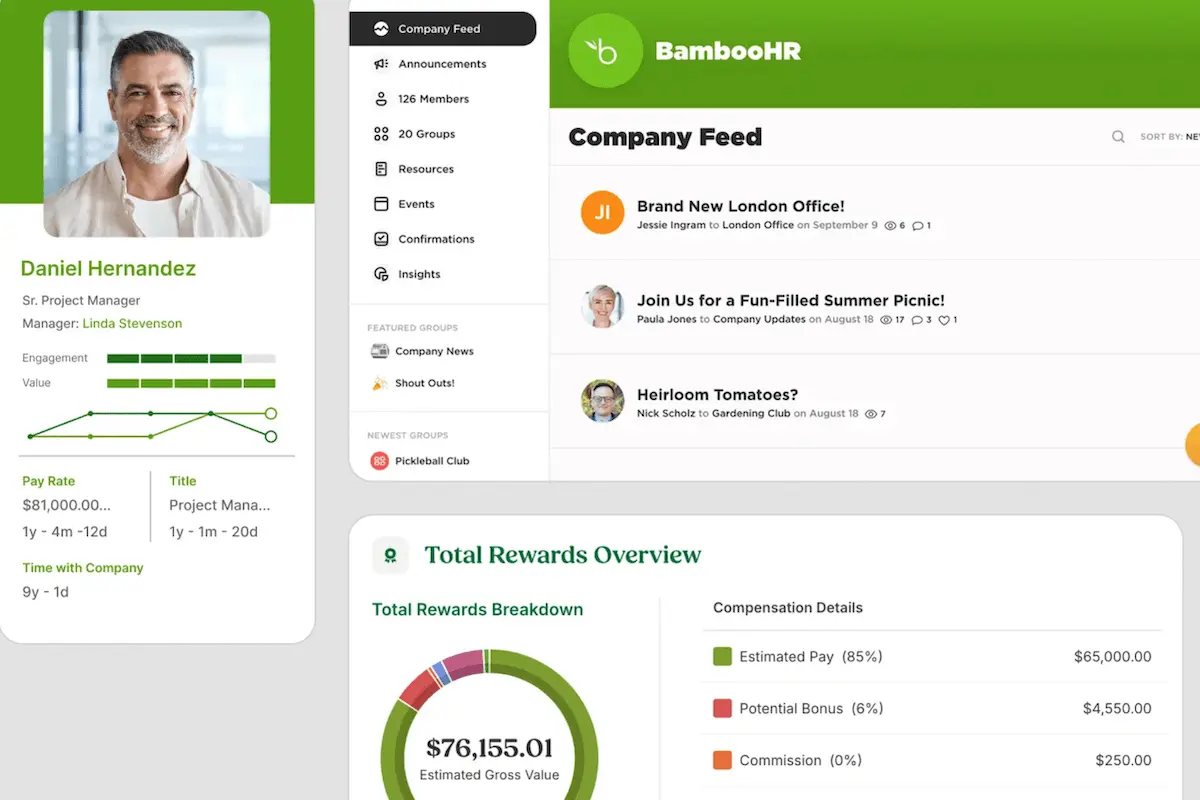
- Employee Experience & Performance: BambooHR fosters engagement with tools like eNPS surveys and employee wellbeing check-ins. Performance management features help align goals and recognize achievements, boosting morale. Total Rewards statements build trust by showing employees the full value of their compensation. With its Employee Community feature, BambooHR enhances internal communication and collaboration.
- Integrations: BambooHR integrations support over 125 platforms, including Slack, Microsoft, and Google, making connecting with other tools your business uses easy. This flexibility ensures smooth workflows across platforms, a key benefit highlighted in our BambooHR review.
Benefits of Using BambooHR
BambooHR offers numerous advantages that streamline HR tasks and improve employee experiences. By addressing HR challenges and providing powerful tools, BambooHR helps businesses focus on what matters most—their people. Below are the key benefits businesses can expect when using this platform.
Simplifies HR Processes
BambooHR automates time-consuming HR tasks like payroll processing, benefits management, and time tracking. Its user-friendly interface ensures HR professionals and employees can navigate the system quickly. Workflows and approval systems significantly reduce manual errors and delays, making HR management stress-free. Our BambooHR review emphasizes that this efficiency is a standout feature for businesses of all sizes.
Enhances Employee Engagement
Through tools like eNPS surveys, performance management, and wellbeing check-ins, BambooHR empowers organizations to listen to employee feedback. Features such as Total Rewards and the Employee Community foster a sense of appreciation and connectivity, boosting overall morale and retention rates. This BambooHR review highlights how these tools create a more engaged and motivated workforce.
Speeds Up Hiring and Onboarding
BambooHR's ATS and digital onboarding tools speed up and improve the hiring and onboarding process. Customizable workflows ensure new hires feel welcome and prepared, and tools like electronic signatures and mobile app access make the process seamless for HR teams and employees.
Centralizes Employee Data
BambooHR provides a secure, centralized database for storing and managing employee records. This central hub ensures easy access to critical information, minimizes paperwork, and improves data accuracy. Built-in data analytics tools allow companies to leverage their data to make informed decisions.
Increases Accessibility with Mobile Tools
The BambooHR mobile app allows employees and HR managers to stay connected and productive on the go. Whether checking schedules, approving time-off requests, or accessing key documents, the mobile app makes HR functions more accessible than ever, enhancing productivity and convenience.
Supports Global Workforces
Although BambooHR is U.S.-focused, its customizable features make it suitable for international teams. The ability to set up region-specific holidays, benefits, and payroll options ensures that global organizations can adapt the platform to meet their needs effectively.
Key Factors to Consider When Choosing HR Software
Selecting the right HR software is crucial for optimizing workforce management and addressing unique business needs. While BambooHR offers a user-friendly platform for small to medium-sized businesses, companies should assess solutions based on their specific requirements. Below are some key factors to consider:
Scalability and Flexibility
Your HR software should grow with your business. Scalable platforms like BambooHR accommodate expanding employee bases and evolving functionality requirements. However, larger organizations or those with global operations may need more advanced compliance features and extensive customization options.
Integration Capabilities
Seamless integration with existing tools such as payroll systems, time trackers, and performance management tools is critical. Solutions like BambooHR provide robust integration options, but it’s essential to ensure compatibility with your unique technology stack for streamlined workflows.
Usability and Support
A platform that prioritizes ease of use and offers comprehensive support, such as BambooHR’s intuitive design and responsive customer service, is essential for HR teams with varying technical expertise.
Specialized Features
Depending on your business’s priorities, consider features such as global workforce management, employee engagement tools, or advanced analytics.
What business types use BambooHR?
This BambooHR review has demonstrated how the platform caters to diverse industries, making it a versatile HR solution for many business types. Below is a breakdown of the most common industries that benefit from BambooHR and a note on who might find it less suitable.
- Construction: Construction companies use BambooHR to manage a mix of full-time, part-time, and contract employees. Its time tracking, benefits administration, and mobile access ensure HR processes are streamlined even for field workers.
- Education: Schools and universities rely on BambooHR for efficient hiring, onboarding, and performance evaluations. Its employee satisfaction tools help academic institutions address faculty and staff engagement.
- Finance: Financial institutions use BambooHR’s secure database and automated reporting features to comply with regulations and manage sensitive employee data effectively.
- Healthcare: BambooHR simplifies workforce management for healthcare providers by tracking certifications, licenses, and shifts while ensuring compliance with labor laws.
- Nonprofit: Nonprofit organizations appreciate BambooHR’s affordability and tools like volunteer management and performance tracking. Its flexibility ensures resources are maximized.
- Technology: Tech companies leverage BambooHR for its integrations with other software, ability to manage remote teams, and focus on employee engagement and retention.
Smaller businesses with fewer than ten employees or startups that need highly customizable, non-US-centric solutions might find BambooHR less ideal. Additionally, companies requiring extensive payroll customization for international employees may need supplementary tools for comprehensive coverage.
Best 5 alternatives to BambooHR

Workleap Officevibe
4.5 / 5
Workleap Officevibe emerges as a promising solution in the realm of employee engagement software, designed to provide organizations with an intuitive way to gauge and enhance workplace satisfaction. Although the provided source details are limited, the product is portrayed as a robust tool intended to streamline the multifaceted process of understanding employee sentiment. Its innovative approach promises to simplify complex workplace dynamics by offering actionable insights, making it a compelling option for businesses seeking to elevate employee engagement levels. Overall, Workleap Officevibe is positioned as a strategic asset for companies eager to harness technology in fostering a positive work environment.
Paylocity
4.5 / 5
Paylocity presents itself as a solution tailored toward addressing the essential operations of human resources management for modern businesses. The platform is positioned to streamline key administrative functions while supporting the broad spectrum of workforce-related tasks that organizations face. Its design is intended to enhance efficiency and simplify everyday HR processes, making it a candidate worth considering for companies in search of comprehensive core HR software. Although the detailed elements of its offering remain unspecified in the source, the overall framework suggests a focus on operational effectiveness and adaptability in the evolving HR landscape.

Workable
4.6 / 5
Workable emerges as a recruitment solution designed to support companies in managing their hiring processes with a clear focus on optimizing core HR functions. Its platform is tailored for organizations seeking to streamline recruitment, promising an approach that simplifies complex workflows while keeping the hiring strategy at its core. With an emphasis on user accessibility and efficiency, Workable presents itself as a tool that prospective core HR software customers can consider when looking to enhance their overall human capital management. This overview invites businesses to explore a solution that bridges the gap between technological innovation and everyday HR needs.

OnPay
4.75 / 5
OnPay is designed as a streamlined solution for managing payroll, offering a blend of efficiency and user-friendly design that caters to businesses of diverse sizes. It simplifies the essential functions of payroll processing while maintaining an adaptable framework that can transform routine tasks into intuitive operations. With its ability to manage computations and deductions with ease, OnPay strives to relieve organizations of the administrative burdens that often complicate payroll management. Overall, it stands as an attractive option for companies in search of a reliable payroll software solution that blends clarity with practical performance.
TalentHR
4 / 5
TalentHR presents a compelling option for organizations aiming to modernize their human resources processes, especially with its freemium pricing model that grants access to core HR features like applicant tracking and benefits management for up to 10 users at no cost. This flexible pricing, combined with scalable premium plans, makes it particularly appealing to startups and expanding businesses. The platform enhances HR efficiency by automating key tasks such as onboarding and time-off tracking, thereby freeing HR teams to concentrate on more strategic responsibilities. Additionally, TalentHR’s cloud-based design ensures secure, centralized employee data accessible from anywhere, while AI-driven tools and multilingual support further empower companies to streamline recruitment and manage diverse, international teams.
Frequently Asked Questions (FAQs)
BambooHR is a reliable platform for small to medium-sized businesses seeking efficient HR management. It’s known for its uptime, user-friendly interface, and robust customer support. The software streamlines critical HR tasks like payroll, time tracking, onboarding, and performance management, reducing errors associated with manual processes. With a secure cloud-based infrastructure, BambooHR ensures data integrity and compliance with industry standards. Frequent updates and integrations with third-party tools further enhance its reliability.
BambooHR is ideal for automating HR processes, including payroll, onboarding, time-off tracking, and performance management. It’s especially good for small and mid-sized businesses looking to centralize HR data and improve employee experience through engagement tools and streamlined workflows.
BambooHR primarily focuses on delivering a user-friendly Human Resources Information System (HRIS) that streamlines HR tasks such as employee data management, onboarding, and performance tracking. It’s designed to help HR departments operate more efficiently and improve employee experience.
BambooHR is not a free platform; it operates on a subscription-based pricing model. In 2026, pricing is customized based on the number of employees and required features. Businesses can contact BambooHR for a tailored quote to suit their specific needs.


