
Birdeye Review 2027: Pricing, Features, Pros & Cons, Ratings & More

Co-Founder and Chief Data Scientist

Birdeye: Top Customer Experience Management Software
4.9 / 5
Featured Customer Experience Management Software Alternatives for Birdeye

$19 per agent per month
Yes
Ticketing, multi-channel support, automation
Editor's Take
Zendesk is a customer service and engagement platform designed to help businesses deliver exceptional support experiences across multiple channels. It provides a unified solution for managing customer inquiries, tracking support tickets, and providing real-time assistance through a variety of touchpoints, including email, chat, phone, social media, and web forms. With its focus on improving customer satisfaction, Zendesk helps organizations streamline support workflows, enhance communication, and drive more personalized service.
One of Zendesk's standout features is its ticketing system, which enables support teams to manage, track, and prioritize customer requests. When a customer submits an inquiry, it automatically creates a ticket, which can be assigned to the appropriate team member for resolution. Zendesk's automation and workflows features help streamline processes by assigning tickets, sending automatic responses, and setting up reminders to ensure that no request goes unaddressed.
Zendesk also offers powerful multi-channel support, allowing businesses to interact with customers via email, live chat, phone calls, social media, and even messaging platforms like WhatsApp. This ensures that customers can reach out through their preferred method, and support teams can engage across various channels in one centralized platform.
For businesses looking to provide self-service options, Zendesk includes a knowledge base and help center feature, where users can search for articles, FAQs, and solutions to common problems. This reduces the volume of support tickets and empowers customers to find answers quickly and independently.
In addition to its customer support capabilities, Zendesk provides powerful analytics and reporting tools that give businesses insights into support team performance, ticket resolution times, customer satisfaction, and more. This data helps companies optimize their support processes and make data-driven decisions.
Expert Score
In evaluating SaaS software, a comprehensive and structured methodology ensures a fair and accurate comparison across key metrics. This approach focuses on the most critical aspects that affect user experience, functionality, and business value. The following metrics—general features, cost, customer service, integrations, and mobile support—are evaluated to provide a holistic view of each software solution’s strengths and weaknesses. These metrics are selected based on their direct impact on software usability, scalability, and long-term effectiveness for businesses.
1. General Features - scoring weight 40%
This metric evaluates the core functionalities and tools the software offers. It involves assessing the comprehensiveness of the features, their relevance to the target users, and the ease of use. This is important because robust and well-designed features determine the software's overall utility and efficiency in solving user problems.
2. Cost - scoring weight 15%
Cost analysis focuses on pricing models, value for money, and scalability. It's crucial to evaluate whether the software’s features justify its price, considering different plans for small and large organizations. This is vital for businesses to ensure they invest in cost-effective solutions that fit their budget.
3. Customer Service - scoring weight 15%
This evaluates the responsiveness, quality, and availability of customer support, including channels like chat, email, or phone. Good customer service is essential for troubleshooting and ensuring smooth software usage, which reduces downtime and frustration for users.
4. Integrations - scoring weight 15%
This examines how well the software integrates with third-party tools (e.g., CRM, payment systems, collaboration apps). Seamless integrations are key for creating a unified workflow and enhancing productivity by connecting multiple systems, which is crucial for operational efficiency.
5. Mobile Support - scoring weight 15%
Mobile support assesses the software’s functionality and performance on mobile devices, including apps and mobile web versions. With increasing remote work and on-the-go usage, strong mobile support is critical to ensure users can access and utilize the software effectively, regardless of location.

By quote
No
Omnichannel routing, workforce optimization, AI automation
Editor's Take
NICE inContact CXone is a cloud-based customer experience platform designed to streamline contact center operations. It offers an all-in-one solution for managing customer interactions across multiple channels, including voice, chat, email, social media, and SMS. The platform combines tools for omnichannel routing, workforce optimization, and analytics to enhance both agent performance and customer satisfaction.
CXone includes advanced features like AI-powered chatbots, real-time reporting, and workforce management tools, which help businesses optimize their contact center operations and reduce costs. It also provides powerful integrations with CRM systems, enabling a unified view of customer data. With its scalable infrastructure, CXone supports businesses of all sizes, from small teams to large enterprises, offering flexibility and robust security.
The platform's comprehensive analytics suite delivers actionable insights into key performance metrics, allowing businesses to monitor and improve their service levels. Additionally, CXone includes automation capabilities, such as automatic call distribution (ACD) and interactive voice response (IVR), to streamline workflows and improve efficiency. Overall, NICE inContact CXone is a powerful solution for businesses looking to enhance their customer service and provide a seamless, multichannel customer experience.
Expert Score
In evaluating SaaS software, a comprehensive and structured methodology ensures a fair and accurate comparison across key metrics. This approach focuses on the most critical aspects that affect user experience, functionality, and business value. The following metrics—general features, cost, customer service, integrations, and mobile support—are evaluated to provide a holistic view of each software solution’s strengths and weaknesses. These metrics are selected based on their direct impact on software usability, scalability, and long-term effectiveness for businesses.
1. General Features - scoring weight 40%
This metric evaluates the core functionalities and tools the software offers. It involves assessing the comprehensiveness of the features, their relevance to the target users, and the ease of use. This is important because robust and well-designed features determine the software's overall utility and efficiency in solving user problems.
2. Cost - scoring weight 15%
Cost analysis focuses on pricing models, value for money, and scalability. It's crucial to evaluate whether the software’s features justify its price, considering different plans for small and large organizations. This is vital for businesses to ensure they invest in cost-effective solutions that fit their budget.
3. Customer Service - scoring weight 15%
This evaluates the responsiveness, quality, and availability of customer support, including channels like chat, email, or phone. Good customer service is essential for troubleshooting and ensuring smooth software usage, which reduces downtime and frustration for users.
4. Integrations - scoring weight 15%
This examines how well the software integrates with third-party tools (e.g., CRM, payment systems, collaboration apps). Seamless integrations are key for creating a unified workflow and enhancing productivity by connecting multiple systems, which is crucial for operational efficiency.
5. Mobile Support - scoring weight 15%
Mobile support assesses the software’s functionality and performance on mobile devices, including apps and mobile web versions. With increasing remote work and on-the-go usage, strong mobile support is critical to ensure users can access and utilize the software effectively, regardless of location.

Custom
14 days
Survey builder, logic & branching, analytics
Editor's Take
SurveySparrow is an advanced online survey and feedback platform designed to help businesses gather, analyze, and act on customer and employee insights. It offers a wide range of tools for creating and distributing surveys, making it easy to collect data across various touchpoints, such as websites, email campaigns, mobile apps, and social media. The platform is known for its user-friendly interface and focus on delivering engaging and conversational survey experiences.
SurveySparrow’s standout feature is its conversational surveys, which provide a more interactive and engaging experience for respondents. Unlike traditional surveys, these conversational surveys use a chat-like interface, improving response rates and providing a more natural way to collect feedback. The platform also supports multi-channel surveys, allowing businesses to reach respondents wherever they are most active.
SurveySparrow includes a powerful survey builder with a wide range of question types, including multiple-choice, rating scales, and open-ended questions. Users can also leverage advanced features like logic and branching to create dynamic, personalized surveys that guide respondents through customized paths based on their answers.
With real-time reporting and analytics, SurveySparrow enables businesses to instantly analyze survey responses, track trends, and gain actionable insights. The platform’s visual dashboards allow users to generate reports and visualize data through charts, graphs, and tables, simplifying the decision-making process.
SurveySparrow also offers advanced integration capabilities, connecting with popular tools such as CRM systems, email marketing platforms, and analytics tools. This helps businesses streamline their workflows and centralize data for more effective analysis.
Expert Score
In evaluating SaaS software, a comprehensive and structured methodology ensures a fair and accurate comparison across key metrics. This approach focuses on the most critical aspects that affect user experience, functionality, and business value. The following metrics—general features, cost, customer service, integrations, and mobile support—are evaluated to provide a holistic view of each software solution’s strengths and weaknesses. These metrics are selected based on their direct impact on software usability, scalability, and long-term effectiveness for businesses.
1. General Features - scoring weight 40%
This metric evaluates the core functionalities and tools the software offers. It involves assessing the comprehensiveness of the features, their relevance to the target users, and the ease of use. This is important because robust and well-designed features determine the software’s overall utility and efficiency in solving user problems.
2. Cost - scoring weight 15%
Cost analysis focuses on pricing models, value for money, and scalability. It’s crucial to evaluate whether the software’s features justify its price, considering different plans for small and large organizations. This is vital for businesses to ensure they invest in cost-effective solutions that fit their budget.
3. Customer Service - scoring weight 15%
This evaluates the responsiveness, quality, and availability of customer support, including channels like chat, email, or phone. Good customer service is essential for troubleshooting and ensuring smooth software usage, which reduces downtime and frustration for users.
4. Integrations - scoring weight 15%
This examines how well the software integrates with third-party tools (e.g., CRM, payment systems, collaboration apps). Seamless integrations are key for creating a unified workflow and enhancing productivity by connecting multiple systems, which is crucial for operational efficiency.
5. Mobile Support - scoring weight 15%
Mobile support assesses the software’s functionality and performance on mobile devices, including apps and mobile web versions. With increasing remote work and on-the-go usage, strong mobile support is critical to ensure users can access and utilize the software effectively, regardless of location.
Birdeye Review
What is Birdeye?
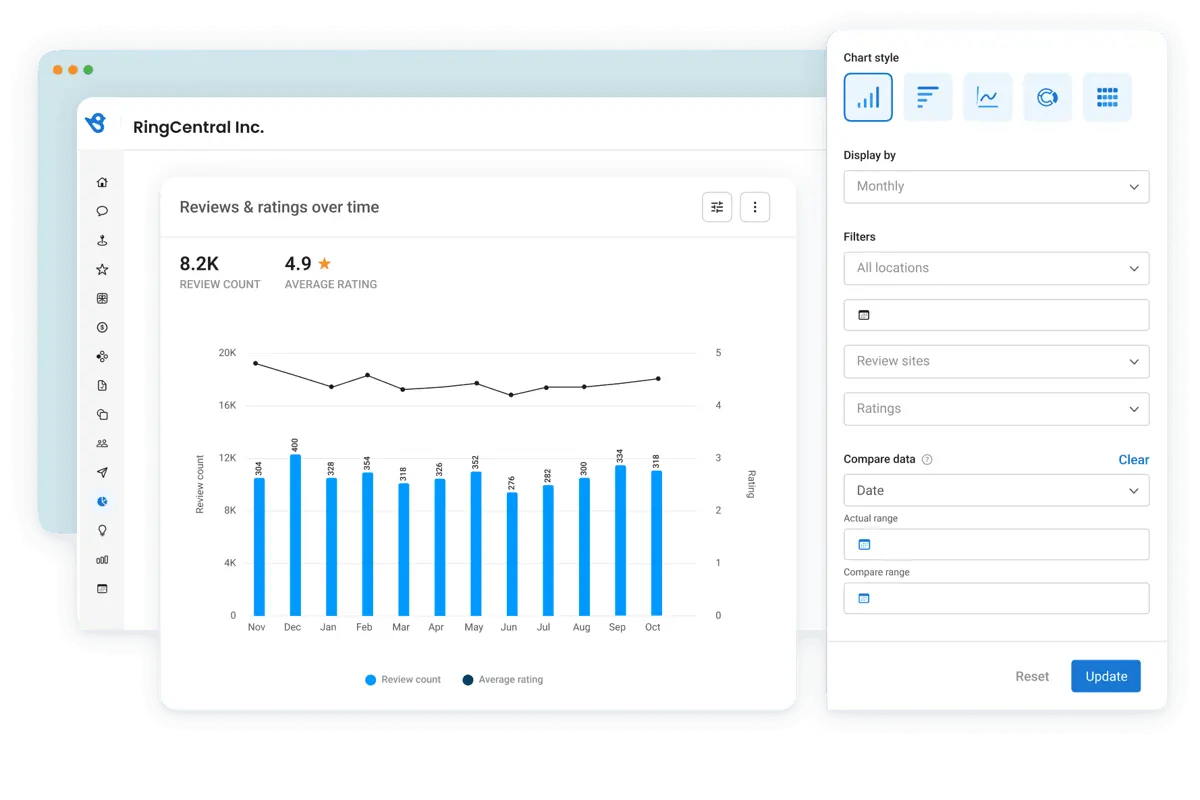
Birdeye is an AI-driven platform that helps local businesses, especially those with multiple locations, improve their reputation, customer experience, and social media management. Serving over 150,000 businesses, it offers a range of tools to simplify customer engagement and boost online visibility. Expect to find detailed information about this particular platform, including its core features, performance, and overall quality, in this Birdeye review.
What’s new in Birdeye?
Birdeye recently launched several important updates and features to improve its AI-driven platform, with a special focus on social media management and customer interaction. Below are some of the latest Birdeye features:
Birdeye Social
Birdeye Social is an AI-powered platform for managing social media across multiple locations. The tool allows businesses to create content, track engagement, and generate performance reports from a central dashboard. Key features include:
- Multi-location publishing for tailored posts
- Bulk publishing to schedule multiple posts at once
- AI-generated content customized for specific industries and locations
- A visual calendar for efficient cross-platform planning
Integration of ChatGPT Model
As part of its AI Everywhere initiative, Birdeye has integrated OpenAI's ChatGPT model into its platform. This update enables businesses to quickly generate personalized responses to customer reviews and surveys, enhancing customer engagement and response times. The feature is expected to save businesses hundreds of hours annually, improving the overall customer experience.
New AI Tools at Birdeye View 2024
At the Birdeye View 2024 conference, the company unveiled new products:
- Insights AI, which delivers tailored recommendations to improve customer experience and online reputation based on sentiment analysis
- Competitors AI, which provides benchmarking tools to help businesses analyze their competitive landscape
Recent Feature Additions
Other Birdeye integrations include Squarespace, Zoho Books, and Mitchell1, expanding its ecosystem. New features such as the Google SEO Rank Report and Listings Verifier have also been added to help businesses enhance their online visibility and search rankings. You will learn more about these things as you continue to read this Birdeye review.
How does Birdeye support effective complaint resolution?
Birdeye leverages its AI-driven tools to streamline the customer complaint resolution process by automatically categorizing negative feedback and flagging potential issues for prompt follow-up. The platform’s real-time sentiment analysis integrates with its unified communication dashboard, enabling teams to address complaints efficiently without losing context. Additionally, Birdeye’s automation capabilities facilitate a smooth workflow for escalating and resolving concerns, ensuring that customer issues are managed proactively. For enhanced solutions that integrate seamlessly with this process, consider exploring complaint management systems.
Featured Customer Experience Management Software Products
$19 per agent per month
Yes
Ticketing, multi-channel support, automation
Editor's Take
Zendesk is a customer service and engagement platform designed to help businesses deliver exceptional support experiences across multiple channels. It provides a unified solution for managing customer inquiries, tracking support tickets, and providing real-time assistance through a variety of touchpoints, including email, chat, phone, social media, and web forms. With its focus on improving customer satisfaction, Zendesk helps organizations streamline support workflows, enhance communication, and drive more personalized service.
One of Zendesk's standout features is its ticketing system, which enables support teams to manage, track, and prioritize customer requests. When a customer submits an inquiry, it automatically creates a ticket, which can be assigned to the appropriate team member for resolution. Zendesk's automation and workflows features help streamline processes by assigning tickets, sending automatic responses, and setting up reminders to ensure that no request goes unaddressed.
Zendesk also offers powerful multi-channel support, allowing businesses to interact with customers via email, live chat, phone calls, social media, and even messaging platforms like WhatsApp. This ensures that customers can reach out through their preferred method, and support teams can engage across various channels in one centralized platform.
For businesses looking to provide self-service options, Zendesk includes a knowledge base and help center feature, where users can search for articles, FAQs, and solutions to common problems. This reduces the volume of support tickets and empowers customers to find answers quickly and independently.
In addition to its customer support capabilities, Zendesk provides powerful analytics and reporting tools that give businesses insights into support team performance, ticket resolution times, customer satisfaction, and more. This data helps companies optimize their support processes and make data-driven decisions.
Expert Score
In evaluating SaaS software, a comprehensive and structured methodology ensures a fair and accurate comparison across key metrics. This approach focuses on the most critical aspects that affect user experience, functionality, and business value. The following metrics—general features, cost, customer service, integrations, and mobile support—are evaluated to provide a holistic view of each software solution’s strengths and weaknesses. These metrics are selected based on their direct impact on software usability, scalability, and long-term effectiveness for businesses.
1. General Features - scoring weight 40%
This metric evaluates the core functionalities and tools the software offers. It involves assessing the comprehensiveness of the features, their relevance to the target users, and the ease of use. This is important because robust and well-designed features determine the software's overall utility and efficiency in solving user problems.
2. Cost - scoring weight 15%
Cost analysis focuses on pricing models, value for money, and scalability. It's crucial to evaluate whether the software’s features justify its price, considering different plans for small and large organizations. This is vital for businesses to ensure they invest in cost-effective solutions that fit their budget.
3. Customer Service - scoring weight 15%
This evaluates the responsiveness, quality, and availability of customer support, including channels like chat, email, or phone. Good customer service is essential for troubleshooting and ensuring smooth software usage, which reduces downtime and frustration for users.
4. Integrations - scoring weight 15%
This examines how well the software integrates with third-party tools (e.g., CRM, payment systems, collaboration apps). Seamless integrations are key for creating a unified workflow and enhancing productivity by connecting multiple systems, which is crucial for operational efficiency.
5. Mobile Support - scoring weight 15%
Mobile support assesses the software’s functionality and performance on mobile devices, including apps and mobile web versions. With increasing remote work and on-the-go usage, strong mobile support is critical to ensure users can access and utilize the software effectively, regardless of location.
By quote
No
Omnichannel routing, workforce optimization, AI automation
Editor's Take
NICE inContact CXone is a cloud-based customer experience platform designed to streamline contact center operations. It offers an all-in-one solution for managing customer interactions across multiple channels, including voice, chat, email, social media, and SMS. The platform combines tools for omnichannel routing, workforce optimization, and analytics to enhance both agent performance and customer satisfaction.
CXone includes advanced features like AI-powered chatbots, real-time reporting, and workforce management tools, which help businesses optimize their contact center operations and reduce costs. It also provides powerful integrations with CRM systems, enabling a unified view of customer data. With its scalable infrastructure, CXone supports businesses of all sizes, from small teams to large enterprises, offering flexibility and robust security.
The platform's comprehensive analytics suite delivers actionable insights into key performance metrics, allowing businesses to monitor and improve their service levels. Additionally, CXone includes automation capabilities, such as automatic call distribution (ACD) and interactive voice response (IVR), to streamline workflows and improve efficiency. Overall, NICE inContact CXone is a powerful solution for businesses looking to enhance their customer service and provide a seamless, multichannel customer experience.
Expert Score
In evaluating SaaS software, a comprehensive and structured methodology ensures a fair and accurate comparison across key metrics. This approach focuses on the most critical aspects that affect user experience, functionality, and business value. The following metrics—general features, cost, customer service, integrations, and mobile support—are evaluated to provide a holistic view of each software solution’s strengths and weaknesses. These metrics are selected based on their direct impact on software usability, scalability, and long-term effectiveness for businesses.
1. General Features - scoring weight 40%
This metric evaluates the core functionalities and tools the software offers. It involves assessing the comprehensiveness of the features, their relevance to the target users, and the ease of use. This is important because robust and well-designed features determine the software's overall utility and efficiency in solving user problems.
2. Cost - scoring weight 15%
Cost analysis focuses on pricing models, value for money, and scalability. It's crucial to evaluate whether the software’s features justify its price, considering different plans for small and large organizations. This is vital for businesses to ensure they invest in cost-effective solutions that fit their budget.
3. Customer Service - scoring weight 15%
This evaluates the responsiveness, quality, and availability of customer support, including channels like chat, email, or phone. Good customer service is essential for troubleshooting and ensuring smooth software usage, which reduces downtime and frustration for users.
4. Integrations - scoring weight 15%
This examines how well the software integrates with third-party tools (e.g., CRM, payment systems, collaboration apps). Seamless integrations are key for creating a unified workflow and enhancing productivity by connecting multiple systems, which is crucial for operational efficiency.
5. Mobile Support - scoring weight 15%
Mobile support assesses the software’s functionality and performance on mobile devices, including apps and mobile web versions. With increasing remote work and on-the-go usage, strong mobile support is critical to ensure users can access and utilize the software effectively, regardless of location.
Custom
14 days
Survey builder, logic & branching, analytics
Editor's Take
SurveySparrow is an advanced online survey and feedback platform designed to help businesses gather, analyze, and act on customer and employee insights. It offers a wide range of tools for creating and distributing surveys, making it easy to collect data across various touchpoints, such as websites, email campaigns, mobile apps, and social media. The platform is known for its user-friendly interface and focus on delivering engaging and conversational survey experiences.
SurveySparrow’s standout feature is its conversational surveys, which provide a more interactive and engaging experience for respondents. Unlike traditional surveys, these conversational surveys use a chat-like interface, improving response rates and providing a more natural way to collect feedback. The platform also supports multi-channel surveys, allowing businesses to reach respondents wherever they are most active.
SurveySparrow includes a powerful survey builder with a wide range of question types, including multiple-choice, rating scales, and open-ended questions. Users can also leverage advanced features like logic and branching to create dynamic, personalized surveys that guide respondents through customized paths based on their answers.
With real-time reporting and analytics, SurveySparrow enables businesses to instantly analyze survey responses, track trends, and gain actionable insights. The platform’s visual dashboards allow users to generate reports and visualize data through charts, graphs, and tables, simplifying the decision-making process.
SurveySparrow also offers advanced integration capabilities, connecting with popular tools such as CRM systems, email marketing platforms, and analytics tools. This helps businesses streamline their workflows and centralize data for more effective analysis.
Expert Score
In evaluating SaaS software, a comprehensive and structured methodology ensures a fair and accurate comparison across key metrics. This approach focuses on the most critical aspects that affect user experience, functionality, and business value. The following metrics—general features, cost, customer service, integrations, and mobile support—are evaluated to provide a holistic view of each software solution’s strengths and weaknesses. These metrics are selected based on their direct impact on software usability, scalability, and long-term effectiveness for businesses.
1. General Features - scoring weight 40%
This metric evaluates the core functionalities and tools the software offers. It involves assessing the comprehensiveness of the features, their relevance to the target users, and the ease of use. This is important because robust and well-designed features determine the software’s overall utility and efficiency in solving user problems.
2. Cost - scoring weight 15%
Cost analysis focuses on pricing models, value for money, and scalability. It’s crucial to evaluate whether the software’s features justify its price, considering different plans for small and large organizations. This is vital for businesses to ensure they invest in cost-effective solutions that fit their budget.
3. Customer Service - scoring weight 15%
This evaluates the responsiveness, quality, and availability of customer support, including channels like chat, email, or phone. Good customer service is essential for troubleshooting and ensuring smooth software usage, which reduces downtime and frustration for users.
4. Integrations - scoring weight 15%
This examines how well the software integrates with third-party tools (e.g., CRM, payment systems, collaboration apps). Seamless integrations are key for creating a unified workflow and enhancing productivity by connecting multiple systems, which is crucial for operational efficiency.
5. Mobile Support - scoring weight 15%
Mobile support assesses the software’s functionality and performance on mobile devices, including apps and mobile web versions. With increasing remote work and on-the-go usage, strong mobile support is critical to ensure users can access and utilize the software effectively, regardless of location.
How much does Birdeye cost?
Birdeye: Top Customer Experience Management Software
4.9 / 5
Birdeye pricing is simple. The platform offers three pricing plans: Starters, Growth, and Dominate. The platform requires company details before displaying Birdeye pricing plans, so your quote may differ from the ones listed here.
Starters - $299 per month
- Reviews AI
- Listings AI
- Messaging AI
Growth - $399 per month
- Reviews AI
- Listings AI
- Messaging AI
- Social AI
Dominate - $449 per month
- Reviews AI
- Listings AI
- Messaging AI
- Social AI
- Chatbot AI
Included in all plans
- Campaigns
- Integrations
- Unlimited contacts
- Team chat
- Mobile app
- World class support
- Payments
- Unlimited users
What sets Birdeye apart?
Birdeye stands out in the customer experience and reputation management field with its robust suite of AI-powered tools, tailored for local businesses. To provide you with a more comprehensive and fair assessment, this Birdeye review includes the pros and cons of using the software.
Birdeye Pros
- Comprehensive Features: Offers a wide range of tools including review generation, social media management, customer surveys, and payment processing.
- AI-Powered Automation: Automates responses and generates insights, significantly reducing the workload on staff while enhancing customer interaction quality.
- User-Friendly Interface: The platform is designed to be intuitive, making it easier for users to navigate and utilize its features effectively.
- Strong Customer Support: Birdeye is known for providing robust support to its users, helping them maximize the platform's capabilities.
Birdeye Cons
- Complexity for Small Businesses: While the extensive features are beneficial for larger organizations, smaller businesses may find the platform overwhelming or may not utilize all available tools effectively.
- Learning Curve: New users may face a learning curve due to the breadth of features offered, which could require time to fully understand and leverage the platform.
- Cost: Some users who wrote Birdeye reviews shared that Birdeye pricing can be considered high compared to some competitors. This may deter small businesses or startups with limited budget.
Birdeye Cons
- Complexity for Small Businesses: While the extensive features are beneficial for larger organizations, smaller businesses may find the platform overwhelming or may not utilize all available tools effectively.
- Learning Curve: New users may face a learning curve due to the breadth of features offered, which could require time to fully understand and leverage the platform.
- Cost: Some users who wrote Birdeye reviews shared that Birdeye pricing can be considered high compared to some competitors. This may deter small businesses or startups with limited budget.
Overall, being aware of this Birdeye pros and cons helps you determine whether this software meets your specific needs.
Birdeye Core Features
Birdeye: Top Customer Experience Management Software
4.9 / 5
In this section of our Birdeye review, we will introduce the core features of the software that help users manage their online reputation effectively.
Reviews Management
- Review Generation: Automates requests for customer reviews via SMS and email, simplifying feedback collection.
- Review Monitoring: Aggregates reviews from over 150 platforms, enabling real-time reputation tracking.
- Response Automation: Uses AI to generate timely responses to reviews, fostering quick engagement with customers.
Social Media Management
Birdeye Social: A dedicated tool for managing social media across multiple locations, with features such as:
- Multi-location Publishing: Create and customize posts for various locations from a single dashboard.
- AI-generated Content: Automatically generates tailored posts for specific industries and locations.
- Bulk Publishing: Schedule hundreds of posts at once via a simple spreadsheet.
- Engagement Tracking: Monitor and respond to customer interactions on social channels.
Customer Feedback and Surveys
- Custom Surveys: Design and send tailored surveys to gather specific customer insights.
- Net Promoter Score (NPS): Measure customer satisfaction and loyalty through NPS surveys.
Insights and Analytics
- Insights AI: Provides actionable insights from sentiment analysis, helping businesses understand and improve their online reputation.
- Benchmarking Tools: Compare your business performance against competitors to identify strengths and areas for improvement.
Listings Management
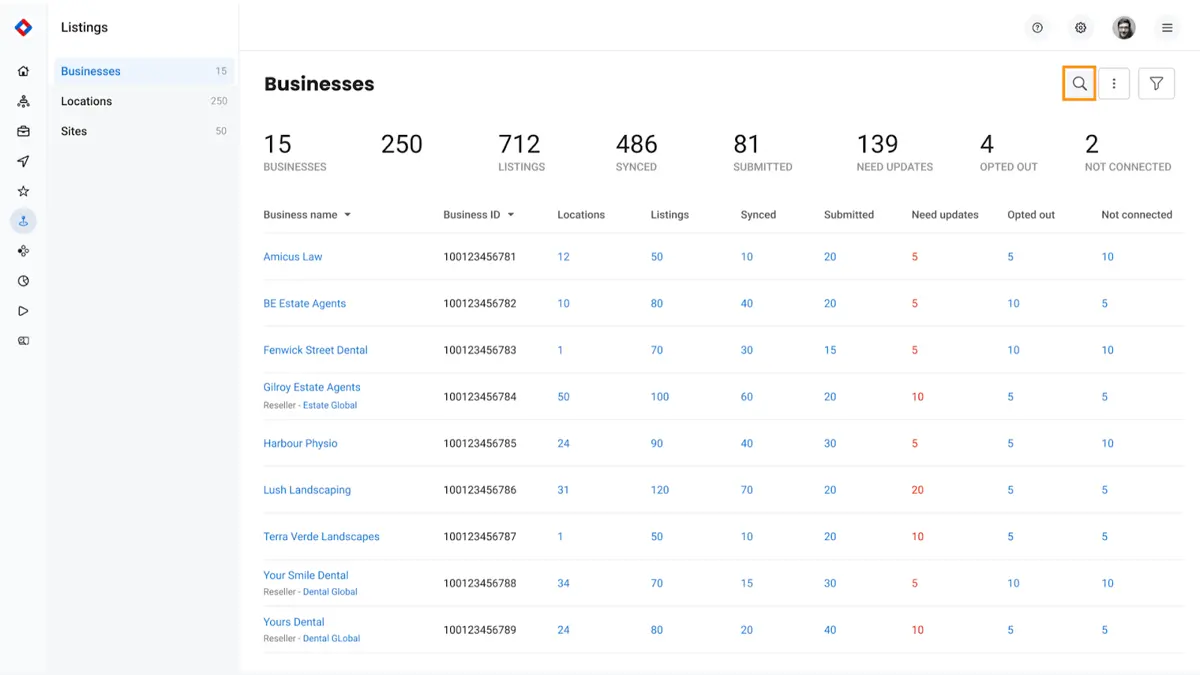
- Listings AI: Builds accurate business profiles to improve visibility in local search results, ensuring consistent business information across platforms.
Messaging and Communication
- Unified Inbox: Centralizes all customer communications across text, social media, web chat, and email for streamlined management.
- Webchat and Chatbots: Engage customers in real-time through customizable chat widgets on your website.
Integrations
- Birdeye integrates with over 3,000 applications, including popular CRM solutions like Salesforce and HubSpot, enhancing its functionality within existing workflows.
Payment Processing
- Allows businesses to collect payments digitally through multiple channels, streamlining transactions with low fees.
Benefits of Using Birdeye
Aside from discussing the potential benefits of using the software, this Birdeye review has also included a case study to help you make informed decisions based on authentic insights and experiences.
Enhanced Online Reputation
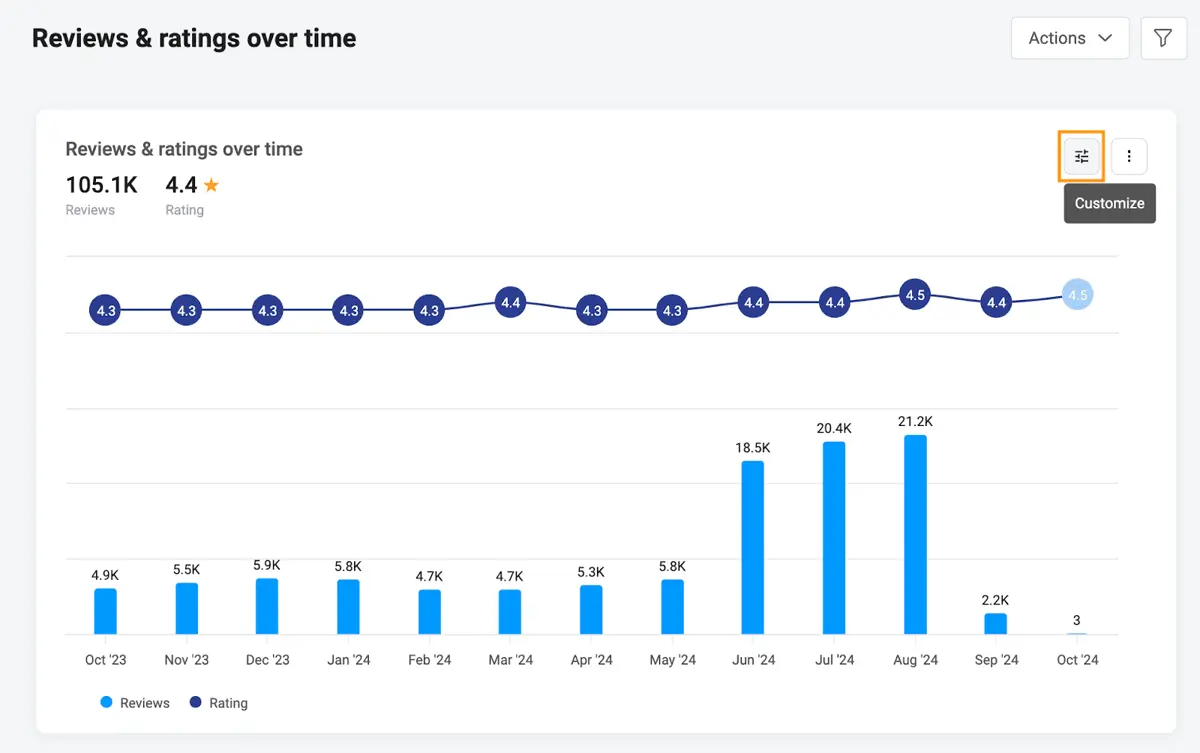
By increasing the number of reviews and improving average star ratings, Birdeye helps businesses strengthen their online reputation, making them more appealing to potential customers.
Complete Care sought to attract more patients by improving its online reputation. Before partnering with Birdeye, the company faced challenges in collecting reviews manually, which resulted in a low number of reviews and average ratings. Things changed for the better when Complete Care adopted the platform.
Automated Review Management
Birdeye automates customer review collection, significantly increasing feedback volume while saving time and effort. This consistency helps businesses gather more reviews with minimal manual input.
By adopting Birdeye, Complete Care automated the review collection process. The platform allowed them to streamline feedback across multiple locations from a single, centralized dashboard.
The results were remarkable: Complete Care saw a 3,653% increase in reviews, totaling over 29,650 with an average rating of 4.8 stars. The open rate for review requests hit 50%, reflecting high patient engagement.
Actionable Insights
The platform offers in-depth analytics that reveal customer sentiment and highlight areas for improvement. This data-driven approach allows businesses to make informed decisions based on real customer feedback.
Integrating patient feedback into the company culture helped Complete Care recognize and reward employees for positive reviews, creating a more patient-focused environment. They introduced initiatives like monthly drawings for staff members mentioned in reviews, boosting employee morale and engagement.
Cost Efficiency
By boosting organic growth and reducing reliance on paid advertising, Birdeye helps businesses lower their cost per lead and cost per click, driving more cost-effective customer acquisition. In the case of Complete Care, their enhanced online reputation also improved search rankings, with more locations appearing on the first page of Google search results. Additionally, the company reduced both cost per lead and cost per click, driven by increased organic growth.
Streamlined Customer Engagement
Birdeye consolidates communication across SMS, social media, and web chat, enabling businesses to respond quickly to inquiries and feedback, thus enhancing customer satisfaction.
Social Media Management
With tools like Birdeye Social, businesses can efficiently manage their social media presence across multiple locations, ensuring consistent branding and engagement with local audiences.
How does Birdeye compare to competitors?
When evaluating customer experience platforms, comparing features and benefits across options is crucial. Birdeye stands out for its comprehensive suite of AI-driven tools tailored for businesses managing multiple locations. Unlike competitors such as Podium or Yext, which excel in niche areas like text-based communication or API-based data management, Birdeye offers a more holistic solution by integrating review management, social media scheduling, and AI-powered sentiment analysis in one platform.
For instance, while Podium is highly effective for SMS-based interactions and payment collection, it lacks the advanced AI capabilities seen in Birdeye's Insights AI and Competitors AI. Similarly, Yext's strength lies in data consistency across platforms, but it doesn’t offer robust tools for social media management like Birdeye Social.
Businesses seeking comprehensive solutions for project coordination might also explore project management software solutions, which can integrate seamlessly with platforms like Birdeye to further enhance operational efficiency.
By comparing these platforms, businesses can make informed decisions tailored to their specific needs.
What business types use Birdeye?
Birdeye is a versatile customer experience platform that caters to a wide range of business types across various industries. It also integrates with various software solutions, including top ERP systems. However, several users who wrote Birdeye reviews online also say that the platform may not be the best fit for very large enterprises or niche businesses with unique needs that require more tailored solutions.
Here’s an overview of the primary sectors that benefit from using Birdeye:
- Healthcare Providers: Hospitals, clinics, and private practices use Birdeye to manage patient reviews, improve their online reputation, and boost patient engagement.
- Dental Practices: Dentists rely on Birdeye to gather patient feedback and maintain a strong online presence. Many also use it as a tool for scheduling appointments.
- Legal Services: Law firms utilize the platform to collect client reviews and manage their reputation in a competitive market.
- Automotive Services: Auto repair shops and dealerships benefit from Birdeye review management and customer communication tools to improve service quality and build customer loyalty.
- Home Services: Plumbing, electrical, and HVAC companies use Birdeye to streamline customer interactions and gather feedback efficiently.
- Restaurants: Dining establishments manage reviews, engage with customers, and promote their services through social media with Birdeye.
- Retail Stores: Brick-and-mortar retailers enhance the customer experience by leveraging Birdeye review and engagement tools.
- Real Estate Agencies: Real estate professionals use Birdeye to manage client feedback and increase their online visibility in local searches.
- Financial Services: Banks and financial advisors boost client trust by collecting positive reviews and maintaining efficient communication through Birdeye.
- Fitness Centers: Gyms and wellness centers engage members, collect feedback, and manage their reputation with Birdeye.
Best 4 alternatives to Birdeye
SurveySparrow
4.6 / 5
SurveySparrow is presented as a survey software solution that promises to streamline the process of gathering and analyzing feedback in an interactive, user-friendly manner. Though the source material does not supply a detailed overview, it suggests that the platform has been designed to meet the needs of organizations looking for a modern approach to survey management. Its framework implies a commitment to enhancing user engagement and delivering flexible survey experiences that can adapt to various industry demands. For prospective customers exploring survey software, SurveySparrow appears to offer a compelling option worth further consideration.

Jotform
4.8 / 5
Jotform stands out as a versatile online form builder software that caters to both individuals and organizations seeking efficient solutions for creating customized forms without needing coding skills. Its intuitive drag-and-drop interface, combined with a vast library of pre-designed templates, enables users to quickly produce professional-quality forms for various applications such as surveys, registrations, and payments. The platform’s strong integration capabilities with popular third-party tools streamline data management and automate workflows, while features like conditional logic personalize the user experience by adapting forms based on input. Additionally, Jotform prioritizes security with SSL encryption and offers collaborative tools and notification systems, making it a comprehensive choice that is accessible even to small users through its free plan.
NICE inContact CXone
4.5 / 5
NICE inContact CXone stands out as a versatile cloud-based contact center platform that integrates multiple functionalities into one cohesive system. It streamlines customer interactions across various channels—such as voice, chat, email, and social media—ensuring that customers are connected with the most suitable agents quickly and efficiently. The platform supports flexible operations by enabling rapid agent deployment from any location, which is especially beneficial for remote or distributed teams. Additionally, CXone’s embedded AI and analytics tools help enhance customer experience while optimizing workforce performance and reducing costs associated with traditional contact center infrastructure.
Zendesk
5 / 5
Zendesk offers a powerful, all-in-one solution for organizations aiming to enhance their customer support through an integrated omnichannel platform that consolidates interactions from email, chat, social media, and phone into a single interface. Its robust customization options allow businesses to modify ticket fields, automate their workflows, and build tailored dashboards, ensuring the software aligns perfectly with unique operational demands. Additionally, AI-driven automation boosts efficiency by managing routine tasks and prioritizing tickets, which helps increase both agent productivity and customer satisfaction. Designed for scalability and ease of use, Zendesk supports companies ranging from startups to large corporations while maintaining strong security and compliance standards suitable for diverse industries.
Frequently Asked Questions (FAQs)
In 2026, Birdeye is primarily used by small to medium-sized businesses across various industries, including healthcare, retail, hospitality, and legal services. These businesses utilize Birdeye to enhance their online presence, manage customer reviews, and improve overall customer experience.
Birdeye review works by calculating a business’ overall rating. It aggregates reviews from over 150 sites and normalize various factors in the process.
Does Birdeye have an app?
You can download the Birdeye app from the App Store (for iOS devices) or Google Play Store (for Android devices), or by scanning the QR code below.
You can download the Birdeye app from the App Store (for iOS devices) or Google Play Store (for Android devices), or by scanning the QR code below.
Birdeye helps local businesses enhance their online presence by collecting and managing customer reviews. This can lead to improved visibility and credibility in local searches. By effectively engaging with customer feedback through Birdeye, businesses can attract more customers and increase overall trust in their services.


