
Creatio Review 2027: Pricing, Features, Pros & Cons, Ratings & More

Co-Founder and Chief Data Scientist

CRM Creatio: Top CRM Software
5 / 5
CRM Creatio Review
What is Creatio?
Creatio is a global vendor of an agentic CRM & workflow platform with no-code and AI at its core. Millions of workflows run on Creatio daily, supporting thousands of clients in 100 countries.
Its offerings include Creatio Studio, a no-code agentic platform to build applications and AI agents with natural language and visual designers, and a CRM suite with embedded AI agents across Creatio Marketing, Sales, and Service. The company provides a Financial Services CRM platform, plus industry workflows across 19 verticals and a range of marketplace add-ons. Creatio is recognized as a Leader and Strong Performer in Gartner and Forrester reports and earned outstanding peer-to-peer reviews.
Creatio is headquartered in Boston, MA, with 850 employees in ten offices across 25 countries. It has long-lasting relationships with thousands of customers and over 500 partners worldwide.
What's new in Creatio?
Creatio features are continuously updated, based on customer feedback, usage analytics, and research into user interface (UI) and user experience (UX). The development team prioritizes enhancements to ensure customers can access new functionalities as quickly as possible.
On October 6, 2025, Creatio released version 8.3.1, known as the "Twin" release. This version introduces a range of AI-powered innovations, no-code enhancements, and productivity tools designed to streamline workflow automation, modern CRM processes, and application development.
With version 8.3, Creatio embeds AI at the very foundation of its architecture. Every data object, relationship, workflow, and business process is natively accessible to AI agents. This means the platform is not retrofitted with AI. It was designed with AI first, ensuring that your agents understand your business context deeply and can act intelligently.
Conversational Workspace With Multi-Agent Collaboration
Creatio’s new conversational workspace empowers users to initiate and manage multiple agent dialogues simultaneously, all using natural language. You can chat with different agents in parallel, each keeping track of context, memory, and role-based permissions. Instead of navigating traditional forms, you simply speak or write your intent, and the agents take action.
By using this chat-first interface, you can:
- Perform any CRM action through conversation.
- Upload and summarize documents (for example, RFPs or contracts).
- Delegate tasks to the appropriate agent based on role and context.
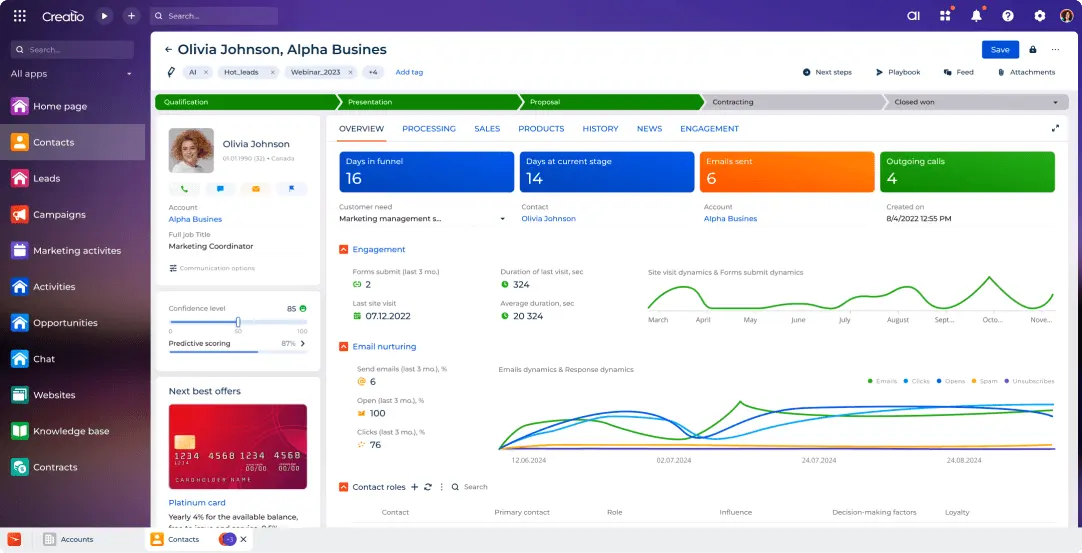
Embedded AI Inside Outlook, Teams, and Mobile
Creatio.ai is now built right into your everyday work tools. Whether you are drafting an email in Outlook, coordinating a meeting in Teams, or checking in on the go through mobile, the AI agent follows you. It brings intelligence, context, and CRM functionality into the very tools you already use, making productivity more seamless and real-time.
When you work in Outlook or Teams, the agent helps you craft responses, pull in CRM data, and suggest next steps, then synchronizes everything back to Creatio automatically.
AI Agents for Sales: Prepare, Personalize, and Close More Deals
Sales teams now work side-by-side with AI agents that automate repetitive tasks such as researching accounts, generating quotes, and preparing for customer meetings. By offloading these routine tasks, salespeople can spend their time building relationships, negotiating deals, and focusing on strategic selling.
The included agents are:
- Account research agent, which enriches account data with deep insights.
- Meeting preparation agent, who crafts agendas, talking points, and personalized content.
- Quote generation agent, which helps generate accurate, tailored proposals based on pricing history, deal context, and business logic.
AI Agents for Marketing: Scale Content Creation and Conversion
Marketing teams gain powerful AI collaborators that make content generation, lead prioritization, and campaign execution more efficient and personalized. These agents let you work faster, with more creativity, and with data-driven insights behind every message.
The new marketing agents include:
- Marketing content agent that helps generate templates, blog drafts, and campaign copy.
- An email generation agent that personalizes bulk email outreach for higher open and click rates.
- Lead conversion agent that scores leads, recommends next steps, and distributes them to the right salespeople.
AI Agents for Service: Resolve Cases Faster with Insight
For service teams, Creatio 8.3 introduces AI agents that support case triage, resolution, and knowledge management. These agents help improve response quality and speed by analyzing cases, drafting replies, and managing your knowledge base.
Specifically, Creatio offers:
- A Customer Support Agent who reviews incoming cases, proposes actions, and drafts response emails.
- A Knowledge Base Agent that builds or updates help articles using insights from real cases and internal knowledge.
No-Code Agent Builder: Create Your Own AI Teammates
One of the most powerful innovations in this release is the No-Code Agent Builder. This tool lets business users create fully functional AI agents without having to write any code. Through a visual UI, you can build agents by combining skills, workflows, and domain knowledge into intelligent teammates that work either independently or together with people.
With the Agent Builder, you can:
- Design agents visually using pre-built skills.
- Define workflows and decision logic.
- Train agents continuously with new context and knowledge.
- Deploy custom agents with a single click.
Dashboard Agent: Build Analytics with Natural Language
Creatio 8.3 introduces the Dashboard Agent, which enables you to use plain English (or any supported language) to request the metrics you want to view. The agent automatically builds the dashboard, adds widgets, connects to the correct data, applies filters, and styles everything according to your brand. You can then refine, iterate, and expand the dashboard by conversing with the agent, all without writing a single formula or query.
For example, you can ask it to:
- Show open opportunities by stage.
- Add a tile for calls or emails made this month.
- Break down opportunities by direct vs partner channels.
- Display a funnel based on conversion stages.
AI-Enhanced No-Code Development Across the Entire Lifecycle
Creatio amplifies its no-code capabilities with AI that supports every step of the app-building process. From designing user interfaces to writing business logic, filtering data, and creating multi-object pages, AI helps you do more, faster, and with less manual effort. And while innovation happens quickly, Creatio ensures you retain full governance, visibility, and system quality.
Key features include:
- Smart filtering by region, lifecycle stage, or customer tier so that apps reflect the right data for the right users.
- Formulas and business rules that users can define using no-code logic to handle complex scenarios.
- Multi-object pages and integration iFrames, enabling unified dashboards and rich user experiences.
- Built-in ALM (Application Lifecycle Management) tools such as versioning, automated deployment, and performance monitoring.
Creatio 8.3 brings powerful ALM tools that help you manage your projects with confidence. Whether you're building internal apps, external portals, or automations, you can now track versions, enforce policies, manage dependencies, and deploy safely across environments. AI helps streamline this process by automating lifecycle tasks and flagging dependencies, giving you control without slowing down innovation.
How much does Creatio cost?
CRM Creatio: Top CRM Software
5 / 5
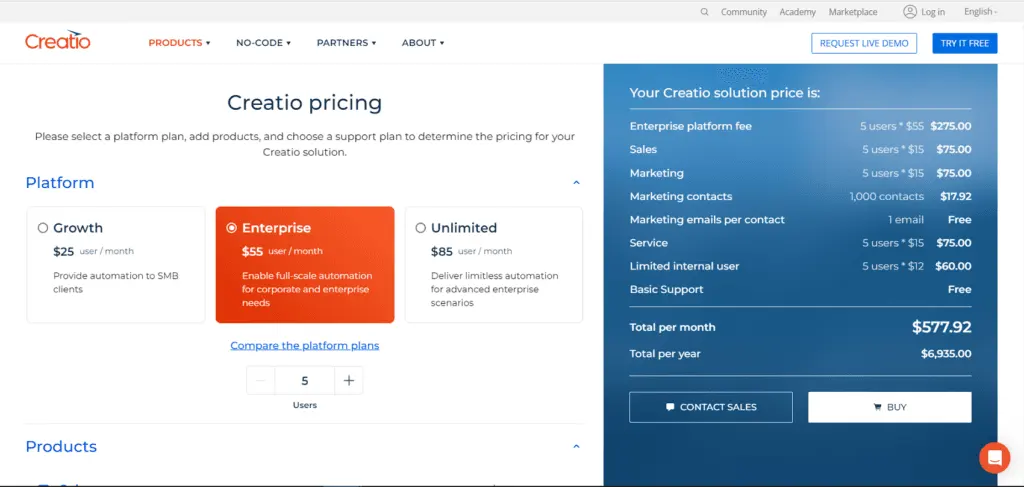
Creatio pricing is determined through the plans that different organizations choose and the products and support plans they include. CRM tools cost $15 per user per month for each product, including sales management tools, a multichannel marketing platform, and a customer service platform. For $12 per user per month, Creatio enables its clients to select additional user types, such as limited internal users, mobile-only users, external B2B portal users, and external B2C portal users.
The following are the different Creatio pricing plans:
Growth – $25 per user/month
- Automation to small and midsize businesses
Enterprise – $55 per user/month
- Full-scale automation for corporate and enterprise
Unlimited – $85 per user/month
- Limitless automation for advanced enterprise needs
What sets Creatio apart?
Our Creatio review and other reviews and ratings found that many customers believe that the digital business platform intuitively fulfills their organizational needs. Creatio users have also experienced its commitment to quality products and efficient customer support through regular updates. Moreover, businesses looking to develop their own digital tools without the complexities of coding may take advantage of Studio Creatio, the software company’s no-code designing platform that lets organizations automate workflows and create software applications.
Explore the following Creatio pros and cons to further learn about the digital platform’s functionalities and their advantages and disadvantages to business processes.
Pros of Using Creatio
- Creatio enables organizations to create their own business software applications without coding.
- The digital platform also offers end-to-end CRM solutions, such as a marketing automation tool, sales packages, and customer service capabilities.
- Several Creatio integrations, including the OneLogin portal, Active Directory Federation Services (ADFS), Google, Webitel, Microsoft Exchange, and Microsoft 365, are available.
- Generally, Creatio is customizable and adaptable to businesses and industries.
- The software company also boasts a responsive customer support team.
Cons of Using Creatio
- Feature enhancements may take time and effort to be deployed.
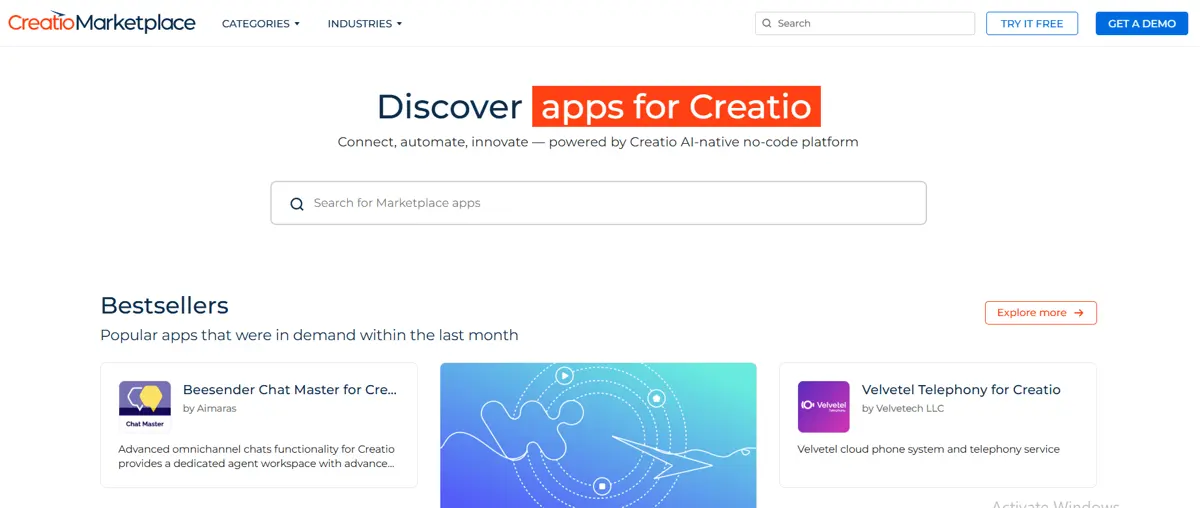
- Creatio Marketplace may have limited options in software applications, according to other Creatio reviews.
- Sales Creatio may be more ideal for businesses offering physical products than businesses in the service industry.
- Pricing may increase as businesses scale.
Creatio Core Features
CRM Creatio: Top CRM Software
5 / 5
In this section, our Creatio review further discusses the essential features of the digital business platform. These components include Creatio Marketplace, the platform’s virtual space for ready-made applications and templates for CRM products, and Creatio Academy, which provides users with resources to familiarize themselves with the proper implementation of Creatio solutions. Read through our list below to learn more:
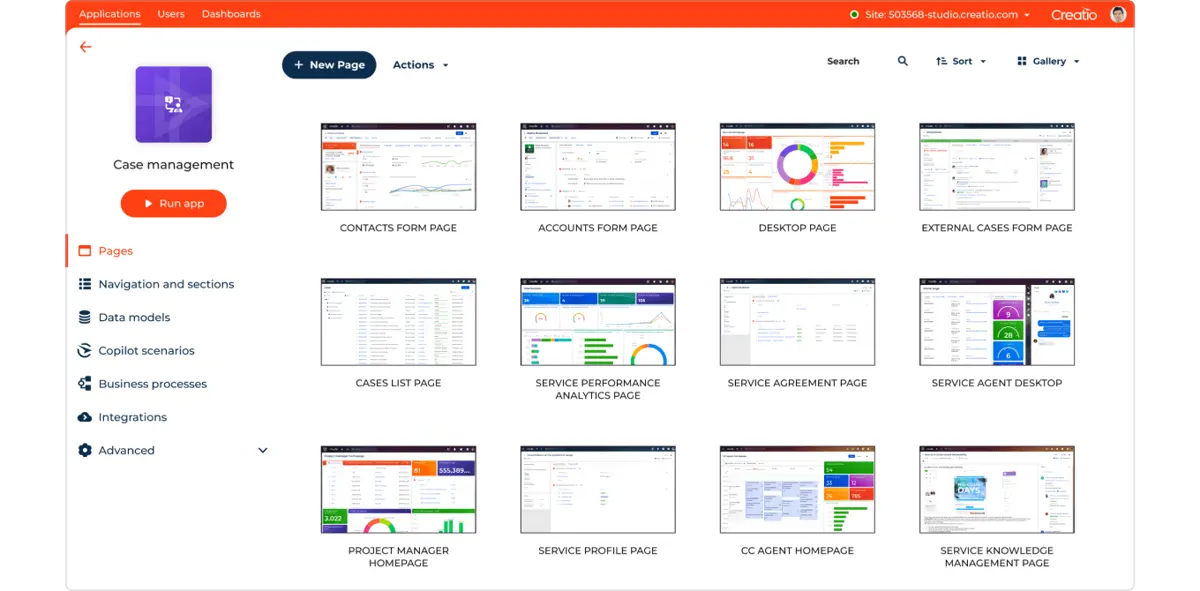
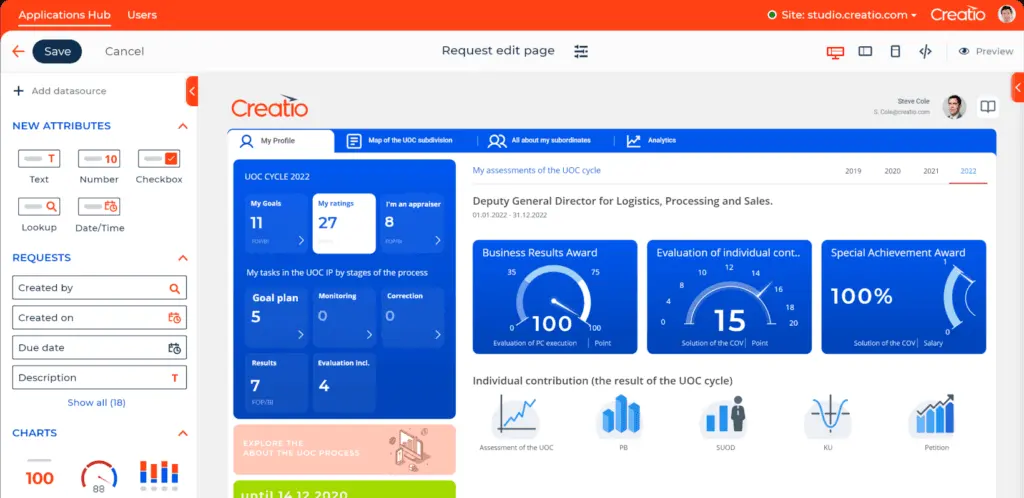
- No-code Platform. Studio Creatio offers both an application hub and a no-code designer. The application hub provides users with existing apps, connectors, and templates. Meanwhile, the no-code designer component has easy-to-use creation and editing tools that let users work on pages, data models, and workflows, among other projects, in a centralized virtual workspace.
- CRM Creatio. CRM Creatio has a variety of digital tools for marketing, sales, and customer service. These solutions are designed to automate administrative-heavy tasks, such as maintaining workflows and launching marketing campaigns, so users may focus on strengthening internal and external connections for performance and profit. Creatio supports campaigns, events, and collaboration, among other CRM activities.
- Creatio Marketplace. Creatio Marketplace provides organizations from different industries with over 400 business solutions. These industries include automotive, education, healthcare, retail, and telecommunications.
- Creatio Academy. Creatio Academy helps organizations adopt Creatio solutions into their daily business processes through training courses, tutorials, and certification.
Benefits of Using Creatio
Besides our Creatio review, client feedback and ratings attest to how the digital business platform supports their organizations’ daily operations and communications among their employees and customers. Explore the following benefits to help inform your decision on the most suitable CRM solution for your business:
- Simple Application Builder. Creatio has a collection of ready-to-install applications, connectors, and templates to help organizations get started on their app development projects. The platform’s no-code design tools make it easier for teams to collaborate and stay on track with project needs and goals. Creatio also allows users to create applications through mobile devices.
- Omnichannel Marketing Platform. Marketing Creatio offers a complete view of customer data from the beginning of their journey. It also helps you nurture leads from capturing to conversion and recycling. Moreover, Creatio supports your campaign in different areas, such as planning, budgeting, and execution. The platform’s analytics features also provide businesses with performance reports on campaigns to improve future company activities.
- End-to-end Sales and Service Management Platforms. With Creatio, organizations may build a comprehensive customer database to track consumer behavior, orders, and concerns efficiently. The platform also enables sales and service teams to monitor individual tasks and team projects from forecast to analysis for positive synchronized outputs. Creatio also centralizes all customer interactions, regardless of their communications channel. Be it through call, email, social media, or the Creatio website.
What business types use Creatio?
Creatio may be utilized by businesses of any size, from small companies to large enterprises, as the Research.com team found out while writing this Creatio review. These organizations come from various industries, such as banking, telecommunications, transportation, retail, manufacturing, the public sector, and media. However, mid-sized businesses may find Creatio ideal for their CRM needs.
Does Creatio provide robust security and compliance measures?
Enterprises require a secure framework to protect sensitive data and ensure continuous compliance. Creatio adheres to standard encryption protocols and enforces strict access controls that align with industry best practices. The platform undergoes regular audits and updates to mitigate emerging risks and maintain data integrity. For organizations seeking integrated systems that further enhance security management, combining Creatio with proven solutions like asset tracking software can streamline risk oversight across multiple operational areas.
How Creatio Enhances Project Management
Incorporating advanced tools into project workflows is essential for efficiency, and Creatio excels in this area. As one of the top project management software tools, Creatio integrates CRM and automation capabilities to optimize project execution across diverse industries. By combining no-code design, real-time data analytics, and robust collaboration features, Creatio supports seamless project management tailored to specific business needs.
- Customizable Workflows. Creatio allows businesses to build tailored project workflows using its no-code tools.
- Centralized Task Management. Teams can assign, prioritize, and track tasks within a unified platform.
- Resource Allocation and Monitoring. Creatio’s analytics tools help managers allocate resources efficiently.
- Collaboration and Communication Tools. Seamless team communication is integrated into Creatio’s project management features.
- Real-Time Performance Tracking. Creatio empowers teams with real-time data on project progress and performance.
How does Creatio support data-driven decision-making and analytics?
In today’s data-centric business environment, leveraging analytics to guide decision-making is crucial for organizations across sectors. While Creatio's core functionalities emphasize workflow automation and CRM, the platform also includes robust data analytics tools that enhance strategic planning and operational insights. This often-overlooked capability offers users the ability to monitor performance, analyze trends, and make informed decisions based on real-time data.
Here are the ways Creatio's analytics tools can support data-driven decisions:
- Customizable Dashboards: Creatio provides configurable dashboards that allow users to visualize essential metrics. From sales forecasts to customer satisfaction scores, businesses can quickly access and interpret relevant KPIs that align with their unique objectives.
- Real-time Reporting: With Creatio's real-time reporting, users gain immediate insights into current operations. This feature enables businesses to monitor ongoing campaigns, track customer interactions, and address performance issues proactively rather than reactively.
- Predictive Analytics: For businesses aiming to stay ahead of trends, Creatio offers predictive analytics tools that help identify patterns and forecast future outcomes. This can be particularly beneficial in sales and marketing, where understanding potential customer behavior can drive engagement strategies.
- Automated Report Generation: Users can set up automatic reports for key metrics, ensuring consistent performance reviews and enabling teams to adjust strategies based on updated data without the need for manual report creation.
- Data Integration: By connecting with external analytics tools, such as Microsoft Power BI or Google Analytics, Creatio allows businesses to enhance their data insights with additional sources, enabling a holistic view of customer journeys and operational efficiency.
Key Insights
- No-Code Platform: Creatio's no-code platform allows organizations to build custom business applications without needing extensive coding knowledge. This capability makes it accessible for businesses to develop and modify applications quickly and efficiently.
- Comprehensive CRM Solutions: Creatio offers end-to-end CRM solutions that encompass marketing automation, sales management, and customer service. These integrated tools help streamline processes and improve customer relationship management.
- Regular Updates and Customer Feedback: Creatio updates its platform every four weeks based on user feedback and analytics. This commitment to continuous improvement ensures that the software evolves to meet the needs of its users.
- Extensive Integration Capabilities: Creatio supports numerous integrations with other business tools, including Google, Microsoft 365, and Salesforce. This flexibility allows businesses to connect their existing systems and enhance their workflows.
- Diverse Industry Applications: Creatio is used across various industries such as banking, telecommunications, manufacturing, healthcare, and retail. Its adaptability makes it suitable for different business needs and sizes.
- Enhanced User Experience: The platform's latest updates include improved UX/UI features such as enhanced calendar functionalities, seamless linking of landing pages, and real-time feed updates. These enhancements contribute to a more intuitive and user-friendly experience.
- Scalable Pricing Plans: Creatio offers flexible pricing plans that cater to different business sizes and needs. The tiered pricing structure ensures that both small and large enterprises can find a suitable plan.
Best 5 alternatives to CRM Creatio

monday sales CRM
4.45 / 5
Monday Sales CRM stands out for its exceptional adaptability, allowing users to customize dashboards, columns, and sales workflows to perfectly suit their distinct business requirements. This level of flexibility is ideal for companies with unique processes or niche operations, enabling them to modify the platform effortlessly without needing advanced technical skills. Additionally, the CRM offers automation features that streamline repetitive tasks like follow-up reminders and status updates, thereby minimizing manual workload and lowering the chance of mistakes. Coupled with integrated communication tools and AI-powered capabilities for email composition and data analysis, monday ensures teams remain coordinated and equipped to make data-driven decisions.

NetSuite CRM
5 / 5
NetSuite CRM delivers a comprehensive platform that consolidates customer information across multiple channels, granting teams instant access to up-to-date data on preferences, transactions, and interactions in one centralized hub. By automating routine sales, marketing, and service activities, it boosts operational efficiency and frees staff to concentrate on cultivating stronger customer relationships. Its cloud-based design facilitates seamless connectivity from any device, enabling collaboration among dispersed teams while providing real-time sales tracking and pipeline visibility to accelerate deal closures. Additionally, advanced forecasting and analytics tools harness historical and predictive data, empowering businesses to enhance decision-making and optimize resource management for sustained growth.

Salesforce CRM
5 / 5
Salesforce CRM stands out as the leading platform globally, offering a unified system to store and analyze customer information, which empowers businesses to make well-informed decisions. Its robust contact management delivers a comprehensive and centralized view of customer data, allowing sales teams to access detailed profiles and better understand their prospects. The integration of AI, especially through Einstein, streamlines everyday tasks like data entry and email follow-ups, enabling employees to concentrate on more strategic activities. Additionally, Salesforce fosters seamless collaboration with tools such as "Chatter" and supports remote accessibility via the cloud and mobile devices, ensuring teams stay connected and productive regardless of location.

HubSpot CRM
5 / 5
HubSpot CRM is a cloud-based customer relationship management platform designed to help businesses manage and analyze customer interactions throughout the sales and marketing lifecycle. It provides tools for contact and lead management, email tracking, pipeline management, marketing automation, and performance analytics. The system is known for its user-friendly interface and seamless integration with other HubSpot tools, making it particularly popular among small to medium-sized businesses. HubSpot CRM is available in a free version with basic features, while more advanced capabilities—such as sales forecasting, custom reporting, and AI-powered insights—are accessible through paid tiers. The platform emphasizes ease of use, scalability, and centralized data, enabling teams to align their sales, marketing, and customer service efforts more effectively.

Pipedrive
4.3 / 5
Pipedrive stands out as a versatile CRM solution designed to simplify and optimize sales workflows by automating routine tasks like lead distribution, follow-up scheduling, and deal tracking. Its high level of customization allows businesses to shape sales pipelines and data fields to suit their specific needs, accommodating a wide range of industries and company sizes. By consolidating customer information and communications through integrations with common email and calendar tools, Pipedrive enhances team collaboration and reduces the hassle of juggling multiple platforms. Furthermore, the platform’s clear visual pipeline offers sales teams an intuitive way to oversee deal progress and quickly spot any obstacles in the sales process.
Frequently Asked Questions (FAQs)
Creatio is a workflow automation and CRM software platform that supports organizations in their daily operations and communications. It enables businesses to create and develop software applications through easy-to-use, no-code tools, and provides comprehensive CRM solutions for marketing, sales, and customer service activities.
Yes, Creatio is a no-code vendor. The platform offers simple application-building tools and full-cycle CRM solutions, allowing businesses to automate workflows and create software applications without needing extensive coding knowledge.
Creatio updates its platform every four weeks based on customer feedback, web analytics, and research on user interface (UI) and user experience (UX). These regular updates ensure the platform continuously evolves to meet user needs.
Creatio is used across various industries, including banking, telecommunications, transportation, retail, manufacturing, the public sector, and media. Its versatility makes it suitable for businesses of different sizes and sectors.
Core features of Creatio include a no-code platform for application development, comprehensive CRM solutions, an extensive content library through Creatio Marketplace, and training resources via Creatio Academy. These features support efficient business operations and enhance customer relationship management.
Creatio supports numerous integrations with other business tools, including Google, Microsoft 365, Salesforce, and many more. These integrations allow businesses to connect their existing systems, enhancing their workflows and operational efficiency.


