
InEvent Review 2027: Pricing, Features, Pros & Cons, Ratings & More

Co-Founder and Chief Data Scientist

InEvent: Top Event Management Software
4.55 / 5
Featured Event Management Software Alternatives for InEvent

$10 per user per month
Google Drive, Slack, Salesforce, and QuickBooks
Request forms and @mentions
Editor's Take
Wrike is a project management platform designed to help teams streamline their workflows and boost productivity. It offers a flexible, user-friendly interface that allows users to manage tasks, track progress, and collaborate on projects in real time. With its customizable dashboards and detailed reporting tools, Wrike provides clear visibility into project timelines and team performance. The platform also supports automation, enabling teams to automate repetitive tasks and reduce manual efforts. Collaboration is enhanced through features like task comments, file sharing, and integrations with tools such as Slack, Microsoft Teams, and Google Workspace. Wrike’s scalability makes it suitable for teams of any size, from small businesses to large enterprises.
Expert Score
In evaluating SaaS software, a comprehensive and structured methodology ensures a fair and accurate comparison across key metrics. This approach focuses on the most critical aspects that affect user experience, functionality, and business value. The following metrics—general features, cost, customer service, integrations, and mobile support—are evaluated to provide a holistic view of each software solution’s strengths and weaknesses. These metrics are selected based on their direct impact on software usability, scalability, and long-term effectiveness for businesses.
1. General Features - scoring weight 40%
This metric evaluates the core functionalities and tools the software offers. It involves assessing the comprehensiveness of the features, their relevance to the target users, and the ease of use. This is important because robust and well-designed features determine the software’s overall utility and efficiency in solving user problems.
2. Cost - scoring weight 15%
Cost analysis focuses on pricing models, value for money, and scalability. It’s crucial to evaluate whether the software’s features justify its price, considering different plans for small and large organizations. This is vital for businesses to ensure they invest in cost-effective solutions that fit their budget.
3. Customer Service - scoring weight 15%
This evaluates the responsiveness, quality, and availability of customer support, including channels like chat, email, or phone. Good customer service is essential for troubleshooting and ensuring smooth software usage, which reduces downtime and frustration for users.
4. Integrations - scoring weight 15%
This examines how well the software integrates with third-party tools (e.g., CRM, payment systems, collaboration apps). Seamless integrations are key for creating a unified workflow and enhancing productivity by connecting multiple systems, which is crucial for operational efficiency.
5. Mobile Support - scoring weight 15%
Mobile support assesses the software’s functionality and performance on mobile devices, including apps and mobile web versions. With increasing remote work and on-the-go usage, strong mobile support is critical to ensure users can access and utilize the software effectively, regardless of location.

Quote-based
No
Virtual Booths, Live Webinars, Networking Tools
Editor's Take
vFairs is a virtual event platform designed to host online conferences, trade shows, and job fairs. It provides tools for event registration, virtual booths, and live webinars, creating an immersive and interactive experience for attendees. The platform supports networking features like chat and video calls, enhancing engagement between participants. With detailed analytics and customizable branding options, vFairs helps organizers deliver professional and impactful virtual events. Its scalability makes it suitable for events of any size or industry.
Expert Score
In evaluating SaaS software, a comprehensive and structured methodology ensures a fair and accurate comparison across key metrics. This approach focuses on the most critical aspects that affect user experience, functionality, and business value. The following metrics—general features, cost, customer service, integrations, and mobile support—are evaluated to provide a holistic view of each software solution’s strengths and weaknesses. These metrics are selected based on their direct impact on software usability, scalability, and long-term effectiveness for businesses.
1. General Features - scoring weight 40%
This metric evaluates the core functionalities and tools the software offers. It involves assessing the comprehensiveness of the features, their relevance to the target users, and the ease of use. This is important because robust and well-designed features determine the software’s overall utility and efficiency in solving user problems.
2. Cost - scoring weight 15%
Cost analysis focuses on pricing models, value for money, and scalability. It’s crucial to evaluate whether the software’s features justify its price, considering different plans for small and large organizations. This is vital for businesses to ensure they invest in cost-effective solutions that fit their budget.
3. Customer Service - scoring weight 15%
This evaluates the responsiveness, quality, and availability of customer support, including channels like chat, email, or phone. Good customer service is essential for troubleshooting and ensuring smooth software usage, which reduces downtime and frustration for users.
4. Integrations - scoring weight 15%
This examines how well the software integrates with third-party tools (e.g., CRM, payment systems, collaboration apps). Seamless integrations are key for creating a unified workflow and enhancing productivity by connecting multiple systems, which is crucial for operational efficiency.
5. Mobile Support - scoring weight 15%
Mobile support assesses the software’s functionality and performance on mobile devices, including apps and mobile web versions. With increasing remote work and on-the-go usage, strong mobile support is critical to ensure users can access and utilize the software effectively, regardless of location.

$9 per seat per month
Free plan available
customizable workflows, task automation, time tracking
Editor's Take
Monday.com is a versatile Work OS that offers a range of marketing-focused features to help teams streamline campaign management, content planning, and overall marketing workflows. Designed to boost collaboration and efficiency, Monday.com allows marketing teams to plan, execute, and track projects in real-time, all from a customizable and visual platform.
Key marketing features include campaign tracking, content calendars, and marketing automation tools that help teams stay on top of deadlines, monitor progress, and optimize resources. The platform also supports integrations with popular marketing tools like HubSpot, Mailchimp, and Google Analytics, allowing teams to centralize their marketing efforts and access valuable insights without leaving the platform. Additionally, Monday.com offers powerful reporting and analytics, providing visibility into campaign performance and ROI.
For marketing teams seeking a flexible, all-in-one solution for managing campaigns, collaborating across departments, and tracking KPIs, Monday.com provides the tools to enhance productivity and achieve marketing goals efficiently.
Expert Score
In evaluating SaaS software, a comprehensive and structured methodology ensures a fair and accurate comparison across key metrics. This approach focuses on the most critical aspects that affect user experience, functionality, and business value. The following metrics—general features, cost, customer service, integrations, and mobile support—are evaluated to provide a holistic view of each software solution’s strengths and weaknesses. These metrics are selected based on their direct impact on software usability, scalability, and long-term effectiveness for businesses.
1. General Features - scoring weight 40%
This metric evaluates the core functionalities and tools the software offers. It involves assessing the comprehensiveness of the features, their relevance to the target users, and the ease of use. This is important because robust and well-designed features determine the software's overall utility and efficiency in solving user problems.
2. Cost - scoring weight 15%
Cost analysis focuses on pricing models, value for money, and scalability. It's crucial to evaluate whether the software’s features justify its price, considering different plans for small and large organizations. This is vital for businesses to ensure they invest in cost-effective solutions that fit their budget.
3. Customer Service - scoring weight 15%
This evaluates the responsiveness, quality, and availability of customer support, including channels like chat, email, or phone. Good customer service is essential for troubleshooting and ensuring smooth software usage, which reduces downtime and frustration for users.
4. Integrations - scoring weight 15%
This examines how well the software integrates with third-party tools (e.g., CRM, payment systems, collaboration apps). Seamless integrations are key for creating a unified workflow and enhancing productivity by connecting multiple systems, which is crucial for operational efficiency.
5. Mobile Support - scoring weight 15%
Mobile support assesses the software’s functionality and performance on mobile devices, including apps and mobile web versions. With increasing remote work and on-the-go usage, strong mobile support is critical to ensure users can access and utilize the software effectively, regardless of location.
InEvent Review
What is InEvent?
InEvent is a comprehensive event management platform that supports hybrid, virtual, and in-person events. Fundamentally, it provides features for tickets and attendee registration, building of websites and landing pages, mobile event apps, badge printing, and NFC/RFID check-in for live events; for virtual formats, it offers live streaming, interactive elements (such as polls, Q&A, and chat), and networking tools.
Organizers can centralize the entire event lifecycle, including pre-event marketing, on-site or online event execution, and post-event analytics, using this system.
Additionally, it provides white-label branding, allows connectors (such as CRM, payment processors, and analytics tools), and ensures enterprise-grade security compliance (including GDPR, SOC 2, etc.).
Due to its extensive feature set, users report that it may have a steep learning curve, despite being strong and adaptable.
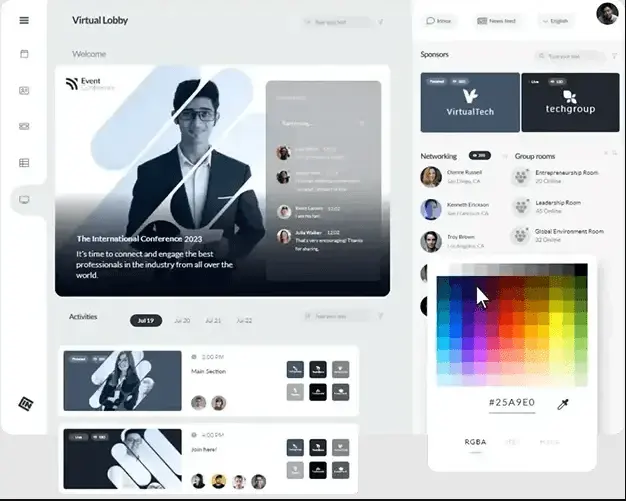
What's New in InEvent?
InEvent has since improved the user experience, as noted in this piece:
AI-powered event tools
InEvent has introduced a new suite called "AI Evolution" with the goal of expediting and improving event planning. Among the major innovations are:
- Based on basic input or pictures, an AI website builder assistant generates or replicates event websites (including branding, layout, mobile friendliness, and SEO optimization).
- Conversational commands, such as "add a 5-star rating field," can be used to create and modify registration logic, fields, and processes in smart registration forms.
- Recognition of Faces At in-person events, check-in allows for quick, touchless access; guests simply approach, glance at a camera, and their badge or entry is instantly processed. (Said to cut check-in time by as much as 70%.)
New integrations with the Microsoft Ecosystem
Additionally, InEvent revealed increased integrations with a number of Microsoft applications, enhancing its suitability for businesses who are currently using the Microsoft stack. These consist of:
- Attendee data, leads, and CRM workflows can all be unified with native integration with Microsoft Dynamics 365.
- Support for deployment through the Microsoft Azure marketplace and scalability through the use of Microsoft cloud infrastructure.
- Utilizing Microsoft Teams for communication capabilities and Microsoft Outlook for event plans, RSVPs, and calendar changes.
Additional enhancements and workflow improvements
InEvent has published more enhancements in the areas of usability, engagement, and event logistics, in addition to the headline items:
- In April 2025, attendees will be able to request various meeting hours, utilize ticket visibility logic that shows or hides tickets based on answers to the registration form, and receive app-based responses to their inquiries on iOS.
- In January 2025, in addition to the previously described facial recognition, "on-site bundles" for in-person event logistics (badge printing, kiosks, and staff) were introduced.
- Continuous enhancements include browser compatibility, a new help center, private-support tools for government clients, and more.
Featured Event Management Software Products
$10 per user per month
Google Drive, Slack, Salesforce, and QuickBooks
Request forms and @mentions
Editor's Take
Wrike is a project management platform designed to help teams streamline their workflows and boost productivity. It offers a flexible, user-friendly interface that allows users to manage tasks, track progress, and collaborate on projects in real time. With its customizable dashboards and detailed reporting tools, Wrike provides clear visibility into project timelines and team performance. The platform also supports automation, enabling teams to automate repetitive tasks and reduce manual efforts. Collaboration is enhanced through features like task comments, file sharing, and integrations with tools such as Slack, Microsoft Teams, and Google Workspace. Wrike’s scalability makes it suitable for teams of any size, from small businesses to large enterprises.
Expert Score
In evaluating SaaS software, a comprehensive and structured methodology ensures a fair and accurate comparison across key metrics. This approach focuses on the most critical aspects that affect user experience, functionality, and business value. The following metrics—general features, cost, customer service, integrations, and mobile support—are evaluated to provide a holistic view of each software solution’s strengths and weaknesses. These metrics are selected based on their direct impact on software usability, scalability, and long-term effectiveness for businesses.
1. General Features - scoring weight 40%
This metric evaluates the core functionalities and tools the software offers. It involves assessing the comprehensiveness of the features, their relevance to the target users, and the ease of use. This is important because robust and well-designed features determine the software’s overall utility and efficiency in solving user problems.
2. Cost - scoring weight 15%
Cost analysis focuses on pricing models, value for money, and scalability. It’s crucial to evaluate whether the software’s features justify its price, considering different plans for small and large organizations. This is vital for businesses to ensure they invest in cost-effective solutions that fit their budget.
3. Customer Service - scoring weight 15%
This evaluates the responsiveness, quality, and availability of customer support, including channels like chat, email, or phone. Good customer service is essential for troubleshooting and ensuring smooth software usage, which reduces downtime and frustration for users.
4. Integrations - scoring weight 15%
This examines how well the software integrates with third-party tools (e.g., CRM, payment systems, collaboration apps). Seamless integrations are key for creating a unified workflow and enhancing productivity by connecting multiple systems, which is crucial for operational efficiency.
5. Mobile Support - scoring weight 15%
Mobile support assesses the software’s functionality and performance on mobile devices, including apps and mobile web versions. With increasing remote work and on-the-go usage, strong mobile support is critical to ensure users can access and utilize the software effectively, regardless of location.
Quote-based
No
Virtual Booths, Live Webinars, Networking Tools
Editor's Take
vFairs is a virtual event platform designed to host online conferences, trade shows, and job fairs. It provides tools for event registration, virtual booths, and live webinars, creating an immersive and interactive experience for attendees. The platform supports networking features like chat and video calls, enhancing engagement between participants. With detailed analytics and customizable branding options, vFairs helps organizers deliver professional and impactful virtual events. Its scalability makes it suitable for events of any size or industry.
Expert Score
In evaluating SaaS software, a comprehensive and structured methodology ensures a fair and accurate comparison across key metrics. This approach focuses on the most critical aspects that affect user experience, functionality, and business value. The following metrics—general features, cost, customer service, integrations, and mobile support—are evaluated to provide a holistic view of each software solution’s strengths and weaknesses. These metrics are selected based on their direct impact on software usability, scalability, and long-term effectiveness for businesses.
1. General Features - scoring weight 40%
This metric evaluates the core functionalities and tools the software offers. It involves assessing the comprehensiveness of the features, their relevance to the target users, and the ease of use. This is important because robust and well-designed features determine the software’s overall utility and efficiency in solving user problems.
2. Cost - scoring weight 15%
Cost analysis focuses on pricing models, value for money, and scalability. It’s crucial to evaluate whether the software’s features justify its price, considering different plans for small and large organizations. This is vital for businesses to ensure they invest in cost-effective solutions that fit their budget.
3. Customer Service - scoring weight 15%
This evaluates the responsiveness, quality, and availability of customer support, including channels like chat, email, or phone. Good customer service is essential for troubleshooting and ensuring smooth software usage, which reduces downtime and frustration for users.
4. Integrations - scoring weight 15%
This examines how well the software integrates with third-party tools (e.g., CRM, payment systems, collaboration apps). Seamless integrations are key for creating a unified workflow and enhancing productivity by connecting multiple systems, which is crucial for operational efficiency.
5. Mobile Support - scoring weight 15%
Mobile support assesses the software’s functionality and performance on mobile devices, including apps and mobile web versions. With increasing remote work and on-the-go usage, strong mobile support is critical to ensure users can access and utilize the software effectively, regardless of location.
$9 per seat per month
Free plan available
customizable workflows, task automation, time tracking
Editor's Take
Monday.com is a versatile Work OS that offers a range of marketing-focused features to help teams streamline campaign management, content planning, and overall marketing workflows. Designed to boost collaboration and efficiency, Monday.com allows marketing teams to plan, execute, and track projects in real-time, all from a customizable and visual platform.
Key marketing features include campaign tracking, content calendars, and marketing automation tools that help teams stay on top of deadlines, monitor progress, and optimize resources. The platform also supports integrations with popular marketing tools like HubSpot, Mailchimp, and Google Analytics, allowing teams to centralize their marketing efforts and access valuable insights without leaving the platform. Additionally, Monday.com offers powerful reporting and analytics, providing visibility into campaign performance and ROI.
For marketing teams seeking a flexible, all-in-one solution for managing campaigns, collaborating across departments, and tracking KPIs, Monday.com provides the tools to enhance productivity and achieve marketing goals efficiently.
Expert Score
In evaluating SaaS software, a comprehensive and structured methodology ensures a fair and accurate comparison across key metrics. This approach focuses on the most critical aspects that affect user experience, functionality, and business value. The following metrics—general features, cost, customer service, integrations, and mobile support—are evaluated to provide a holistic view of each software solution’s strengths and weaknesses. These metrics are selected based on their direct impact on software usability, scalability, and long-term effectiveness for businesses.
1. General Features - scoring weight 40%
This metric evaluates the core functionalities and tools the software offers. It involves assessing the comprehensiveness of the features, their relevance to the target users, and the ease of use. This is important because robust and well-designed features determine the software's overall utility and efficiency in solving user problems.
2. Cost - scoring weight 15%
Cost analysis focuses on pricing models, value for money, and scalability. It's crucial to evaluate whether the software’s features justify its price, considering different plans for small and large organizations. This is vital for businesses to ensure they invest in cost-effective solutions that fit their budget.
3. Customer Service - scoring weight 15%
This evaluates the responsiveness, quality, and availability of customer support, including channels like chat, email, or phone. Good customer service is essential for troubleshooting and ensuring smooth software usage, which reduces downtime and frustration for users.
4. Integrations - scoring weight 15%
This examines how well the software integrates with third-party tools (e.g., CRM, payment systems, collaboration apps). Seamless integrations are key for creating a unified workflow and enhancing productivity by connecting multiple systems, which is crucial for operational efficiency.
5. Mobile Support - scoring weight 15%
Mobile support assesses the software’s functionality and performance on mobile devices, including apps and mobile web versions. With increasing remote work and on-the-go usage, strong mobile support is critical to ensure users can access and utilize the software effectively, regardless of location.
How Much Does InEvent Cost?
InEvent: Top Event Management Software
4.55 / 5
InEvent offers a range of event platform packages, starting at $6,000 for a single event and $9,000 for an annual subscription. Below are the packages provided by InEvent depending on the user’s needs:
V&H Advanced - By quote
- Custom branding
- Forms
- Emails
- Magic Links
- Tickets
- Chat
- Polling
- Questions
- Reports
- Event app
- Landing pages
- Live Studio
- RTMP streaming
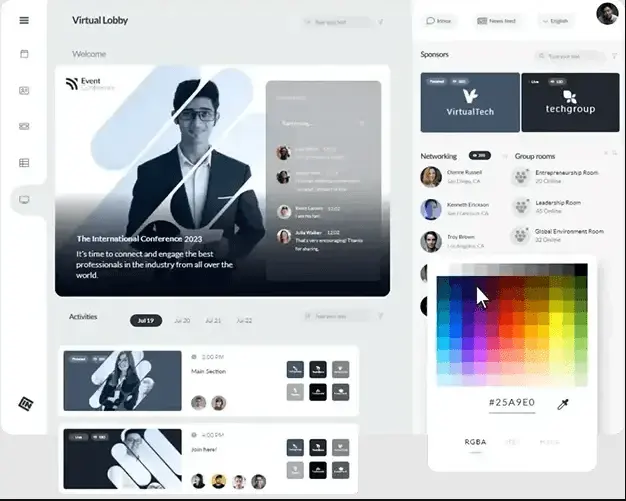
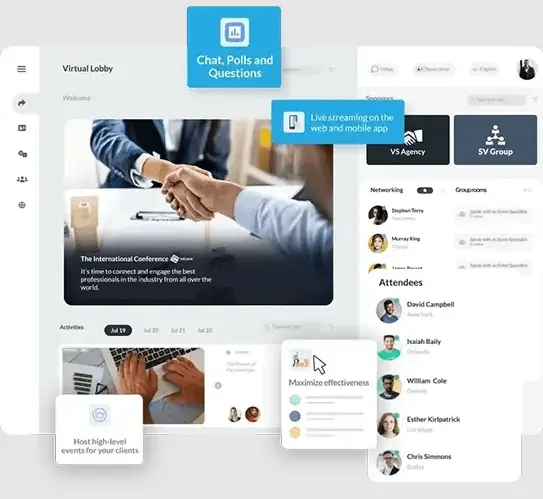
- Virtual lobby
- Premium worldwide 24/7 support
V&H Pro - By quote
- Everything in Advanced +
- API developers
- Single Sign On (SSO)
- Marketo integration
- Salesforce integration
- Not included in this package:
V&H Full - By quote
- Everything in Pro +
- Live Studio
- RTMP streaming
- Virtual lobby
What Sets InEvent Apart
Nowadays, most customers are looking for what InEvent offers as an event management platform. By reading this review, users can learn about the benefits and drawbacks of using this platform and why its characteristics make it a dependable option.
InEvent Pros
- All-in-One Platform: InEvent consolidates registration, streaming, networking, and analytics into a single system. This reduces technical problems and saves time by eliminating the need to juggle different tools. It's ideal for efficiently managing multi-day or hybrid events.
- Strong Customization and Branding: The platform's extensive customization capabilities enable event planners to maintain consistent branding across emails, apps, and websites. Presenting the event under the user’s brand name is possible with white-label alternatives. This makes it easier to provide sponsors and guests with a polished, businesslike experience.
- Powerful Automation and AI Features: Recent releases have included AI capabilities for creating forms, webpages, and automating attendance workflows. These capabilities streamline event planning by eliminating tedious processes, such as check-in and registration setup. By utilizing more intelligent data and customization, they also enhance attendee engagement.
InEvent Cons
- Steep Learning Curve: New users often find InEvent intimidating due to its extensive feature set. It may take some time to become proficient in setting up workflows, automating tasks, or creating unique designs.
- High Cost for Small Teams: Due to its enterprise-level architecture, InEvent might be costly for single events or smaller enterprises. Only higher-tier plans offer certain sophisticated tools and integrations.
- Occasional Technical Glitches: During major events, users have reported issues such as sluggish loading times and mobile app glitches. Although InEvent's support staff is quick to respond, these glitches can still ruin live events.
InEvent Core Features
InEvent: Top Event Management Software
4.55 / 5
Before starting their software search, the team advises clients to create a list of the features they want in an event management system. Using a list of the most important criteria, users can choose features that suit their budget.
- Event Registration and Ticketing: InEvent provides automated confirmations, customizable registration forms, and flexible ticketing options. Organizers can centrally manage multiple ticket categories, discount codes, and payment integrations. This simplifies entry procedures and makes it easy to track attendance.
- Virtual and Hybrid Event Hosting: The platform supports breakout rooms, live broadcasting, and interactive features such as chat, polling, and Q&A. It enables both online and in-person audiences to participate with ease. Because of its adaptability, it's perfect for international events or hybrid conferences.
- Networking and Engagement Tools: InEvent features include virtual lounges, AI matchmaking, and one-on-one meeting scheduling. These resources enable participants to form bonds based on shared interests or objectives. Better networking results and increased engagement follow.
- Analytics and Reporting: Organizers have access to detailed information on registration, engagement, session attendance, and return on investment. Reports can be integrated with marketing platforms and CRMs or exported. This data-driven strategy helps enhance subsequent events and efficiently gauge achievement.
- Customization and Branding: With InEvent's complete white-labeling feature, users can create communications, mobile apps, and event pages that are consistent with their brand. Users can customize everything, including domain names and logos. This ensures a dependable and polished brand experience throughout the event.
Numerous "out-of-the-box" interfaces with CRMs, marketing tools, payment systems, and analytics platforms—including Salesforce, Marketo, HubSpot, Microsoft Dynamics 365, Stripe, PayPal, and more—are supported by InEvent.
However, if an issue arises during integration, contact their Help Center.
Benefits of Using InEvent
There are numerous advantages to using InEvent’s various event management services.
Comprehensive All-in-One Platform
InEvent eliminates the need for numerous disparate technologies by combining registration, ticketing, mobile apps, analytics, and virtual/onsite event hosting under one roof. This results in a more efficient event pipeline and fewer integrations to maintain. It's perfect for event coordinators who prefer to focus on the attendee experience and minimize platform juggling.
White-label Customization and Branding
Emails, registration forms, apps, and websites can all have their appearance and feel completely customized to fit the user’s brand identity. This makes it easier for participants and stakeholders to have a consistent, polished experience. Additionally, it facilitates the setup of unique domains and branding for live events.
Flexible Virtual, On-Site, and Hybrid Event Support
Users can serve participants in-person, virtually, or a combination of both, with InEvent's support for livestreaming, breakout rooms, mobile check-in, badge printing, and hybrid formats. This adaptability is especially helpful in the modern world, when event formats are subject to sudden changes. It enables users to adjust without reworking workflows or transferring to another platform.
Deep Analytics and Data-driven Insights
The software provides reports on lead generation, session engagement, attendee behavior, registration, and other key metrics. These insights aid in ROI measurement, event improvement, and audience preference analysis. Enterprise and marketing departments can benefit greatly from this data capacity.
Global Support, Multi-language, and Compliance Ready
InEvent offers global deployment, multilingual support, and adherence to regulations such as GDPR and SOC 2. This guarantees that users can manage data governance and security when hosting events across international borders. This lowers risk and streamlines compliance overhead for companies that operate across geographical boundaries.
What Business Types Use InEvent?
The following sectors and companies benefit the most from InEvent:
- Corporations and Enterprises
Large corporations utilize InEvent for internal conferences, product launches, training sessions, and hybrid events. Multilingual, worldwide deployment, and enterprise-grade security (SOC 2, GDPR) are supported. Event data can be integrated into sales/marketing workflows using CRM systems like Salesforce, HubSpot, and Microsoft Dynamics 365.
- Event Organisers and Agencies
InEvent provides registration, tickets, live streaming, interactive sessions, and networking solutions for event planners and managers. White-labeling and personalization keep the agency or client's brand at the forefront.
- Educational Institutions / Training Providers
Universities, professional bodies, and corporate training providers host webinars, seminars, certificate conferences, and remote/hybrid learning events via InEvent. They may create interactive learning experiences using breakout rooms, live Q&A, polling, and analytics.
- Non-profits and Associations
Through InEvent, membership organizations, industry associations, and nonprofits offer annual general meetings, fundraising events, virtual congresses, and member networking opportunities. Flexible virtual and hybrid formats allow the platform to reach scattered member bases.
- Medium / Small Business with Growth Needs
Small and mid-sized companies utilize InEvent for product launches, marketing-driven events, customer/user conferences, and lead-generation webinars despite its enterprise features. The platform offers scalable plans for usage growth.
Best 5 Alternatives to InEvent
In addition to the review, the team utilized information from other reliable databases and sources to objectively evaluate InEvent. The Research.com team is aware that every company and sales force has different needs; thus, InEvent's solution might not be suitable for everyone. The team has identified the most effective alternatives to InEvent after conducting a comprehensive review.
1. CVent Event Marketing & Management
Cvent Event Marketing & Management is a platform frequently used for enterprise-scale and large-scale events. Integrates venue sourcing, attendee administration, analytics, and registration for in-person, virtual, and hybrid formats. Designed for organizations that require robust event operations, global scope, and deep control.
2. Bizzabo
Bizzabo is designed to accommodate the entire event lifecycle, including registration, website/app development, mobile engagement, networking, and analytics. It prioritizes a refined attendee experience by supporting in-person, virtual, and hybrid events. An excellent option for those seeking a marketing-centric event tool and a modern interface.
3. Whova
Whova is a platform that is both flexible and cost-effective, making it an excellent choice for mid-sized events, associations, and conferences. Offers analytics, attendee networking, mobile event app, ticketing, and event registration. It is particularly well-regarded for its attendee-facing features and simplicity of use.
4. Hubilo
Hubilo emphasizes virtual and hybrid events that utilize engagement-oriented tools, including analytics, networking lounges, and interactive sessions. Provides sponsors and exhibitors with the ability to monitor their progress in real time and capture leads. Suitable for events that emphasize exhibitor ROI or have a substantial virtual component.
5. EventsAir
EventsAir is a comprehensive event management solution that encompasses on-site operations, badge/visitor administration, mobile app, websites, and registration. It is suitable for both live and virtual events, offering a platform with a wide range of capabilities, particularly if the user require all services to be located in one place.
Frequently Asked Questions (FAQs)
In 2026, InEvent provides various support options including live chat, email support, and a comprehensive knowledge base. They also offer personalized onboarding and training sessions to ensure users maximize the platform's capabilities.
Following the creation of the event (via Company → Events → +New Event), users set up the necessary information, including the name, date, and mode (in-person, virtual, or hybrid). Users also set up tools, registration, tickets, and the website, among other things.
Yes, users have the option to activate the "Approval requirement" function, which requires human approval of registrants prior to their attendance.
InEvent's 2026 pricing structure is characterized by a tiered model that caters to different needs, from small events to large-scale conferences. Users can opt for customizable packages to meet specific requirements, offering flexibility and ensuring value. Detailed pricing information is available upon request directly from InEvent.
Following the event, customers can manage credits (based on their contract), extract reports (including attendance, engagement, leads, and email analytics), and utilize templates or the "Copy Event" tools to expedite the setup of subsequent events.


