
LearnRight Review 2027: Pricing, Features, Pros & Cons, Ratings & More

Co-Founder and Chief Data Scientist

LearnRight: Top Training Management Software
4.25 / 5
Featured Training Management Software Alternatives for LearnRight

$9 per seat per month
Zoom, Google Docs, Salesforce, Slack and more
Document collaboration and comments
Editor's Take
monday.com is a Work Operating System (Work OS) that enables teams to plan, organize, and manage tasks efficiently. Known for its customizable interface, it allows users to tailor workflows to suit specific needs, whether for task management or complex projects. The software’s automation features help reduce manual work by automating repetitive tasks based on set triggers. monday.com also fosters team collaboration through real-time updates, file sharing, and discussion threads, making it easier for teams to stay aligned and productive. Additionally, it integrates with popular tools like Slack, Google Drive, and Zoom to streamline operations across platforms.
Expert Score
In evaluating SaaS software, a comprehensive and structured methodology ensures a fair and accurate comparison across key metrics. This approach focuses on the most critical aspects that affect user experience, functionality, and business value. The following metrics—general features, cost, customer service, integrations, and mobile support—are evaluated to provide a holistic view of each software solution’s strengths and weaknesses. These metrics are selected based on their direct impact on software usability, scalability, and long-term effectiveness for businesses.
1. General Features - scoring weight 40%
This metric evaluates the core functionalities and tools the software offers. It involves assessing the comprehensiveness of the features, their relevance to the target users, and the ease of use. This is important because robust and well-designed features determine the software's overall utility and efficiency in solving user problems.
2. Cost - scoring weight 15%
Cost analysis focuses on pricing models, value for money, and scalability. It's crucial to evaluate whether the software’s features justify its price, considering different plans for small and large organizations. This is vital for businesses to ensure they invest in cost-effective solutions that fit their budget.
3. Customer Service - scoring weight 15%
This evaluates the responsiveness, quality, and availability of customer support, including channels like chat, email, or phone. Good customer service is essential for troubleshooting and ensuring smooth software usage, which reduces downtime and frustration for users.
4. Integrations - scoring weight 15%
This examines how well the software integrates with third-party tools (e.g., CRM, payment systems, collaboration apps). Seamless integrations are key for creating a unified workflow and enhancing productivity by connecting multiple systems, which is crucial for operational efficiency.
5. Mobile Support - scoring weight 15%
Mobile support assesses the software’s functionality and performance on mobile devices, including apps and mobile web versions. With increasing remote work and on-the-go usage, strong mobile support is critical to ensure users can access and utilize the software effectively, regardless of location.

$4.08 per user per month
(billed annually)
30 days
Yes
Editor's Take
iSpring LMS is a user-friendly learning management system (LMS) tailored for businesses and educators to deliver eLearning content efficiently. It offers features like course creation, quizzes, learning paths, and progress tracking. iSpring LMS supports various content types, including video lectures and interactive modules, and integrates with the iSpring Suite authoring tool for seamless content development. Pros include a straightforward interface, mobile-friendly access, and powerful reporting tools. However, customization options can be limited, and pricing may be high for smaller organizations. It is ideal for corporate training, employee development, and onboarding, providing a reliable platform for scalable eLearning.
Expert Score
In evaluating SaaS software, a comprehensive and structured methodology ensures a fair and accurate comparison across key metrics. This approach focuses on the most critical aspects that affect user experience, functionality, and business value. The following metrics—general features, cost, customer service, integrations, and mobile support—are evaluated to provide a holistic view of each software solution’s strengths and weaknesses. These metrics are selected based on their direct impact on software usability, scalability, and long-term effectiveness for businesses.
1. General Features - scoring weight 40%
This metric evaluates the core functionalities and tools the software offers. It involves assessing the comprehensiveness of the features, their relevance to the target users, and the ease of use. This is important because robust and well-designed features determine the software's overall utility and efficiency in solving user problems.
2. Cost - scoring weight 15%
Cost analysis focuses on pricing models, value for money, and scalability. It's crucial to evaluate whether the software’s features justify its price, considering different plans for small and large organizations. This is vital for businesses to ensure they invest in cost-effective solutions that fit their budget.
3. Customer Service - scoring weight 15%
This evaluates the responsiveness, quality, and availability of customer support, including channels like chat, email, or phone. Good customer service is essential for troubleshooting and ensuring smooth software usage, which reduces downtime and frustration for users.
4. Integrations - scoring weight 15%
This examines how well the software integrates with third-party tools (e.g., CRM, payment systems, collaboration apps). Seamless integrations are key for creating a unified workflow and enhancing productivity by connecting multiple systems, which is crucial for operational efficiency.
5. Mobile Support - scoring weight 15%
Mobile support assesses the software’s functionality and performance on mobile devices, including apps and mobile web versions. With increasing remote work and on-the-go usage, strong mobile support is critical to ensure users can access and utilize the software effectively, regardless of location.

Quote-based
14 days
Payroll Processing, Time Tracking, Employee Records
Editor's Take
TalentHR is a user-friendly human resource management system tailored for small to mid-sized businesses. It simplifies HR processes such as employee onboarding, performance tracking, and payroll management. The platform offers centralized employee records and tools for managing leave, attendance, and compliance. TalentHR’s intuitive dashboard provides actionable insights and analytics to support decision-making. Designed to save time and reduce administrative burdens, it enables HR teams to focus on strategic initiatives while ensuring accurate and efficient operations.
Expert Score
In evaluating SaaS software, a comprehensive and structured methodology ensures a fair and accurate comparison across key metrics. This approach focuses on the most critical aspects that affect user experience, functionality, and business value. The following metrics—general features, cost, customer service, integrations, and mobile support—are evaluated to provide a holistic view of each software solution’s strengths and weaknesses. These metrics are selected based on their direct impact on software usability, scalability, and long-term effectiveness for businesses.
1. General Features - scoring weight 40%
This metric evaluates the core functionalities and tools the software offers. It involves assessing the comprehensiveness of the features, their relevance to the target users, and the ease of use. This is important because robust and well-designed features determine the software's overall utility and efficiency in solving user problems.
2. Cost - scoring weight 15%
Cost analysis focuses on pricing models, value for money, and scalability. It's crucial to evaluate whether the software’s features justify its price, considering different plans for small and large organizations. This is vital for businesses to ensure thhey invest in cost-effective solutions that fit their budget.
3. Customer Service - scoring weight 15%
This evaluates the responsiveness, quality, and availability of customer support, including channels like chat, email, or phone. Good customer service is essential for troubleshooting and ensuring smooth software usage, which reduces downtime and frustration for users.
4. Integrations - scoring weight 15%
This examines how well the software integrates with third-party tools (e.g., CRM, payment systems, collaboration apps). Seamless integrations are key for creating a unified workflow and enhancing productivity by connecting multiple systems, which is crucial for operational efficiency.
5. Mobile Support - scoring weight 15%
Mobile support assesses the software’s functionality and performance on mobile devices, including apps and mobile web versions. With increasing remote work and on-the-go usage, strong mobile support is critical to ensure users can access and utilize the software effectively, regardless of location.
LearnRight Review
What is LearnRight?
LearnRight is an all-in-one training solution designed to revolutionize digital learning for educational institutions and businesses. This platform focuses on cutting-edge technology and user-friendly design to offer a comprehensive platform that exceeds modern educational needs.
LearnRight is known for its user-centric design, adaptive learning paths, collaborative tools such as forums and gamification, and multi-platform support for on-the-go learning. Moreover, the platform integrates instructor-led training, facilitates seamless migration from existing LMS platforms, and allows for robust customization and branding to align with institutional goals. Furthermore, LearnRight serves as a comprehensive LMS solution that grows with users, tracks learning retention, and measures results to empower learners to apply their new skills effectively.
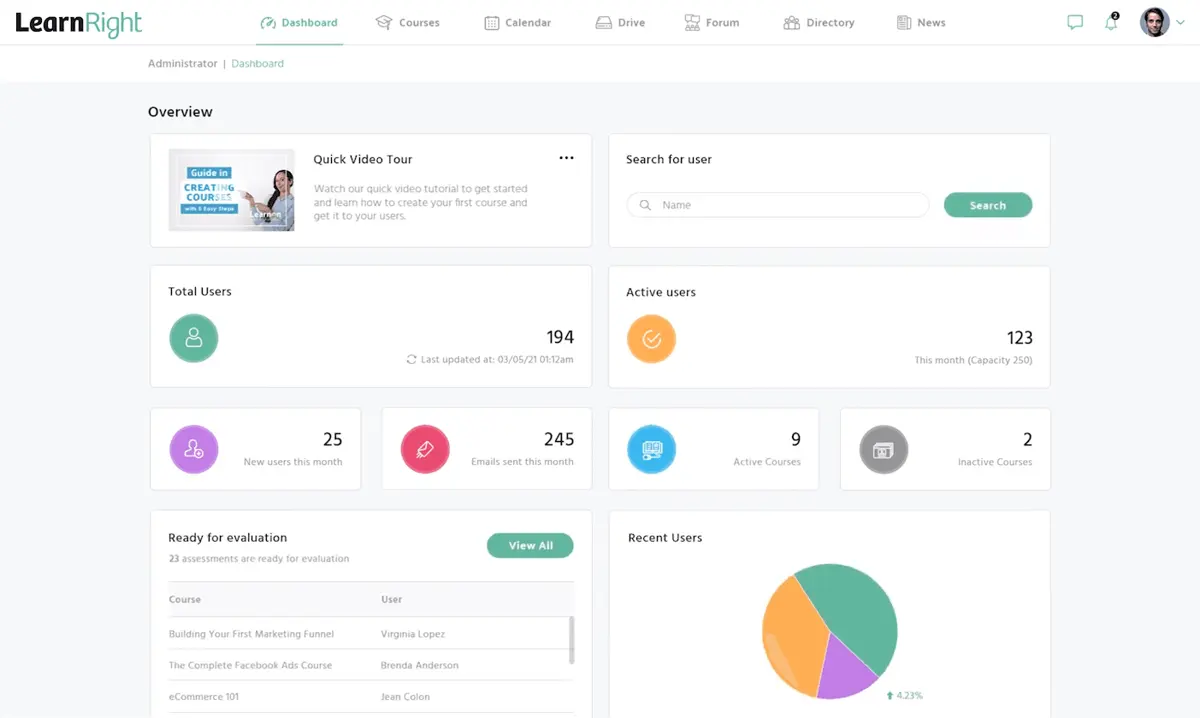
What's new in LearnRight?
LearnRight, while officially established in 2022, originates from a team with a background in web design since 2014. Evolving from creating customized platforms, this LMS now presents a robust set of features coupled with a modern interface. As of now, there are no updates for LearnRight, but the team is committed to further expanding its functionality.
Training Management Software
$9 per seat per month
Zoom, Google Docs, Salesforce, Slack and more
Document collaboration and comments
Editor's Take
monday.com is a Work Operating System (Work OS) that enables teams to plan, organize, and manage tasks efficiently. Known for its customizable interface, it allows users to tailor workflows to suit specific needs, whether for task management or complex projects. The software’s automation features help reduce manual work by automating repetitive tasks based on set triggers. monday.com also fosters team collaboration through real-time updates, file sharing, and discussion threads, making it easier for teams to stay aligned and productive. Additionally, it integrates with popular tools like Slack, Google Drive, and Zoom to streamline operations across platforms.
Expert Score
In evaluating SaaS software, a comprehensive and structured methodology ensures a fair and accurate comparison across key metrics. This approach focuses on the most critical aspects that affect user experience, functionality, and business value. The following metrics—general features, cost, customer service, integrations, and mobile support—are evaluated to provide a holistic view of each software solution’s strengths and weaknesses. These metrics are selected based on their direct impact on software usability, scalability, and long-term effectiveness for businesses.
1. General Features - scoring weight 40%
This metric evaluates the core functionalities and tools the software offers. It involves assessing the comprehensiveness of the features, their relevance to the target users, and the ease of use. This is important because robust and well-designed features determine the software's overall utility and efficiency in solving user problems.
2. Cost - scoring weight 15%
Cost analysis focuses on pricing models, value for money, and scalability. It's crucial to evaluate whether the software’s features justify its price, considering different plans for small and large organizations. This is vital for businesses to ensure they invest in cost-effective solutions that fit their budget.
3. Customer Service - scoring weight 15%
This evaluates the responsiveness, quality, and availability of customer support, including channels like chat, email, or phone. Good customer service is essential for troubleshooting and ensuring smooth software usage, which reduces downtime and frustration for users.
4. Integrations - scoring weight 15%
This examines how well the software integrates with third-party tools (e.g., CRM, payment systems, collaboration apps). Seamless integrations are key for creating a unified workflow and enhancing productivity by connecting multiple systems, which is crucial for operational efficiency.
5. Mobile Support - scoring weight 15%
Mobile support assesses the software’s functionality and performance on mobile devices, including apps and mobile web versions. With increasing remote work and on-the-go usage, strong mobile support is critical to ensure users can access and utilize the software effectively, regardless of location.
$4.08 per user per month
(billed annually)
30 days
Yes
Editor's Take
iSpring LMS is a user-friendly learning management system (LMS) tailored for businesses and educators to deliver eLearning content efficiently. It offers features like course creation, quizzes, learning paths, and progress tracking. iSpring LMS supports various content types, including video lectures and interactive modules, and integrates with the iSpring Suite authoring tool for seamless content development. Pros include a straightforward interface, mobile-friendly access, and powerful reporting tools. However, customization options can be limited, and pricing may be high for smaller organizations. It is ideal for corporate training, employee development, and onboarding, providing a reliable platform for scalable eLearning.
Expert Score
In evaluating SaaS software, a comprehensive and structured methodology ensures a fair and accurate comparison across key metrics. This approach focuses on the most critical aspects that affect user experience, functionality, and business value. The following metrics—general features, cost, customer service, integrations, and mobile support—are evaluated to provide a holistic view of each software solution’s strengths and weaknesses. These metrics are selected based on their direct impact on software usability, scalability, and long-term effectiveness for businesses.
1. General Features - scoring weight 40%
This metric evaluates the core functionalities and tools the software offers. It involves assessing the comprehensiveness of the features, their relevance to the target users, and the ease of use. This is important because robust and well-designed features determine the software's overall utility and efficiency in solving user problems.
2. Cost - scoring weight 15%
Cost analysis focuses on pricing models, value for money, and scalability. It's crucial to evaluate whether the software’s features justify its price, considering different plans for small and large organizations. This is vital for businesses to ensure they invest in cost-effective solutions that fit their budget.
3. Customer Service - scoring weight 15%
This evaluates the responsiveness, quality, and availability of customer support, including channels like chat, email, or phone. Good customer service is essential for troubleshooting and ensuring smooth software usage, which reduces downtime and frustration for users.
4. Integrations - scoring weight 15%
This examines how well the software integrates with third-party tools (e.g., CRM, payment systems, collaboration apps). Seamless integrations are key for creating a unified workflow and enhancing productivity by connecting multiple systems, which is crucial for operational efficiency.
5. Mobile Support - scoring weight 15%
Mobile support assesses the software’s functionality and performance on mobile devices, including apps and mobile web versions. With increasing remote work and on-the-go usage, strong mobile support is critical to ensure users can access and utilize the software effectively, regardless of location.
Quote-based
14 days
Payroll Processing, Time Tracking, Employee Records
Editor's Take
TalentHR is a user-friendly human resource management system tailored for small to mid-sized businesses. It simplifies HR processes such as employee onboarding, performance tracking, and payroll management. The platform offers centralized employee records and tools for managing leave, attendance, and compliance. TalentHR’s intuitive dashboard provides actionable insights and analytics to support decision-making. Designed to save time and reduce administrative burdens, it enables HR teams to focus on strategic initiatives while ensuring accurate and efficient operations.
Expert Score
In evaluating SaaS software, a comprehensive and structured methodology ensures a fair and accurate comparison across key metrics. This approach focuses on the most critical aspects that affect user experience, functionality, and business value. The following metrics—general features, cost, customer service, integrations, and mobile support—are evaluated to provide a holistic view of each software solution’s strengths and weaknesses. These metrics are selected based on their direct impact on software usability, scalability, and long-term effectiveness for businesses.
1. General Features - scoring weight 40%
This metric evaluates the core functionalities and tools the software offers. It involves assessing the comprehensiveness of the features, their relevance to the target users, and the ease of use. This is important because robust and well-designed features determine the software's overall utility and efficiency in solving user problems.
2. Cost - scoring weight 15%
Cost analysis focuses on pricing models, value for money, and scalability. It's crucial to evaluate whether the software’s features justify its price, considering different plans for small and large organizations. This is vital for businesses to ensure thhey invest in cost-effective solutions that fit their budget.
3. Customer Service - scoring weight 15%
This evaluates the responsiveness, quality, and availability of customer support, including channels like chat, email, or phone. Good customer service is essential for troubleshooting and ensuring smooth software usage, which reduces downtime and frustration for users.
4. Integrations - scoring weight 15%
This examines how well the software integrates with third-party tools (e.g., CRM, payment systems, collaboration apps). Seamless integrations are key for creating a unified workflow and enhancing productivity by connecting multiple systems, which is crucial for operational efficiency.
5. Mobile Support - scoring weight 15%
Mobile support assesses the software’s functionality and performance on mobile devices, including apps and mobile web versions. With increasing remote work and on-the-go usage, strong mobile support is critical to ensure users can access and utilize the software effectively, regardless of location.

$15 per month
Yes
email tracking, pipeline management, reporting
Editor's Take
HubSpot Sales is a powerful sales automation and customer relationship management (CRM) platform designed to help sales teams streamline processes, improve productivity, and close deals faster. Integrated within the HubSpot ecosystem, this tool provides a comprehensive suite for lead tracking, email automation, pipeline management, and sales analytics, making it ideal for businesses looking to optimize their sales efforts from prospecting to closing.
HubSpot Sales simplifies outreach with email tracking, templates, and automated follow-ups, allowing sales reps to engage leads more effectively and track interactions in real-time. The platform’s pipeline management features give sales teams a clear view of deal stages, helping them prioritize tasks and move leads through the sales funnel with ease. With built-in reporting and insights, HubSpot Sales provides valuable metrics on performance, helping teams identify trends and improve strategy. Integrations with popular tools like Gmail, Outlook, and LinkedIn make it easy for teams to manage all communications within one platform. For organizations aiming to enhance their sales process and drive growth, HubSpot Sales delivers a scalable, user-friendly solution that empowers teams to close deals faster and with greater efficiency.
Expert Score
In evaluating SaaS software, a comprehensive and structured methodology ensures a fair and accurate comparison across key metrics. This approach focuses on the most critical aspects that affect user experience, functionality, and business value. The following metrics—general features, cost, customer service, integrations, and mobile support—are evaluated to provide a holistic view of each software solution’s strengths and weaknesses. These metrics are selected based on their direct impact on software usability, scalability, and long-term effectiveness for businesses.
1. General Features - scoring weight 40%
This metric evaluates the core functionalities and tools the software offers. It involves assessing the comprehensiveness of the features, their relevance to the target users, and the ease of use. This is important because robust and well-designed features determine the software's overall utility and efficiency in solving user problems.
2. Cost - scoring weight 15%
Cost analysis focuses on pricing models, value for money, and scalability. It's crucial to evaluate whether the software’s features justify its price, considering different plans for small and large organizations. This is vital for businesses to ensure they invest in cost-effective solutions that fit their budget.
3. Customer Service - scoring weight 15%
This evaluates the responsiveness, quality, and availability of customer support, including channels like chat, email, or phone. Good customer service is essential for troubleshooting and ensuring smooth software usage, which reduces downtime and frustration for users.
4. Integrations - scoring weight 15%
This examines how well the software integrates with third-party tools (e.g., CRM, payment systems, collaboration apps). Seamless integrations are key for creating a unified workflow and enhancing productivity by connecting multiple systems, which is crucial for operational efficiency.
5. Mobile Support - scoring weight 15%
Mobile support assesses the software’s functionality and performance on mobile devices, including apps and mobile web versions. With increasing remote work and on-the-go usage, strong mobile support is critical to ensure users can access and utilize the software effectively, regardless of location.

$10 per user per month
Google Drive, Slack, Salesforce, and QuickBooks
Request forms and @mentions
Editor's Take
Wrike is a project management platform designed to help teams streamline their workflows and boost productivity. It offers a flexible, user-friendly interface that allows users to manage tasks, track progress, and collaborate on projects in real time. With its customizable dashboards and detailed reporting tools, Wrike provides clear visibility into project timelines and team performance. The platform also supports automation, enabling teams to automate repetitive tasks and reduce manual efforts. Collaboration is enhanced through features like task comments, file sharing, and integrations with tools such as Slack, Microsoft Teams, and Google Workspace. Wrike’s scalability makes it suitable for teams of any size, from small businesses to large enterprises.
Expert Score
In evaluating SaaS software, a comprehensive and structured methodology ensures a fair and accurate comparison across key metrics. This approach focuses on the most critical aspects that affect user experience, functionality, and business value. The following metrics—general features, cost, customer service, integrations, and mobile support—are evaluated to provide a holistic view of each software solution’s strengths and weaknesses. These metrics are selected based on their direct impact on software usability, scalability, and long-term effectiveness for businesses.
1. General Features - scoring weight 40%
This metric evaluates the core functionalities and tools the software offers. It involves assessing the comprehensiveness of the features, their relevance to the target users, and the ease of use. This is important because robust and well-designed features determine the software’s overall utility and efficiency in solving user problems.
2. Cost - scoring weight 15%
Cost analysis focuses on pricing models, value for money, and scalability. It’s crucial to evaluate whether the software’s features justify its price, considering different plans for small and large organizations. This is vital for businesses to ensure they invest in cost-effective solutions that fit their budget.
3. Customer Service - scoring weight 15%
This evaluates the responsiveness, quality, and availability of customer support, including channels like chat, email, or phone. Good customer service is essential for troubleshooting and ensuring smooth software usage, which reduces downtime and frustration for users.
4. Integrations - scoring weight 15%
This examines how well the software integrates with third-party tools (e.g., CRM, payment systems, collaboration apps). Seamless integrations are key for creating a unified workflow and enhancing productivity by connecting multiple systems, which is crucial for operational efficiency.
5. Mobile Support - scoring weight 15%
Mobile support assesses the software’s functionality and performance on mobile devices, including apps and mobile web versions. With increasing remote work and on-the-go usage, strong mobile support is critical to ensure users can access and utilize the software effectively, regardless of location.
How much does LearnRight cost?
LearnRight: Top Training Management Software
4.25 / 5
LearnRight offers a user-friendly platform that facilitates course creation and delivery for instructors and easy access for learners. While LearnRight pricing plans aren't publicly available, individuals interested in the platform can reach out to the LearnRight support team for a demo and pricing details.
In addition, LearnRight extends a generous 30-day free trial period to allow users to explore its features and evaluate its suitability for their requirements. This commitment to transparency empowers users to make educated decisions about incorporating LearnRight into their educational endeavors.
What sets LearnRight apart?
In this section of our LearnRight review, we will discuss how this platform revolutionizes digital learning for educational institutions and businesses. We will also tackle LearnRight pros and cons to help users gain a comprehensive understanding of its capabilities and potential impact.
LearnRight Pros
- User-Friendly Interface. LearnRight boasts an intuitive interface that makes course creation, management, and navigation easy for administrators and learners.
- Comprehensive Feature Set. With a wide range of features including course creation, learner engagement, training delivery, reporting, and security, LearnRight offers a comprehensive solution for all aspects of learning management.
- Flexible Monetization Options. Organizations can monetize their courses and training programs using various methods supported by LearnRight, such as subscriptions, one-time purchases, and discounts.
- Scalability. LearnRight is designed to accommodate organizations of various sizes and industries and offers scalability to meet growing training needs. Whether an organization has a few users or thousands, LearnRight can scale accordingly to provide a reliable learning management solution.
- Integration Flexibility. Beyond its core features, LearnRight offers seamless integration with external systems and websites. In turn, this provides users with the flexibility to leverage existing tools and workflows. This integration capability enhances efficiency and streamlines the learning process for administrators and learners alike.
- In-depth Reporting. LearnRight provides highly customizable reporting features that enable organizations to track metrics that matter most to them. Be it educational outcomes, user data, or revenue tracking, LearnRight's reporting tools empower organizations to gain valuable insights and make data-driven decisions.
LearnRight Cons
- Complexity for Beginners. LearnRight provides extensive features that might overwhelm beginners.
- Integration Challenges. Organizations might face difficulties setting up external system integrations with LearnRight, particularly if customization is needed.

LearnRight Core Features
LearnRight: Top Training Management Software
4.25 / 5
LearnRight integrates a range of features within a unified database to enable seamless data sharing and foster collaborative learning experiences. In this section of our LearnRight review, we will outline the LearnRight features that users can anticipate.
- Course Creation and Management. LearnRight offers an intuitive interface for creating and managing courses, with support for various activities such as webinars, quizzes, and videos. This platform’s flexible monetization options and integration with SCORM, xAPI, and TinCan ensure a seamless learning experience.
- Learner Engagement. With features like notifications, certificates, social learning environments, and gamification, LearnRight keeps learners engaged and motivated. This platform’s mobile-friendly interface and recertification options enhance accessibility and learner participation.
- Training Delivery. LearnRight makes organizing courses into learning journeys, monitoring progress, and conducting instructor-led training easy. This platform also supports blended learning and attendance tracking to ensure effective training delivery.
- Calendar and Events. LearnRight comes with calendar features that enable easy management of events, event registrations, and credits for attendance. With this, learners and stakeholders can stay updated on course schedules and deadlines to enhance efficiency.
- Reporting. LearnRight provides customizable reporting options for tracking educational outcomes, user data, and revenue. With reports that can be downloaded in CSV or PDF formats, the platform enables organizations to analyze performance and make informed decisions.
- Portal Management. LearnRight allows customizable dashboard setups and quick access to portal management tasks such as system settings, branding configurations, and monetization data. This streamlines administrative tasks and enhances user experience by tailoring the platform to specific organizational needs.
- Community Building Tools. With features like forums, messaging capabilities, and a searchable directory, LearnRight fosters a sense of community among learners. Users can also engage in discussions, share knowledge, and collaborate effectively within the platform to enrich their learning experience.
- Drive. LearnRight offers secure file storage and sharing capabilities so administrators can control user access permissions and restrict content viewing based on payment or user roles. This feature ensures that learners can access relevant resources while maintaining data security and compliance.
Benefits of Using LearnRight
As other LearnRight reviews share, this platform not only enhances learner involvement but also provides ease of use. Below, we detail some of the other LearnRight benefits that users can reap.
Engaging Learning Experience
LearnRight offers an engaging learning experience that incorporates various elements such as timely notifications, personalized certificates upon completion, and gamified learning activities. These interactive components not only make the learning process more enjoyable but also encourage active participation that ultimately fosters better knowledge retention among users.
Comprehensive Training Delivery
LearnRight provides a comprehensive solution for effective training delivery that covers organizing courses into cohesive learning journeys, monitoring attendance, and tracking progress. With this approach, training programs are tailored to meet diverse learning needs and promote optimal engagement and skill development.
Flexible Monetization Options
LearnRight offers organizations versatile monetization choices, including diverse payment methods, bundled course options, and subscription management capabilities. Through these, businesses can effectively generate revenue from their courses and training initiatives to ensure financial viability and scalability.
Robust Security Measures
LearnRight places a premium on safeguarding user data through stringent encryption methods, adherence to GDPR, and frequent security evaluations. These robust security measures ensure confidentiality and data integrity, fostering trust and assurance among learners and administrators.
Responsive Support Services
LearnRight offers round-the-clock live chat, email, and telephone support, coupled with comprehensive onboarding assistance and training materials. This ensures that organizations receive prompt and personalized support at every stage of their learning journey, which contributes to a seamless and positive user experience.
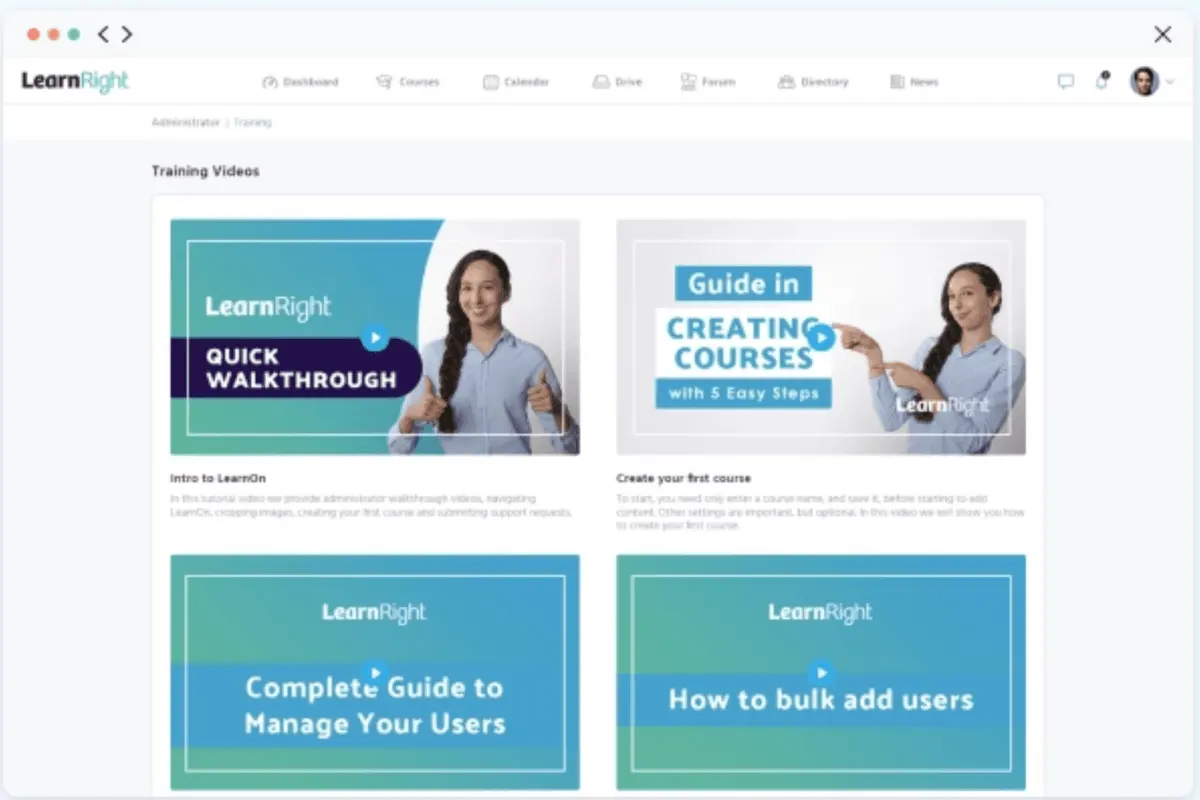
What are the steps to migrate to LearnRight from an existing LMS?
Transitioning to a new Learning Management System (LMS) like LearnRight can feel daunting, but following these steps can help ensure a smooth migration for educational institutions and businesses:
- Data Mapping and Preparation: Assess your current LMS to understand its data structure, including course materials, user data, and completion records. This step helps map the information effectively for migration into LearnRight.
- Engage LearnRight's Onboarding Support: Utilize LearnRight’s onboarding support, available through live chat, phone, and email, to guide your team on the migration process and address specific needs.
- Test and Validate Data Transfer: Conduct trial migrations to test the integrity of transferred data. Ensure that course content, user data, and completion records appear accurately on the LearnRight platform.
- Train Staff and Learners: Facilitate training sessions for staff and learners to familiarize them with LearnRight’s interface and features, ensuring a seamless adoption experience.
How easy is it to implement LearnRight?
LearnRight’s implementation process is designed to be efficient and minimizes disruption. Organizations receive structured onboarding that simplifies data migration and system integration without lengthy downtime. Effective alignment with existing IT frameworks is facilitated through standardized setup and clear configuration guidelines. Additionally, leveraging complementary systems such as CMMS software can streamline operational workflows, ensuring a cohesive transition and ongoing support.
What business types use LearnRight?
LearnRight is well-suited for diverse businesses and industries, including corporate enterprises, small and medium-sized businesses (SMBs), educational institutions, nonprofit organizations, and professional training providers. This is due to its comprehensive learning management solutions for various training needs, such as employee onboarding, compliance training, professional development, online courses, and continuing education programs. Some of LearnRight’s notable customers include Cleaning Contractors, ISQua, and Retail Excellence.
In contrast, LearnRight may not be suitable for businesses in highly regulated industries, very small businesses, tech startups with unique needs, or companies seeking basic LMS functionality. Furthermore, LearnRight may be challenging to implement and maintain for organizations with limited IT resources, especially if extensive customization or integration is required.
What to Consider Before Choosing LearnRight
When selecting an LMS like LearnRight, it’s essential to assess various factors to ensure that the platform aligns with your organizational goals and delivers long-term value. Beyond the features and benefits highlighted above, here are critical considerations you should evaluate:
- Scalability and Growth Alignment
Ensure that LearnRight can scale with your organization as your learning and training needs expand. While LearnRight offers a 30-day free trial for exploration, assessing its scalability over time is vital, especially for fast-growing businesses that may require advanced customization and integrations.
- Total Cost of Ownership
The upfront cost is only one part of the equation. LearnRight does not publicly disclose its pricing, making it essential to inquire specifically about long-term costs, potential additional fees for support or integrations, and upgrade expenses. To better understand budget planning and how LearnRight compares to other LMS platforms in terms of affordability, refer to this comprehensive guide on lms pricing.
- Integration with Existing Systems
For seamless operational workflows, verify that LearnRight integrates effectively with your existing tools and software. Evaluate its compatibility with enterprise systems such as HR platforms, CRMs, or e-commerce solutions to ensure streamlined course management and reporting.
- User Experience (UX)
A platform's usability and accessibility directly impact learner engagement and administrative management. Test both the instructor and learner interfaces during the trial period to determine whether its design truly aligns with your team’s needs and technical proficiency.
- Compliance and Data Security
As data security grows increasingly critical, LearnRight’s adherence to stringent standards like GDPR and its regular security evaluations are key advantages. However, verify that its compliance measures also address specific industry or geographic regulatory requirements pertinent to your organization.
By thoroughly evaluating these dimensions, you'll be better positioned to determine if LearnRight is the ideal LMS solution for your enterprise or educational needs.
Key Insights
- User-Centric Design: LearnRight offers a user-friendly interface designed to enhance the learning experience for both administrators and learners.
- Comprehensive Feature Set: The platform includes extensive features such as course creation, learner engagement, training delivery, reporting, and security, providing an all-in-one solution for learning management.
- Adaptive Learning Paths: LearnRight supports personalized learning journeys, ensuring that learners receive relevant and tailored content to meet their individual needs.
- Multi-Platform Support: The platform is accessible on various devices, allowing learners to engage with content on-the-go, enhancing flexibility and convenience.
- Integration and Customization: LearnRight supports seamless integration with external systems and offers robust customization options to align with organizational goals and existing workflows.
- Monetization Options: Organizations can monetize their courses through various methods, including subscriptions, one-time purchases, and bundled courses.
- Engagement and Gamification: Features such as notifications, certificates, social learning environments, and gamification keep learners motivated and engaged.
- Robust Security: The platform prioritizes data security with stringent encryption methods, GDPR compliance, and regular security evaluations.
- Responsive Support: LearnRight offers round-the-clock support, including live chat, email, and phone assistance, ensuring users receive timely help and guidance.
Frequently Asked Questions (FAQs)
LearnRight is an all-in-one training solution designed to enhance digital learning for educational institutions and businesses. It offers a comprehensive platform with a user-friendly design, adaptive learning paths, and collaborative tools.
While LearnRight was officially established in 2022, it originated from a team with web design experience since 2014. There are no current updates, but the team is committed to expanding the platform's functionality.
LearnRight does not publicly disclose pricing plans. Interested individuals can contact LearnRight for a demo and detailed pricing information. The platform also offers a 30-day free trial to explore its features.
LearnRight stands out for its user-centric design, comprehensive feature set, adaptive learning paths, integration flexibility, and robust security measures. It also offers extensive customization and flexible monetization options.
Core features of LearnRight include course creation and management, learner engagement tools, training delivery options, calendar and event management, robust reporting, portal management, community-building tools, and secure file storage and sharing.
Benefits of using LearnRight include an engaging learning experience, comprehensive training delivery, flexible monetization options, robust security measures, and responsive support services.
LearnRight's pricing is competitive compared to other LMS platforms. It offers flexible payment plans tailored to various needs, ranging from small businesses to large enterprises. With its comprehensive features, LearnRight provides value through affordable tiered subscriptions, making it accessible for a wide range of organizations.
LearnRight stands out from its alternatives due to its user-friendly interface, robust analytics, and customizable course creation tools. Additionally, the platform's integration capabilities and responsive customer support distinguish it from other options in the market.
LearnRight may not be ideal for very small businesses with limited resources or those in highly regulated industries. It might also be challenging to implement and maintain for organizations with minimal IT support.
LearnRight supports learner engagement through features like notifications, certificates, social learning environments, and gamification, which encourage active participation and motivation.
LearnRight allows extensive customization, including branded dashboards, flexible monetization setups, and integration with external systems to align with organizational goals and workflows.


