
Setyl Review 2027: Pricing, Features, Pros & Cons, Ratings & More

Co-Founder and Chief Data Scientist

Setyl: Top Asset Tracking Software
4.6 / 5
Featured Asset Tracking Software Alternatives for Setyl

$9 per seat per month
Zoom, Google Docs, Salesforce, Slack and more
Document collaboration and comments
Editor's Take
monday.com is a Work Operating System (Work OS) that enables teams to plan, organize, and manage tasks efficiently. Known for its customizable interface, it allows users to tailor workflows to suit specific needs, whether for task management or complex projects. The software’s automation features help reduce manual work by automating repetitive tasks based on set triggers. monday.com also fosters team collaboration through real-time updates, file sharing, and discussion threads, making it easier for teams to stay aligned and productive. Additionally, it integrates with popular tools like Slack, Google Drive, and Zoom to streamline operations across platforms.
Expert Score
In evaluating SaaS software, a comprehensive and structured methodology ensures a fair and accurate comparison across key metrics. This approach focuses on the most critical aspects that affect user experience, functionality, and business value. The following metrics—general features, cost, customer service, integrations, and mobile support—are evaluated to provide a holistic view of each software solution’s strengths and weaknesses. These metrics are selected based on their direct impact on software usability, scalability, and long-term effectiveness for businesses.
1. General Features - scoring weight 40%
This metric evaluates the core functionalities and tools the software offers. It involves assessing the comprehensiveness of the features, their relevance to the target users, and the ease of use. This is important because robust and well-designed features determine the software's overall utility and efficiency in solving user problems.
2. Cost - scoring weight 15%
Cost analysis focuses on pricing models, value for money, and scalability. It's crucial to evaluate whether the software’s features justify its price, considering different plans for small and large organizations. This is vital for businesses to ensure they invest in cost-effective solutions that fit their budget.
3. Customer Service - scoring weight 15%
This evaluates the responsiveness, quality, and availability of customer support, including channels like chat, email, or phone. Good customer service is essential for troubleshooting and ensuring smooth software usage, which reduces downtime and frustration for users.
4. Integrations - scoring weight 15%
This examines how well the software integrates with third-party tools (e.g., CRM, payment systems, collaboration apps). Seamless integrations are key for creating a unified workflow and enhancing productivity by connecting multiple systems, which is crucial for operational efficiency.
5. Mobile Support - scoring weight 15%
Mobile support assesses the software’s functionality and performance on mobile devices, including apps and mobile web versions. With increasing remote work and on-the-go usage, strong mobile support is critical to ensure users can access and utilize the software effectively, regardless of location.

$10 per user per month
Google Drive, Slack, Salesforce, and QuickBooks
Request forms and @mentions
Editor's Take
Wrike is a project management platform designed to help teams streamline their workflows and boost productivity. It offers a flexible, user-friendly interface that allows users to manage tasks, track progress, and collaborate on projects in real time. With its customizable dashboards and detailed reporting tools, Wrike provides clear visibility into project timelines and team performance. The platform also supports automation, enabling teams to automate repetitive tasks and reduce manual efforts. Collaboration is enhanced through features like task comments, file sharing, and integrations with tools such as Slack, Microsoft Teams, and Google Workspace. Wrike’s scalability makes it suitable for teams of any size, from small businesses to large enterprises.
Expert Score
In evaluating SaaS software, a comprehensive and structured methodology ensures a fair and accurate comparison across key metrics. This approach focuses on the most critical aspects that affect user experience, functionality, and business value. The following metrics—general features, cost, customer service, integrations, and mobile support—are evaluated to provide a holistic view of each software solution’s strengths and weaknesses. These metrics are selected based on their direct impact on software usability, scalability, and long-term effectiveness for businesses.
1. General Features - scoring weight 40%
This metric evaluates the core functionalities and tools the software offers. It involves assessing the comprehensiveness of the features, their relevance to the target users, and the ease of use. This is important because robust and well-designed features determine the software’s overall utility and efficiency in solving user problems.
2. Cost - scoring weight 15%
Cost analysis focuses on pricing models, value for money, and scalability. It’s crucial to evaluate whether the software’s features justify its price, considering different plans for small and large organizations. This is vital for businesses to ensure they invest in cost-effective solutions that fit their budget.
3. Customer Service - scoring weight 15%
This evaluates the responsiveness, quality, and availability of customer support, including channels like chat, email, or phone. Good customer service is essential for troubleshooting and ensuring smooth software usage, which reduces downtime and frustration for users.
4. Integrations - scoring weight 15%
This examines how well the software integrates with third-party tools (e.g., CRM, payment systems, collaboration apps). Seamless integrations are key for creating a unified workflow and enhancing productivity by connecting multiple systems, which is crucial for operational efficiency.
5. Mobile Support - scoring weight 15%
Mobile support assesses the software’s functionality and performance on mobile devices, including apps and mobile web versions. With increasing remote work and on-the-go usage, strong mobile support is critical to ensure users can access and utilize the software effectively, regardless of location.

$50 per month
7 days
Powerful search, customizable metadata, version control
Editor's Take
Pics.io is a robust Digital Asset Management (DAM) solution built to help businesses and creative teams organize, collaborate on, and distribute digital files efficiently. The platform integrates seamlessly with Google Drive, transforming it into a full-featured DAM system where users can store, categorize, and retrieve assets like images, videos, and documents. With Pics.io, teams can centralize their digital content, making it easy to manage large volumes of files and ensure everyone has access to the latest versions.
Key features include powerful search and filtering capabilities, customizable metadata, version control, and advanced sharing options, which simplify collaboration and streamline workflows. Teams can annotate assets, request approvals, and provide feedback directly within the platform, making it ideal for creative processes and project collaboration. Pics.io also offers access control settings and audit trails, ensuring asset security and compliance.
Its integration with Google Workspace and third-party tools like Slack and Adobe Creative Cloud further enhances team productivity, enabling seamless transitions between content creation and management. Pics.io’s flexible pricing plans cater to businesses of all sizes, from small teams to large enterprises, providing an affordable solution for managing and maximizing the value of digital assets.
Overall, Pics.io is an ideal DAM solution for organizations looking to organize their digital content efficiently, improve collaboration, and scale their asset management processes.
Expert Score
In evaluating SaaS software, a comprehensive and structured methodology ensures a fair and accurate comparison across key metrics. This approach focuses on the most critical aspects that affect user experience, functionality, and business value. The following metrics—general features, cost, customer service, integrations, and mobile support—are evaluated to provide a holistic view of each software solution’s strengths and weaknesses. These metrics are selected based on their direct impact on software usability, scalability, and long-term effectiveness for businesses.
1. General Features - scoring weight 40%
This metric evaluates the core functionalities and tools the software offers. It involves assessing the comprehensiveness of the features, their relevance to the target users, and the ease of use. This is important because robust and well-designed features determine the software's overall utility and efficiency in solving user problems.
2. Cost - scoring weight 15%
Cost analysis focuses on pricing models, value for money, and scalability. It's crucial to evaluate whether the software’s features justify its price, considering different plans for small and large organizations. This is vital for businesses to ensure they invest in cost-effective solutions that fit their budget.
3. Customer Service - scoring weight 15%
This evaluates the responsiveness, quality, and availability of customer support, including channels like chat, email, or phone. Good customer service is essential for troubleshooting and ensuring smooth software usage, which reduces downtime and frustration for users.
4. Integrations - scoring weight 15%
This examines how well the software integrates with third-party tools (e.g., CRM, payment systems, collaboration apps). Seamless integrations are key for creating a unified workflow and enhancing productivity by connecting multiple systems, which is crucial for operational efficiency.
5. Mobile Support - scoring weight 15%
Mobile support assesses the software’s functionality and performance on mobile devices, including apps and mobile web versions. With increasing remote work and on-the-go usage, strong mobile support is critical to ensure users can access and utilize the software effectively, regardless of location.
Setyl Review
What is Setyl?
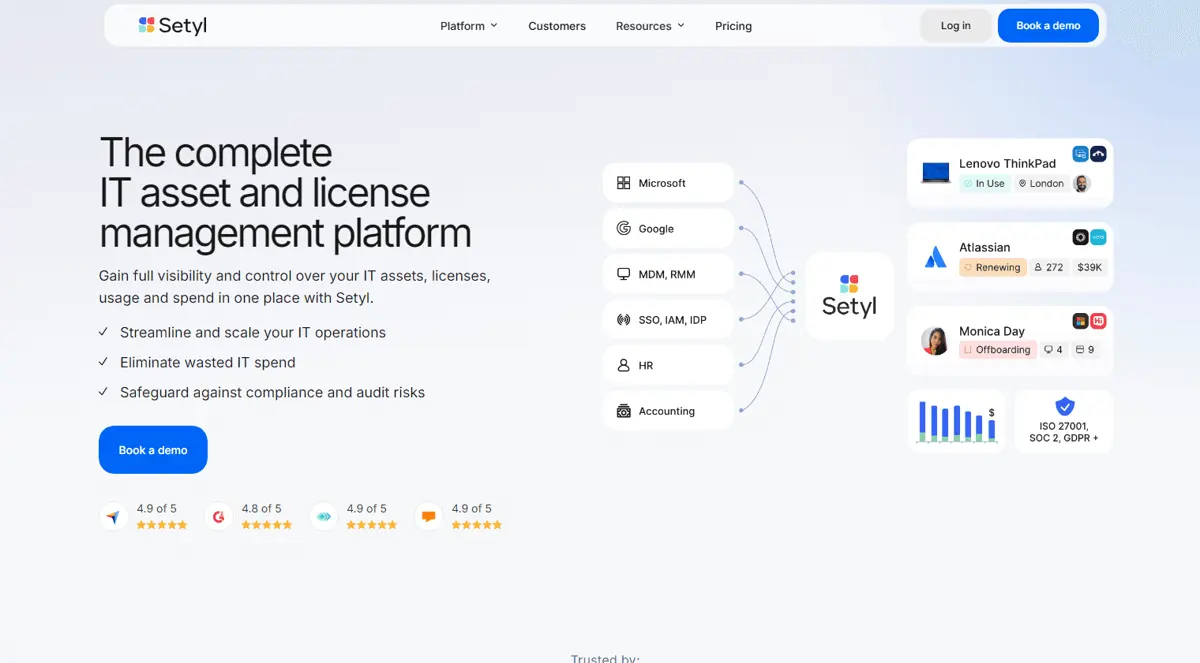
Setyl is a cutting-edge cloud-based IT asset management (ITAM) platform designed to help businesses effectively monitor, control, and optimize their overall IT expenditures, as well as their hardware and software purchases.
Businesses can maintain a comprehensive record of their hardware assets, including phones, laptops, and other devices, along with essential information such as location, assignment, warranty, and lifecycle status, thanks to this unified system.
Software assets, including SaaS subscriptions, licenses, service contracts, renewal dates, and user access rights, are also managed by Setyl, in addition to hardware tracking. Devices and licenses are assigned or recovered as employees join or depart the firm, thanks to the platform's support for people lifecycle activities, such as onboarding and offboarding.
What's New in Setyl?
As mentioned in this review, Setyl has since enhanced the user experience.
- By deploying a pre-made kit, users can onboard new hires more quickly. The Fall 2025 update brings "Kits," which are templates of hardware and software arranged by role, department, or location.
- Fall 2025 will also see the addition of Asset Groups & Stock Alerts, which allow users to create custom asset groups (such as all "MacBook Pro 16/32GB/ Manila" devices) and set alerts for when stock falls below a predetermined threshold.
- The "Apps" page in Reports now provides more detailed information on software usage, cost, licensing, detection source, and status.
- Direct interfaces for key SaaS tools, such as automated synchronization of Slack and Zoom licensing data (assignees, activity dates, and contract details), to facilitate rightsizing.
- Features such as "Auto-Create assets" from the linked MDM/RMM integration (which automatically generates a record for newly discovered assets in Setyl) and other integrations with Addigy, Mosyle, and Workspace ONE are planned for summer 2025.
- The ability to automatically update asset details when linked systems (MDM/RMM) identify changes (OS, RAM, assignee, etc.) and the ability to schedule "Useful Life" expiry reports for assets approaching end-of-life were added earlier in March 2025.
- For a comprehensive recap of 2024, the platform included vendor audit workflows, cost-per-employee reports, and compliance overviews, and expanded the number of out-of-the-box integrations.
Featured Asset Tracking Software Products
$9 per seat per month
Zoom, Google Docs, Salesforce, Slack and more
Document collaboration and comments
Editor's Take
monday.com is a Work Operating System (Work OS) that enables teams to plan, organize, and manage tasks efficiently. Known for its customizable interface, it allows users to tailor workflows to suit specific needs, whether for task management or complex projects. The software’s automation features help reduce manual work by automating repetitive tasks based on set triggers. monday.com also fosters team collaboration through real-time updates, file sharing, and discussion threads, making it easier for teams to stay aligned and productive. Additionally, it integrates with popular tools like Slack, Google Drive, and Zoom to streamline operations across platforms.
Expert Score
In evaluating SaaS software, a comprehensive and structured methodology ensures a fair and accurate comparison across key metrics. This approach focuses on the most critical aspects that affect user experience, functionality, and business value. The following metrics—general features, cost, customer service, integrations, and mobile support—are evaluated to provide a holistic view of each software solution’s strengths and weaknesses. These metrics are selected based on their direct impact on software usability, scalability, and long-term effectiveness for businesses.
1. General Features - scoring weight 40%
This metric evaluates the core functionalities and tools the software offers. It involves assessing the comprehensiveness of the features, their relevance to the target users, and the ease of use. This is important because robust and well-designed features determine the software's overall utility and efficiency in solving user problems.
2. Cost - scoring weight 15%
Cost analysis focuses on pricing models, value for money, and scalability. It's crucial to evaluate whether the software’s features justify its price, considering different plans for small and large organizations. This is vital for businesses to ensure they invest in cost-effective solutions that fit their budget.
3. Customer Service - scoring weight 15%
This evaluates the responsiveness, quality, and availability of customer support, including channels like chat, email, or phone. Good customer service is essential for troubleshooting and ensuring smooth software usage, which reduces downtime and frustration for users.
4. Integrations - scoring weight 15%
This examines how well the software integrates with third-party tools (e.g., CRM, payment systems, collaboration apps). Seamless integrations are key for creating a unified workflow and enhancing productivity by connecting multiple systems, which is crucial for operational efficiency.
5. Mobile Support - scoring weight 15%
Mobile support assesses the software’s functionality and performance on mobile devices, including apps and mobile web versions. With increasing remote work and on-the-go usage, strong mobile support is critical to ensure users can access and utilize the software effectively, regardless of location.
$10 per user per month
Google Drive, Slack, Salesforce, and QuickBooks
Request forms and @mentions
Editor's Take
Wrike is a project management platform designed to help teams streamline their workflows and boost productivity. It offers a flexible, user-friendly interface that allows users to manage tasks, track progress, and collaborate on projects in real time. With its customizable dashboards and detailed reporting tools, Wrike provides clear visibility into project timelines and team performance. The platform also supports automation, enabling teams to automate repetitive tasks and reduce manual efforts. Collaboration is enhanced through features like task comments, file sharing, and integrations with tools such as Slack, Microsoft Teams, and Google Workspace. Wrike’s scalability makes it suitable for teams of any size, from small businesses to large enterprises.
Expert Score
In evaluating SaaS software, a comprehensive and structured methodology ensures a fair and accurate comparison across key metrics. This approach focuses on the most critical aspects that affect user experience, functionality, and business value. The following metrics—general features, cost, customer service, integrations, and mobile support—are evaluated to provide a holistic view of each software solution’s strengths and weaknesses. These metrics are selected based on their direct impact on software usability, scalability, and long-term effectiveness for businesses.
1. General Features - scoring weight 40%
This metric evaluates the core functionalities and tools the software offers. It involves assessing the comprehensiveness of the features, their relevance to the target users, and the ease of use. This is important because robust and well-designed features determine the software’s overall utility and efficiency in solving user problems.
2. Cost - scoring weight 15%
Cost analysis focuses on pricing models, value for money, and scalability. It’s crucial to evaluate whether the software’s features justify its price, considering different plans for small and large organizations. This is vital for businesses to ensure they invest in cost-effective solutions that fit their budget.
3. Customer Service - scoring weight 15%
This evaluates the responsiveness, quality, and availability of customer support, including channels like chat, email, or phone. Good customer service is essential for troubleshooting and ensuring smooth software usage, which reduces downtime and frustration for users.
4. Integrations - scoring weight 15%
This examines how well the software integrates with third-party tools (e.g., CRM, payment systems, collaboration apps). Seamless integrations are key for creating a unified workflow and enhancing productivity by connecting multiple systems, which is crucial for operational efficiency.
5. Mobile Support - scoring weight 15%
Mobile support assesses the software’s functionality and performance on mobile devices, including apps and mobile web versions. With increasing remote work and on-the-go usage, strong mobile support is critical to ensure users can access and utilize the software effectively, regardless of location.
$50 per month
7 days
Powerful search, customizable metadata, version control
Editor's Take
Pics.io is a robust Digital Asset Management (DAM) solution built to help businesses and creative teams organize, collaborate on, and distribute digital files efficiently. The platform integrates seamlessly with Google Drive, transforming it into a full-featured DAM system where users can store, categorize, and retrieve assets like images, videos, and documents. With Pics.io, teams can centralize their digital content, making it easy to manage large volumes of files and ensure everyone has access to the latest versions.
Key features include powerful search and filtering capabilities, customizable metadata, version control, and advanced sharing options, which simplify collaboration and streamline workflows. Teams can annotate assets, request approvals, and provide feedback directly within the platform, making it ideal for creative processes and project collaboration. Pics.io also offers access control settings and audit trails, ensuring asset security and compliance.
Its integration with Google Workspace and third-party tools like Slack and Adobe Creative Cloud further enhances team productivity, enabling seamless transitions between content creation and management. Pics.io’s flexible pricing plans cater to businesses of all sizes, from small teams to large enterprises, providing an affordable solution for managing and maximizing the value of digital assets.
Overall, Pics.io is an ideal DAM solution for organizations looking to organize their digital content efficiently, improve collaboration, and scale their asset management processes.
Expert Score
In evaluating SaaS software, a comprehensive and structured methodology ensures a fair and accurate comparison across key metrics. This approach focuses on the most critical aspects that affect user experience, functionality, and business value. The following metrics—general features, cost, customer service, integrations, and mobile support—are evaluated to provide a holistic view of each software solution’s strengths and weaknesses. These metrics are selected based on their direct impact on software usability, scalability, and long-term effectiveness for businesses.
1. General Features - scoring weight 40%
This metric evaluates the core functionalities and tools the software offers. It involves assessing the comprehensiveness of the features, their relevance to the target users, and the ease of use. This is important because robust and well-designed features determine the software's overall utility and efficiency in solving user problems.
2. Cost - scoring weight 15%
Cost analysis focuses on pricing models, value for money, and scalability. It's crucial to evaluate whether the software’s features justify its price, considering different plans for small and large organizations. This is vital for businesses to ensure they invest in cost-effective solutions that fit their budget.
3. Customer Service - scoring weight 15%
This evaluates the responsiveness, quality, and availability of customer support, including channels like chat, email, or phone. Good customer service is essential for troubleshooting and ensuring smooth software usage, which reduces downtime and frustration for users.
4. Integrations - scoring weight 15%
This examines how well the software integrates with third-party tools (e.g., CRM, payment systems, collaboration apps). Seamless integrations are key for creating a unified workflow and enhancing productivity by connecting multiple systems, which is crucial for operational efficiency.
5. Mobile Support - scoring weight 15%
Mobile support assesses the software’s functionality and performance on mobile devices, including apps and mobile web versions. With increasing remote work and on-the-go usage, strong mobile support is critical to ensure users can access and utilize the software effectively, regardless of location.

$66 per month, free demo plan available
No
File uploads, real-time image processing, content delivery
Editor's Take
Uploadcare is a versatile file management and media processing platform designed to streamline file handling, optimize media, and enhance digital experiences for businesses. With powerful tools for file uploads, real-time image processing, and content delivery, Uploadcare enables websites and applications to manage media efficiently, ensuring fast and responsive user experiences. It supports a wide range of file types, offers robust scalability, and integrates seamlessly into existing workflows through its API-first approach.
The platform’s Adaptive Delivery feature automatically optimizes images and videos based on device type, screen size, and network speed, helping businesses reduce load times and improve performance without sacrificing quality. Real-time media processing also allows users to crop, resize, and transform images and videos on demand, enabling dynamic content adjustments that meet branding and design needs.
Uploadcare’s security features, including advanced encryption and compliance with privacy standards like GDPR and HIPAA, make it a reliable choice for industries handling sensitive data. Additionally, it integrates with popular platforms and frameworks, including WordPress, Shopify, and frameworks like React and Angular, allowing developers to implement its capabilities quickly and flexibly.
With tiered pricing plans suited for startups, growing businesses, and enterprise needs, Uploadcare provides a scalable, efficient solution for businesses aiming to improve file management, optimize media delivery, and enhance user experiences across digital platforms.
Expert Score
In evaluating SaaS software, a comprehensive and structured methodology ensures a fair and accurate comparison across key metrics. This approach focuses on the most critical aspects that affect user experience, functionality, and business value. The following metrics—general features, cost, customer service, integrations, and mobile support—are evaluated to provide a holistic view of each software solution’s strengths and weaknesses. These metrics are selected based on their direct impact on software usability, scalability, and long-term effectiveness for businesses.
1. General Features - scoring weight 40%
This metric evaluates the core functionalities and tools the software offers. It involves assessing the comprehensiveness of the features, their relevance to the target users, and the ease of use. This is important because robust and well-designed features determine the software's overall utility and efficiency in solving user problems.
2. Cost - scoring weight 15%
Cost analysis focuses on pricing models, value for money, and scalability. It's crucial to evaluate whether the software’s features justify its price, considering different plans for small and large organizations. This is vital for businesses to ensure they invest in cost-effective solutions that fit their budget.
3. Customer Service - scoring weight 15%
This evaluates the responsiveness, quality, and availability of customer support, including channels like chat, email, or phone. Good customer service is essential for troubleshooting and ensuring smooth software usage, which reduces downtime and frustration for users.
4. Integrations - scoring weight 15%
This examines how well the software integrates with third-party tools (e.g., CRM, payment systems, collaboration apps). Seamless integrations are key for creating a unified workflow and enhancing productivity by connecting multiple systems, which is crucial for operational efficiency.
5. Mobile Support - scoring weight 15%
Mobile support assesses the software’s functionality and performance on mobile devices, including apps and mobile web versions. With increasing remote work and on-the-go usage, strong mobile support is critical to ensure users can access and utilize the software effectively, regardless of location.

$29 per month
30 days
branded space, collaboration tools, search
Editor's Take
Filecamp is a user-friendly Digital Asset Management (DAM) platform designed to help businesses organize, manage, and share digital files seamlessly. Ideal for marketing teams, creative agencies, and enterprises, Filecamp offers centralized storage where teams can categorize, tag, and search assets like images, videos, and documents, streamlining workflows and ensuring easy accessibility to the latest content.
With customizable branding and intuitive folders, Filecamp allows teams to set up a branded, organized space that fits their unique asset management needs. Its robust access control features allow administrators to assign user permissions, ensuring that each user only has access to relevant files. Filecamp also provides version control, making it easy to keep track of updates and collaborate on creative projects.
The platform’s collaboration tools include built-in commenting and approval workflows, allowing team members and clients to provide feedback directly within the platform, reducing the need for emails and external tools. Additionally, Filecamp’s search and metadata tagging features make it easy to find and organize assets quickly, improving team productivity and efficiency.
Filecamp integrates with various tools, supports multiple file formats, and offers scalable pricing options suited for businesses of all sizes. Overall, Filecamp is a powerful DAM solution that combines simplicity, customization, and efficient collaboration, making it an ideal choice for businesses looking to improve digital asset management and team collaboration.
Expert Score
In evaluating SaaS software, a comprehensive and structured methodology ensures a fair and accurate comparison across key metrics. This approach focuses on the most critical aspects that affect user experience, functionality, and business value. The following metrics—general features, cost, customer service, integrations, and mobile support—are evaluated to provide a holistic view of each software solution’s strengths and weaknesses. These metrics are selected based on their direct impact on software usability, scalability, and long-term effectiveness for businesses.
1. General Features - scoring weight 40%
This metric evaluates the core functionalities and tools the software offers. It involves assessing the comprehensiveness of the features, their relevance to the target users, and the ease of use. This is important because robust and well-designed features determine the software’s overall utility and efficiency in solving user problems.
2. Cost - scoring weight 15%
Cost analysis focuses on pricing models, value for money, and scalability. It’s crucial to evaluate whether the software’s features justify its price, considering different plans for small and large organizations. This is vital for businesses to ensure they invest in cost-effective solutions that fit their budget.
3. Customer Service - scoring weight 15%
This evaluates the responsiveness, quality, and availability of customer support, including channels like chat, email, or phone. Good customer service is essential for troubleshooting and ensuring smooth software usage, which reduces downtime and frustration for users.
4. Integrations - scoring weight 15%
This examines how well the software integrates with third-party tools (e.g., CRM, payment systems, collaboration apps). Seamless integrations are key for creating a unified workflow and enhancing productivity by connecting multiple systems, which is crucial for operational efficiency.
5. Mobile Support - scoring weight 15%
Mobile support assesses the software’s functionality and performance on mobile devices, including apps and mobile web versions. With increasing remote work and on-the-go usage, strong mobile support is critical to ensure users can access and utilize the software effectively, regardless of location.
How Much Does Setyl Cost?
Setyl: Top Asset Tracking Software
4.6 / 5
Setyl offers three plans, each with various subpackages, and a free demo that users can book directly on their website.
Below are the packages provided by Setyl depending on the user’s needs:
Essential - starting from $300/month
- Asset and license inventory
- Employee onboarding and offboarding workflows
- Employee surveys
- Asset lifecycle management
- Application lifecycle management
- Asset tagging and recovery
- ISO 27001, SOC 2, and GDPR compliance features
- Activity logs
- User permissions
- Customer support
- Core Google and Microsoft integrations
Complete - By quote
- Everything in Essential +
- Shadow IT detection
- Vendor audits
- IT spend management and reporting
- Automated workflows
- Automatic warranty finder
Advanced - By quote
- Everything in Complete +
- Dedicated custom success manager
- SLA uptime guarantee
- Sandbox account
What Sets Setyl Apart
Nowadays, most customers are looking for what Setyl offers as an IT asset management platform. By reading this review, users can learn about the benefits and drawbacks of using this platform and why its characteristics make it a dependable option.
Setyl Pros
- Unified Visibility Over IT Assets and Licenses: Setyl gives users a "single source of truth" instead of requiring them to manage several spreadsheets or disparate systems by combining hardware (devices, peripherals) and software (licenses, subscriptions) into a single central platform.
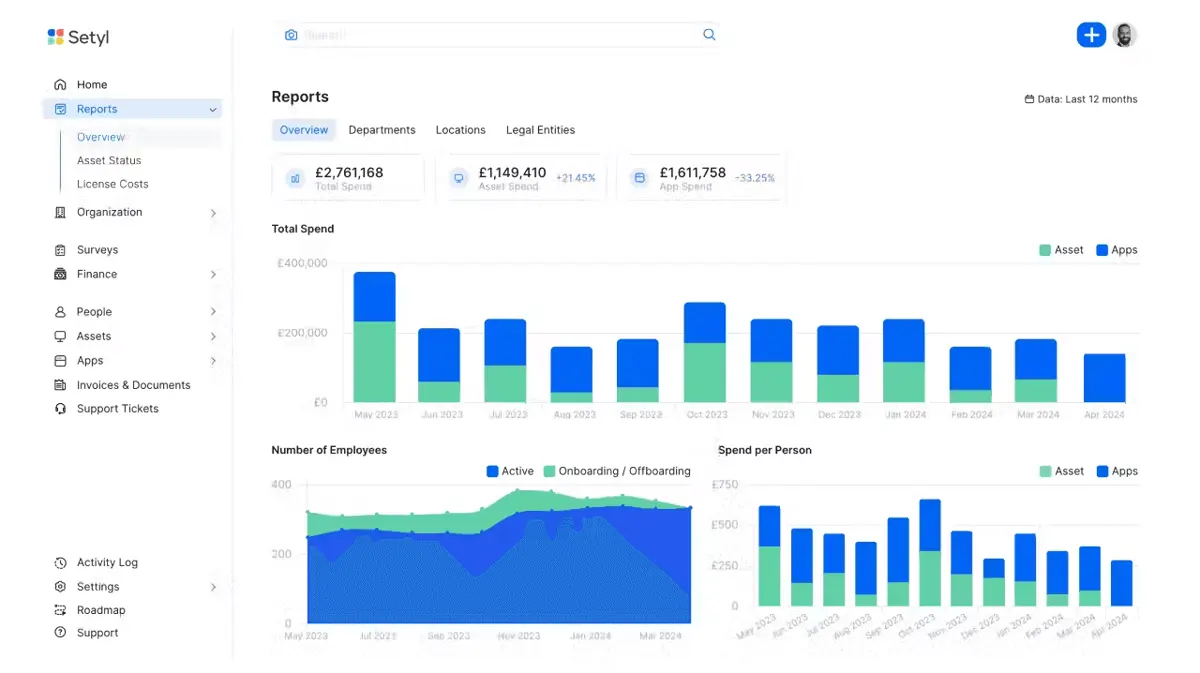
- Cost and Spend Optimization: Setyl assists in identifying wasteful spending (such as unused licenses or over-provisioned devices) and promotes savings across IT budgets by monitoring software usage, license renewals, and hardware lifecycles.
- Strong Audit, Compliance, and Workflow Support: To lower risk and enhance governance, the platform provides tools to support regulatory requirements (such as ISO 27001 and SOC 2), vendor audits, asset lifecycle monitoring, and staff onboarding/offboarding workflows.
Setyl Cons
- Limited Advanced Customization and Reporting: While Setyl excels in tracking key assets and licenses, some users claim that it lacks the capacity to create highly customized dashboards or perform in-depth analytics when compared to enterprise-grade alternatives.
- Mobile Functionality Is Less Mature: According to several reviewers, there is room for improvement in the mobile or field-centric experience (such as asset scanning and phone check-in/check-out), which could have an impact on teams operating in different locations.
- May Be Less Suited for Very Large, Complex Enterprises: Although effective for medium-sized businesses, some criticism suggests that Setyl may lack the sophisticated, enterprise-only features required for extremely complex, worldwide operations with elaborate workflows.
Setyl Core Features
Setyl: Top Asset Tracking Software
4.6 / 5
Before starting their software search, the team advises clients to create a list of the features they want in an IT asset management system. Using a list of the most important criteria, users can choose features that suit their budget.
- Hardware Asset Management: Setyl provides comprehensive tracking for all tangible IT assets, including mobile devices, laptops, desktop computers, and accessories. It keeps track of important information such as depreciation, warranty, owner, location, and asset type. This feature enables businesses to maintain an accurate, real-time inventory by ensuring the effective utilization and proper maintenance of assets throughout their lifecycle.
- Software and License Management: The platform centralizes information on all software and SaaS licenses, contracts, and subscriptions across departments. Teams can identify underused or duplicated programs by monitoring vendor details, usage metrics, and renewal dates. This helps reduce unnecessary software costs while ensuring compliance with licensing agreements.
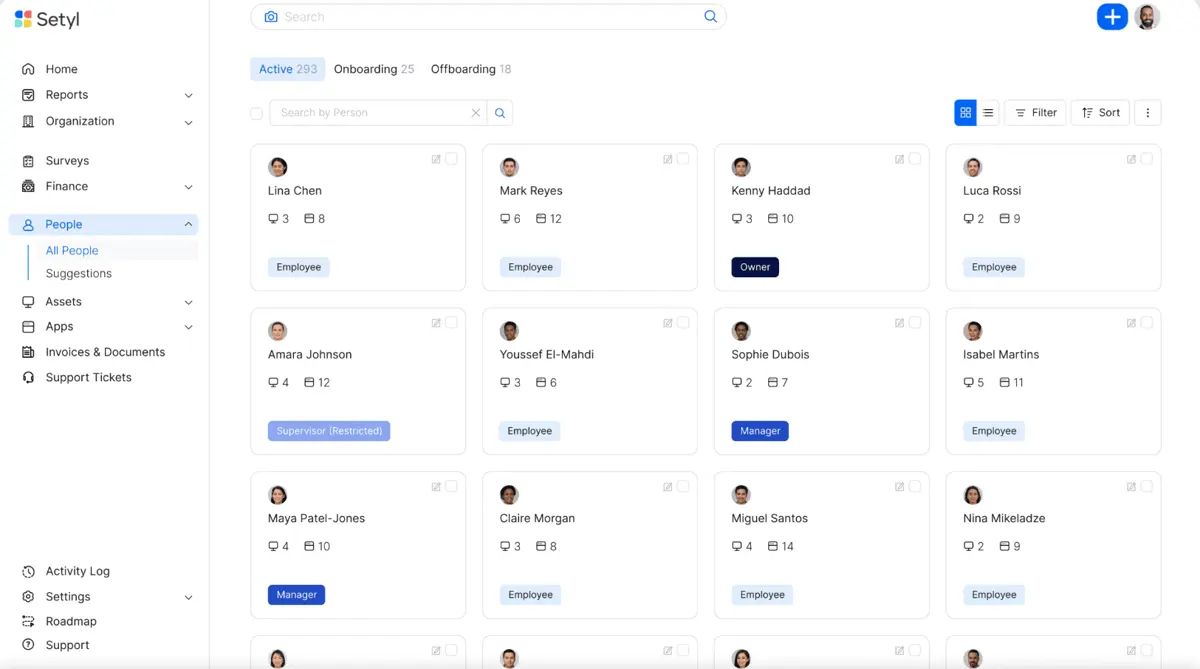
- People and Onboarding / Offboarding Workflows: Setyl automates the process of allocating or recovering resources during onboarding and offboarding by tying employee lifecycle events to IT assets and licenses. It ensures that assets are retrieved when an employee departs the company and that new employees are provided with the needed tools immediately. This enhances accountability, reduces data security threats, and facilitates faster HR and IT collaboration.
- IT Spend Management and Cost Optimization: The platform provides a clear picture of all IT expenses by combining spending on hardware, software, and services. It suggests ways to cut costs and helps identify wasteful areas, including unused hardware or inactive licenses. Organizations can make data-driven purchase decisions and manage their budgets more strategically with the help of visual reports and expenditure insights.
- Compliance, Audit, and Vendor Management: By upholding precise audit trails, vendor records, and documentation for standards such as ISO 27001 and SOC 2, Setyl assists regulatory compliance initiatives. Teams can use it to monitor risk indicators, including unauthorized software, contract renewals, and access rights. This feature guarantees preparedness for internal or external audits and improves security governance.
To automate procedures and optimize IT asset management, Setyl integrates with several tools. It syncs device data and statuses with MDM and RMM systems, including Jamf, Addigy, Mosyle, Microsoft Intune, and NinjaOne. SSO and identity technologies, such as Okta, JumpCloud, and Microsoft Entra ID, help it manage user data and access permissions.
To connect employee lifecycle events with asset and license assignments, Setyl integrates with BambooHR, HiBob, and ADP Workforce Now. It also integrates with fintech platforms like Xero and NetSuite for expense management and reconciliation, as well as helpdesk systems like Zendesk or Zapier for asset workflow automation and support.
However, if an issue arises during integration, contact their Help Center.
Benefits of Using Setyl
There are numerous advantages to using Setyl’s various IT asset management services.
Full Visibility and Control Over IT Assets
Setyl creates a centralized "source of truth" for IT administration by combining hardware, software, licenses, users, and vendors onto a single platform. This lessens the need for dispersed spreadsheets or compartmentalized systems. Organizations may proactively manage assets and usage with comprehensive tracking of status, location, and owner.
Cost Savings Through Optimization of Spend
The software detects possible waste and duplicate purchases by identifying underutilized or unused hardware and licenses. Organizations can make more strategic purchasing decisions by monitoring employee or departmental expenditures, usage, and renewals. This ultimately leads to lower IT overhead and more transparent budgeting.
Improved Compliance and Audit Readiness
Setyl offers tools such as complete asset lists, vendor checks, and detailed activity records that meet standards like ISO 27001 and SOC 2. Setting this up streamlines the preparation process for regulatory evaluations or audits. Additionally, it reduces the likelihood of non-compliance or unfulfilled responsibilities.
Streamlined Workflows for Onboarding / Offboarding
The system associates asset and license assignment or recovery with employee lifecycle activities, such as joining, changing roles, and departing. This ensures that departing employees' assets are promptly retrieved and that new personnel have the necessary tools and licenses in place. Clearer asset accountability, fewer lost devices, and less orphaned software are the outcomes.
Scalability and Ease of Implementation
Setyl provides a relatively short deployment path, supports an infinite number of assets, and connects with numerous popular systems (HR, MDM/RMM, SSO/IDP, ticketing, and accounting). This implies that the platform may expand without experiencing numerous manual bottlenecks when the company grows (for example, by adding additional staff, devices, or software). Time and effort to value are decreased by the integration and convenience of usage.
What Business Types Use Setyl
The following sectors and companies benefit the most from Setyl:
Mid-sized Organizations
Setyl is specifically made for businesses that don't require or want the expense and complexity of a major enterprise solution but have outgrown spreadsheets or other simple tools.
Technology, SaaS, and Digital Businesses
Setyl is typically used by businesses with numerous devices, software licenses, or SaaS subscriptions to track their assets, identify ownership, and determine the associated costs.
Regulated Sectors Needing Compliance / Audit Readiness
Setyl is used by companies in industries such as financial services, healthcare, and any organization susceptible to audits (including ISO 27001 and SOC 2).
Organization with Multiple Locations or Global Operations
Setyl's centralized asset, user, and license registry is advantageous for businesses that manage equipment and software across multiple offices, remote workers, departments, or countries.
Companies Focused on Cost-Optimization and IT Spend Control
Setyl is helpful for tracking usage, renewals, and lifecycle/depreciation for businesses that realize they have unused licenses or outdated technology and wish to reduce unnecessary IT expenditure.
Best 5 Alternatives to Setyl
In addition to the review, the team utilized information from other reliable databases and sources to objectively evaluate Setyl. The Research.com team is aware that every company and sales force has different needs; thus, Setyl's solution might not be suitable for everyone. The team has identified the most effective alternatives to Setyl after conducting a comprehensive review.
1. Asset Panda
Asset Panda is an extremely adaptable cloud-based solution for managing and tracking assets. It enables users to integrate across tech stacks, create workflows, and track assets via mobile barcodes and QR codes.
2. ManageEngine AssetExplorer
ManageEngine AssetExplorer is a full-featured ITAM accessible solution, both on-premises and in the cloud. It provides discovery, hardware and software inventory, license management, and lifecycle tracking.
3. EZO AssetSonar
EZO AssetSonar is a platform that is specifically designed for the IT asset lifecycle. It offers hardware and software monitoring, CMDB capabilities, audit readiness, and integrations with ITSM tools.
4. Lansweeper
Lansweeper is dedicated to the comprehensive discovery of all assets, including IT, OT, and IoT. It offers technology asset intelligence, which unifies managed, unmanaged, and shadow IT assets to enhance visibility and mitigate risk.
5. NinjaOne
NinjaOne is a comprehensive IT management and asset tracking solution that is particularly well-suited for IT teams responsible for managing large fleets. It provides automation, utilization analytics, hardware/software inventory, and robust endpoint visibility.
Best 5 alternatives to Setyl
Filecamp
4.8 / 5
Filecamp appears as an entrant in the digital asset management space, seemingly focused on centralizing and organizing digital files for teams with creative, collaborative needs. Although the source details are sparse, one can infer that Filecamp is positioned to help businesses streamline the handling and secure sharing of their digital assets. Its mention in this context suggests a tool designed to accommodate modern workflows, offering a potentially intuitive solution for managing various file types. Prospective customers exploring digital asset management software might find that Filecamp’s approach aligns with the goal of efficient, organized, and secure digital content management.
Pics.io
4.5 / 5
PICS.IO emerges as a dynamic entry in the realm of digital asset management software, designed to streamline the intricate process of organizing, retrieving, and safeguarding valuable digital content. It presents a robust framework that promises to simplify asset curation and enhance operational efficiencies, offering a solution that appeals to businesses looking to optimize management of complex digital repositories. While its features hint at a thoughtful blend of innovation and practicality, potential users will find that its structured yet flexible approach caters to a diverse range of asset management needs. Overall, the platform underscores a commitment to delivering a comprehensive and agile solution for modern digital asset challenges.
Uploadcare
4.5 / 5
Uploadcare stands out as a powerful solution for managing and delivering files efficiently, boasting a highly intuitive HTML5 uploader that integrates effortlessly with major JavaScript frameworks and offers extensive branding customization. Its all-encompassing toolkit supports the entire file lifecycle, from upload and validation to storage, transformation, and global distribution, with capabilities such as batch uploading, automatic compression, and support for very large files up to 5TB. Leveraging an advanced CDN with over 325,000 nodes across 135 countries, Uploadcare ensures rapid, low-latency file delivery worldwide. Enhanced by real-time image manipulation and rigorous security features—including malware scanning and strict file type restrictions—the platform provides a flexible, secure environment that adapts well to varied development workflows.
Wrike
4.15 / 5
Wrike emerges in the realm of project collaboration software as a solution designed with teams in mind, promising an environment that supports streamlined coordination and efficient project management. Although the available source details remain sparse, Wrike's brief positioning hints at an underlying framework aimed at optimizing collaborative workflows for varying project scales. Its general profile suggests that it caters to teams seeking a central hub for managing project tasks and enhancing communication. For prospective customers exploring project collaboration options, Wrike presents itself as a candidate worthy of further investigation to clarify its full range of capabilities.
monday
5 / 5
Monday.com is a highly adaptable platform designed to streamline work and project management for teams of various sizes. Its user-friendly, visually organized interface, enhanced by color-coded elements, allows users to navigate effortlessly without needing technical skills. With over 200 ready-made templates and a straightforward drag-and-drop system, teams can quickly set up workflows and begin managing tasks efficiently. Additionally, its powerful dashboard builder and no-code automation tools help users visualize data clearly and eliminate repetitive processes, boosting overall productivity.
Frequently Asked Questions
Yes, Setyl offers a free trial in 2026, allowing potential users to test its features and capabilities before committing to a subscription. This trial provides an opportunity to explore Setyl's asset management tools without financial obligation.
The number of "People" in the organization is one factor in the per-unit pricing model that Setyl employs.
Setyl makes it easy to automatically bring in and update information about assets, users, and licenses by connecting with various types of systems, including MDM/RMM systems, HR platforms, identity providers (SSO/IAM), and accounting/finance software.
Setyl addresses critical inquiries regarding data location, third-party subprocessors, penetration testing, and compliance certifications, such as ISO 27001/SOC 2.
In 2026, Setyl adheres to several security and compliance standards to ensure data protection and privacy. These include GDPR compliance, ISO 27001 certification for information security management, and SOC 2 Type II, demonstrating its commitment to maintaining robust security protocols for user data.


