
Auzmor Learn vs TalentLMS – 2027 Comparison

Co-Founder and Chief Data Scientist
Auzmor Learn vs TalentLMS Comparison Table of Contents
- What is Auzmor Learn?
- Who is Auzmor Learn for?
- Key benefits of Auzmor Learn
- What is TalentLMS?
- Who is TalentLMS for?
- Key Benefits of TalentLMS
- Who are Auzmor Learn and TalentLMS best for?
- Auzmor Learn vs TalentLMS Feature Comparison
- Auzmor Learn vs TalentLMS Pricing
- Choosing the Right LMS for Your Organization's Needs
- Auzmor Learn Pros and Cons
- How Do Integration Capabilities Impact LMS Performance?
- TalentLMS Pros and Cons
- Verdict – Auzmor Learn vs TalentLMS: Which software is better?
- How to Transition Smoothly to a New LMS
What is Auzmor Learn?
In comparing Auzmor Learn vs TalentLMS, both platforms are equally capable as enterprise learning management systems (LMS). Auzmor Learn is a cloud-based LMS that helps businesses and organizations manage, track, and deliver training to employees. It is one of the leading LMSs in the market that serves as a one-stop-shop platform for the training needs of businesses, nonprofit organizations, government institutions, and even freelancers.
Auzmor Learn lets instructors create their own courses with the platform’s authoring tool. They can also choose from a vast content library written by subject matter experts all over the world. Auzmor Learn can be used to train employees, conduct sales training, and educate customers.
Featured LMS Software Providers

$4.08 per user per month
(billed annually)
30 days
Yes
Editor's Take
iSpring LMS is a user-friendly learning management system (LMS) tailored for businesses and educators to deliver eLearning content efficiently. It offers features like course creation, quizzes, learning paths, and progress tracking. iSpring LMS supports various content types, including video lectures and interactive modules, and integrates with the iSpring Suite authoring tool for seamless content development. Pros include a straightforward interface, mobile-friendly access, and powerful reporting tools. However, customization options can be limited, and pricing may be high for smaller organizations. It is ideal for corporate training, employee development, and onboarding, providing a reliable platform for scalable eLearning.
Expert Score
In evaluating SaaS software, a comprehensive and structured methodology ensures a fair and accurate comparison across key metrics. This approach focuses on the most critical aspects that affect user experience, functionality, and business value. The following metrics—general features, cost, customer service, integrations, and mobile support—are evaluated to provide a holistic view of each software solution’s strengths and weaknesses. These metrics are selected based on their direct impact on software usability, scalability, and long-term effectiveness for businesses.
1. General Features - scoring weight 40%
This metric evaluates the core functionalities and tools the software offers. It involves assessing the comprehensiveness of the features, their relevance to the target users, and the ease of use. This is important because robust and well-designed features determine the software's overall utility and efficiency in solving user problems.
2. Cost - scoring weight 15%
Cost analysis focuses on pricing models, value for money, and scalability. It's crucial to evaluate whether the software’s features justify its price, considering different plans for small and large organizations. This is vital for businesses to ensure they invest in cost-effective solutions that fit their budget.
3. Customer Service - scoring weight 15%
This evaluates the responsiveness, quality, and availability of customer support, including channels like chat, email, or phone. Good customer service is essential for troubleshooting and ensuring smooth software usage, which reduces downtime and frustration for users.
4. Integrations - scoring weight 15%
This examines how well the software integrates with third-party tools (e.g., CRM, payment systems, collaboration apps). Seamless integrations are key for creating a unified workflow and enhancing productivity by connecting multiple systems, which is crucial for operational efficiency.
5. Mobile Support - scoring weight 15%
Mobile support assesses the software’s functionality and performance on mobile devices, including apps and mobile web versions. With increasing remote work and on-the-go usage, strong mobile support is critical to ensure users can access and utilize the software effectively, regardless of location.

Free; $89 per month
(billed annually)
Demo available
Yes
Editor's Take
TalentLMS is a cloud-based learning management system designed for businesses of all sizes to deliver effective training programs. Key features include course management, quizzes, gamification, and reporting tools. The platform supports a variety of content types, including video and presentations, and integrates with popular tools like Zoom and Salesforce. Pros include an intuitive interface, customizable branding, and a free tier for small teams. However, advanced reporting and customization options are limited in lower-tier plans. TalentLMS is ideal for corporate training, employee onboarding, and compliance programs, offering scalability and flexibility to suit different learning needs.
Expert Score
In evaluating SaaS software, a comprehensive and structured methodology ensures a fair and accurate comparison across key metrics. This approach focuses on the most critical aspects that affect user experience, functionality, and business value. The following metrics—general features, cost, customer service, integrations, and mobile support—are evaluated to provide a holistic view of each software solution’s strengths and weaknesses. These metrics are selected based on their direct impact on software usability, scalability, and long-term effectiveness for businesses.
1. General Features - scoring weight 40%
This metric evaluates the core functionalities and tools the software offers. It involves assessing the comprehensiveness of the features, their relevance to the target users, and the ease of use. This is important because robust and well-designed features determine the software’s overall utility and efficiency in solving user problems.
2. Cost - scoring weight 15%
Cost analysis focuses on pricing models, value for money, and scalability. It’s crucial to evaluate whether the software’s features justify its price, considering different plans for small and large organizations. This is vital for businesses to ensure they invest in cost-effective solutions that fit their budget.
3. Customer Service - scoring weight 15%
This evaluates the responsiveness, quality, and availability of customer support, including channels like chat, email, or phone. Good customer service is essential for troubleshooting and ensuring smooth software usage, which reduces downtime and frustration for users.
4. Integrations - scoring weight 15%
This examines how well the software integrates with third-party tools (e.g., CRM, payment systems, collaboration apps). Seamless integrations are key for creating a unified workflow and enhancing productivity by connecting multiple systems, which is crucial for operational efficiency.
5. Mobile Support - scoring weight 15%
Mobile support assesses the software’s functionality and performance on mobile devices, including apps and mobile web versions. With increasing remote work and on-the-go usage, strong mobile support is critical to ensure users can access and utilize the software effectively, regardless of location.

Custom
14 days
Course creation, customizable learning paths, automated assessments
Editor's Take
SkyPrep is an intuitive Learning Management System (LMS) designed to streamline online training and onboarding for businesses, educational institutions, and non-profits. Known for its user-friendly interface, SkyPrep makes it easy for administrators to create, manage, and deliver training content while providing learners with a seamless, engaging experience. Key features include course creation tools, customizable learning paths, automated assessments, and reporting capabilities, enabling organizations to tailor training programs to individual or group needs.
One of SkyPrep’s strengths is its ability to support a range of media, including videos, presentations, and quizzes, making it versatile for various training formats. Its analytics and reporting tools offer valuable insights into learner progress, course completion rates, and knowledge gaps, empowering administrators to refine training content and improve learning outcomes.
The platform also integrates with popular software like Google Workspace, Salesforce, and Zoom, enhancing collaboration and accessibility for remote teams. With features like automated notifications, compliance tracking, and gamification, SkyPrep helps organizations keep learners engaged while ensuring that critical training requirements are met.
SkyPrep offers scalable pricing plans to fit small teams, growing businesses, and large enterprises, making it a cost-effective solution for organizations looking to simplify training and boost team performance. Overall, SkyPrep is an effective LMS choice for organizations that prioritize ease of use, customizability, and a comprehensive suite of learning management tools.
Expert Score
In evaluating SaaS software, a comprehensive and structured methodology ensures a fair and accurate comparison across key metrics. This approach focuses on the most critical aspects that affect user experience, functionality, and business value. The following metrics—general features, cost, customer service, integrations, and mobile support—are evaluated to provide a holistic view of each software solution’s strengths and weaknesses. These metrics are selected based on their direct impact on software usability, scalability, and long-term effectiveness for businesses.
1. General Features - scoring weight 40%
This metric evaluates the core functionalities and tools the software offers. It involves assessing the comprehensiveness of the features, their relevance to the target users, and the ease of use. This is important because robust and well-designed features determine the software’s overall utility and efficiency in solving user problems.
2. Cost - scoring weight 15%
Cost analysis focuses on pricing models, value for money, and scalability. It’s crucial to evaluate whether the software’s features justify its price, considering different plans for small and large organizations. This is vital for businesses to ensure they invest in cost-effective solutions that fit their budget.
3. Customer Service - scoring weight 15%
This evaluates the responsiveness, quality, and availability of customer support, including channels like chat, email, or phone. Good customer service is essential for troubleshooting and ensuring smooth software usage, which reduces downtime and frustration for users.
4. Integrations - scoring weight 15%
This examines how well the software integrates with third-party tools (e.g., CRM, payment systems, collaboration apps). Seamless integrations are key for creating a unified workflow and enhancing productivity by connecting multiple systems, which is crucial for operational efficiency.
5. Mobile Support - scoring weight 15%
Mobile support assesses the software’s functionality and performance on mobile devices, including apps and mobile web versions. With increasing remote work and on-the-go usage, strong mobile support is critical to ensure users can access and utilize the software effectively, regardless of location.

Editor's Take
Absorb is a comprehensive learning management system designed to deliver, track, and manage online training for businesses of all sizes. Known for its modern, user-friendly interface, Absorb offers a flexible solution for employee training, compliance, and certification programs. The platform supports a wide range of learning formats, including eLearning, instructor-led training, and blended learning, making it adaptable to different training needs.
Key features include a robust course builder, automated reporting and analytics, mobile accessibility, and advanced integrations with third-party systems like HR and CRM software. Absorb also offers a highly customizable interface, allowing businesses to tailor the platform to reflect their branding and specific workflows.
With its scalability, ease of use, and strong focus on learner engagement and tracking, Absorb is an ideal solution for organizations looking to enhance their learning and development initiatives while maintaining control and flexibility over their training programs.
Expert Score
In evaluating SaaS software, a comprehensive and structured methodology ensures a fair and accurate comparison across key metrics. This approach focuses on the most critical aspects that affect user experience, functionality, and business value. The following metrics—general features, cost, customer service, integrations, and mobile support—are evaluated to provide a holistic view of each software solution’s strengths and weaknesses. These metrics are selected based on their direct impact on software usability, scalability, and long-term effectiveness for businesses.
1. General Features - scoring weight 40%
This metric evaluates the core functionalities and tools the software offers. It involves assessing the comprehensiveness of the features, their relevance to the target users, and the ease of use. This is important because robust and well-designed features determine the software’s overall utility and efficiency in solving user problems.
2. Cost - scoring weight 15%
Cost analysis focuses on pricing models, value for money, and scalability. It’s crucial to evaluate whether the software’s features justify its price, considering different plans for small and large organizations. This is vital for businesses to ensure they invest in cost-effective solutions that fit their budget.
3. Customer Service - scoring weight 15%
This evaluates the responsiveness, quality, and availability of customer support, including channels like chat, email, or phone. Good customer service is essential for troubleshooting and ensuring smooth software usage, which reduces downtime and frustration for users.
4. Integrations - scoring weight 15%
This examines how well the software integrates with third-party tools (e.g., CRM, payment systems, collaboration apps). Seamless integrations are key for creating a unified workflow and enhancing productivity by connecting multiple systems, which is crucial for operational efficiency.
5. Mobile Support - scoring weight 15%
Mobile support assesses the software’s functionality and performance on mobile devices, including apps and mobile web versions. With increasing remote work and on-the-go usage, strong mobile support is critical to ensure users can access and utilize the software effectively, regardless of location.

$8 per user per month
30 days
Yes
Editor's Take
360Learning is an AI-driven enterprise LMS that closes skills gaps by capturing internal expertise with collaborative learning Academies. Legacy systems force L&D teams to choose between scale and relevance. 360Learning eliminates this trade-off. Using agentic AI, it transforms the expertise that runs your business into scalable learning for your entire organization—upskilling employees, customers, and partners from one platform.
The platform merges enterprise LMS and LXP capabilities, including agentic automation, adaptive coaching, a multimodal AI content builder, and the market’s #1 rated mobile app. Its ecosystem of 50+ partners includes an SAP Silver Partnership and Workday Design Partnership, ensuring learning connects to your broader business strategy.
Over 2,500 companies, including Heineken, Equinox, Michelin, Merlin, and Cisco, trust 360Learning as their enterprise LMS. Rated #1 AI LMS by eLearning Industry and backed by dedicated implementation, support, and services teams, 360Learning helps L&D become a growth lever, not a cost center.
360Learning, founded in 2013, has raised $240 million and operates teams across North America and Europe.
Expert Score
In evaluating SaaS software, a comprehensive and structured methodology ensures a fair and accurate comparison across key metrics. This approach focuses on the most critical aspects that affect user experience, functionality, and business value. The following metrics—general features, cost, customer service, integrations, and mobile support—are evaluated to provide a holistic view of each software solution’s strengths and weaknesses. These metrics are selected based on their direct impact on software usability, scalability, and long-term effectiveness for businesses.
1. General Features - scoring weight 40%
This metric evaluates the core functionalities and tools the software offers. It involves assessing the comprehensiveness of the features, their relevance to the target users, and the ease of use. This is important because robust and well-designed features determine the software's overall utility and efficiency in solving user problems.
2. Cost - scoring weight 15%
Cost analysis focuses on pricing models, value for money, and scalability. It's crucial to evaluate whether the software’s features justify its price, considering different plans for small and large organizations. This is vital for businesses to ensure they invest in cost-effective solutions that fit their budget.
3. Customer Service - scoring weight 15%
This evaluates the responsiveness, quality, and availability of customer support, including channels like chat, email, or phone. Good customer service is essential for troubleshooting and ensuring smooth software usage, which reduces downtime and frustration for users.
4. Integrations - scoring weight 15%
This examines how well the software integrates with third-party tools (e.g., CRM, payment systems, collaboration apps). Seamless integrations are key for creating a unified workflow and enhancing productivity by connecting multiple systems, which is crucial for operational efficiency.
5. Mobile Support - scoring weight 15%
Mobile support assesses the software’s functionality and performance on mobile devices, including apps and mobile web versions. With increasing remote work and on-the-go usage, strong mobile support is critical to ensure users can access and utilize the software effectively, regardless of location.
Who is Auzmor Learn for?
Auzmor Learn is suitable for businesses that aim to develop their employees’ skills and foster a culture of learning. There are various courses available on the platform, from business skills to compliance training. Auzmor Learn can also be used by companies that want to sell courses and conduct training programs for their partners and customers.
Key Benefits of Auzmor Learn
- Intuitive and user-friendly: Based on feedback, most users find the UI of Auzmor Learn easy to use and intuitive. Creating courses is a quick process, and quizzes can be added to measure the effectiveness of the training.
- Efficient training management: It is easy to track training programs and manage their progress. Real-time tracking and reporting features enable administrators to monitor training and identify areas for improvement.
- Scalable platform: Auzmor Learn is a cloud-based learning management system that is scalable and suitable for businesses of all sizes. Whether it's a small, medium, or large organization, Auzmor Learn can accommodate the training needs and growth of the business.
- Customizable and flexible: Auzmor Learn is designed to be customizable, allowing organizations to tailor the platform to their specific training requirements. Instructors can set custom learning paths to fit the learner’s needs.
- Enhanced employee engagement: The platform offers features that promote employee engagement and collaboration. Employees can socialize and engage directly within the platform by tagging and commenting on content.
- Accessible learning: Auzmor Learn is available on any device, whether on a personal computer or through mobile. This allows employees to learn at their own pace and convenience, increasing accessibility and engagement with the training content.
What is TalentLMS?
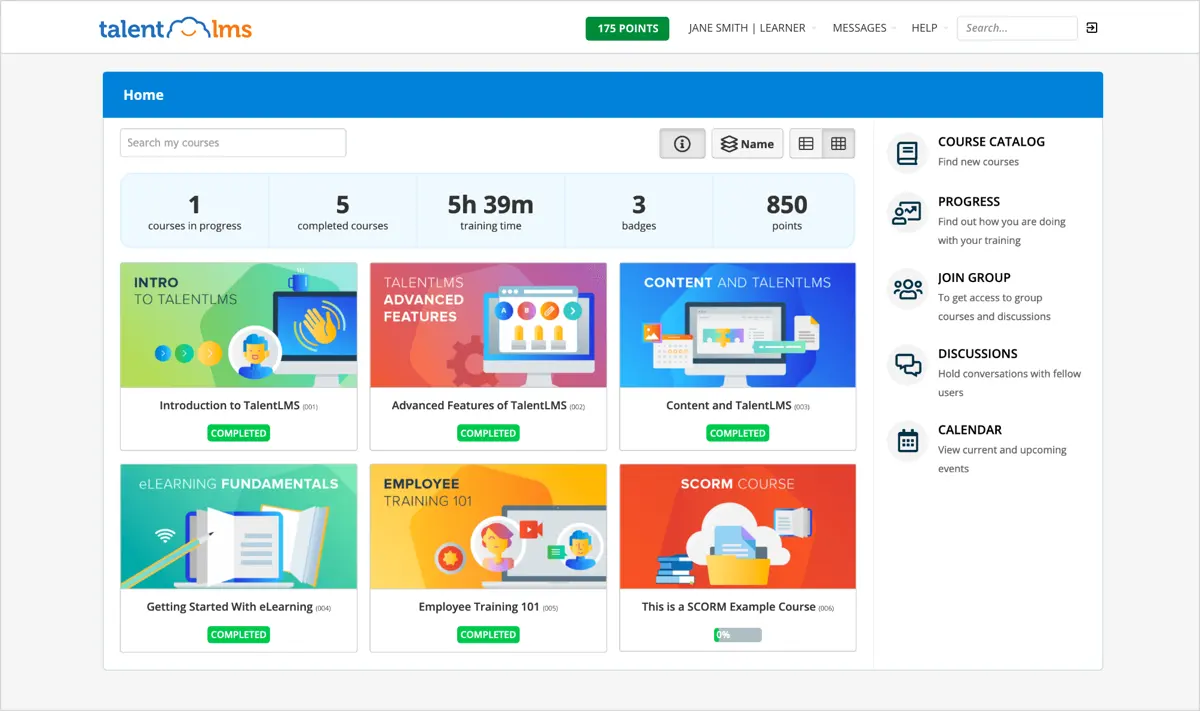
TalentLMS is a cloud-based LMS that allows users to create and share online courses with remote teams. Since 2012, they have helped thousands of customers provide training to their employees and improve their learning experience. TalentLMS is suitable for teams of any size and can be customized according to their needs.
TalentLMS is mobile-friendly, allowing remote teams to access up-to-date courses without the need to install software. It is also budget-friendly, with a free-to-start option. TalentLMS is used by more than 70,000 teams worldwide, including major corporations like Google, Amazon, Oracle, OpenAI, Unilever, and Meta.
Who is TalentLMS for?
TalentLMS is an enterprise LMS for businesses that want to provide training programs for their employees, customers, and partners. Whether it is on-site or remote, teams can communicate and collaborate through video conferences and messaging built into the platform. It is also great for growing companies as TalentLMS is easily scalable, with flexible packages that accommodate hundreds of users.
Key Benefits of TalentLMS
- Customizability: TalentLMS offers a fully customizable platform for businesses to tailor to their specific needs. Users can easily set up courses and create learning paths to address different learning styles.
- Scalability: The platform seamlessly grows and scales to meet the organization's training needs.
- Cost-effective: TalentLMS offers a range of pricing plans, including a free-to-start option. This makes it a budget-friendly choice for businesses looking to implement an LMS without breaking the bank.
- Integration capabilities: The platform integrates with various applications, such as Microsoft Outlook, WooCommerce, PayPal, Google Analytics, and more. This makes using the LMS easy as it seamlessly works with tools and applications that employees already use.
- Support and guidance: TalentLMS provides expert guidance and support throughout the training process. The support team is responsive and quick to address any issues or problems that may arise.
Who are Auzmor Learn and TalentLMS best for?
- Businesses: In this Auzmor Learn and TalentLMS matchup, both are scalable platforms that can accommodate the training needs of companies of any size. They provide a more efficient way to deliver employee training and track progress.
- Learning and development teams: Both platforms can be used to simplify the process of creating and managing learning content. Learning and development teams can use these platforms to design and deliver engaging training materials to employees.
- Administrators and trainers: Auzmor Learn and TalentLMS offer features that allow administrators and trainers to efficiently manage and track employee training. They can assign courses, track progress, and generate reports to assess the effectiveness of the training programs.
Auzmor Learn vs TalentLMS Feature Comparison
While most learning management systems have more or less the same features to facilitate online employee training programs, some LMSs stand out more than others. As we examine Auzmor Learn vs TalentLMS features, we can better see which ones they have in common and which functionalities you can take advantage of.
Content Delivery
In online learning programs, there are many ways for instructors and learners to deliver and receive content. We saw various types of content delivery as we examined Auzmor Learn vs TalentLMS. Auzmor Learn features blended learning that allows instructors to apply various delivery methods such as self-paced learning, instructor-led training, personalized e-learning courses, and social collaboration. This ensures that students with varying needs are able to choose the delivery method most suited for them.
TalentLMS is suitable for companies that have remote teams and need to facilitate training for them. Instructors can host video conferencing within the platform, and learners can easily communicate and collaborate through messaging. The platform is also available on any device, so they can access the courses anywhere they go. They can also do work offline and sync progress when they go back online.
Custom Content
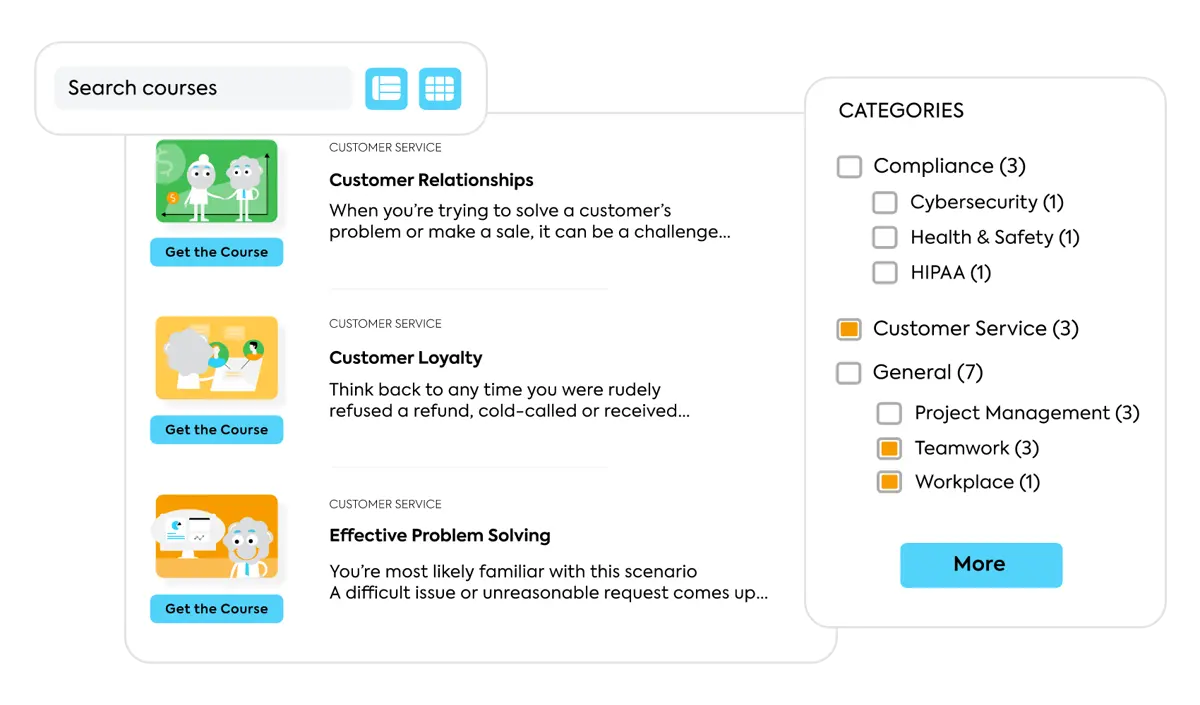
Whether it is for employee training or customer education, creating courses can take a lot of time and effort for most instructors. Thankfully, LMSs today have features that make it easy for anyone without code or design knowledge to create interactive and meaningful courses. In comparing Auzmor Learn vs TalentLMS, we saw that Auzmor Learn has an easy-to-use navigation that lets instructors course builder where they can upload existing content, including SCROM files. Widgets such as flashcards, hotspots, and tab activities can also be added to make courses more engaging to learners. Some of these key functions in custom content creation can also be found in Auzmor Learn alternatives.
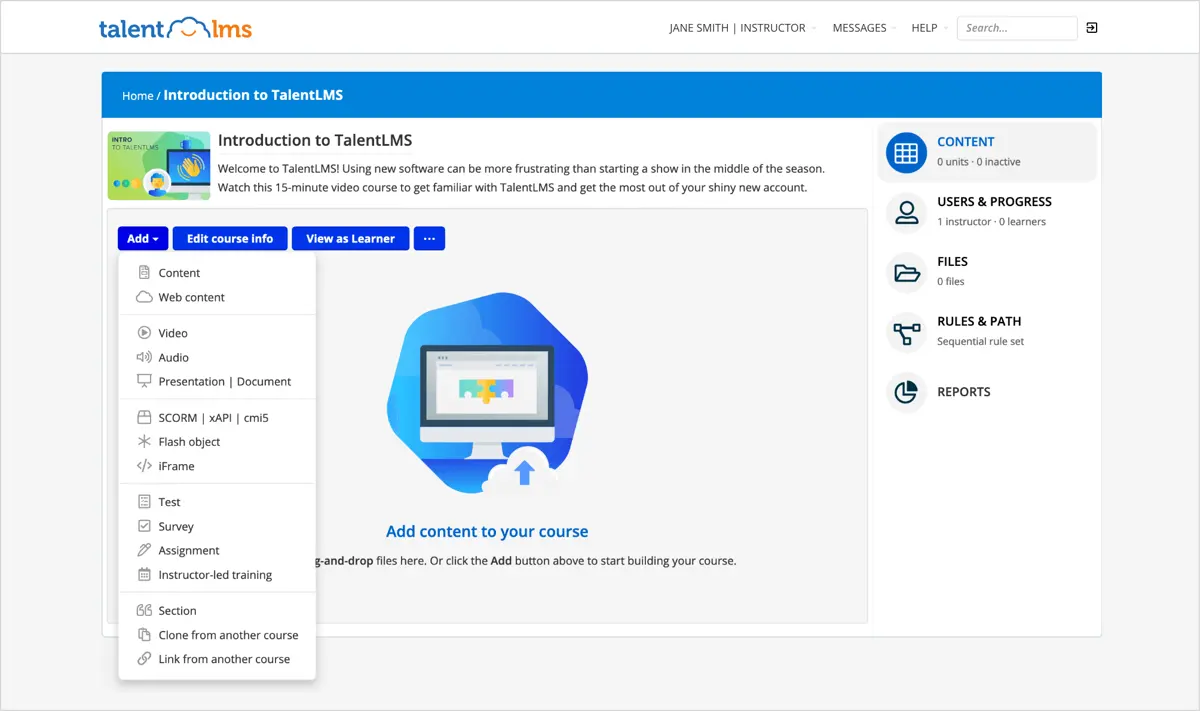
Creating courses in TalentLMS is just as easy. It has a drag-and-drop feature that lets users upload various types of media, and one can also upload existing SCROM, xAPI, or cmi5 files. Custom certificates can be generated to be awarded to learners at the end of every course. Instructors can also add in other types of assessments like surveys to get instant feedback on their training program.
Reports and Analytics
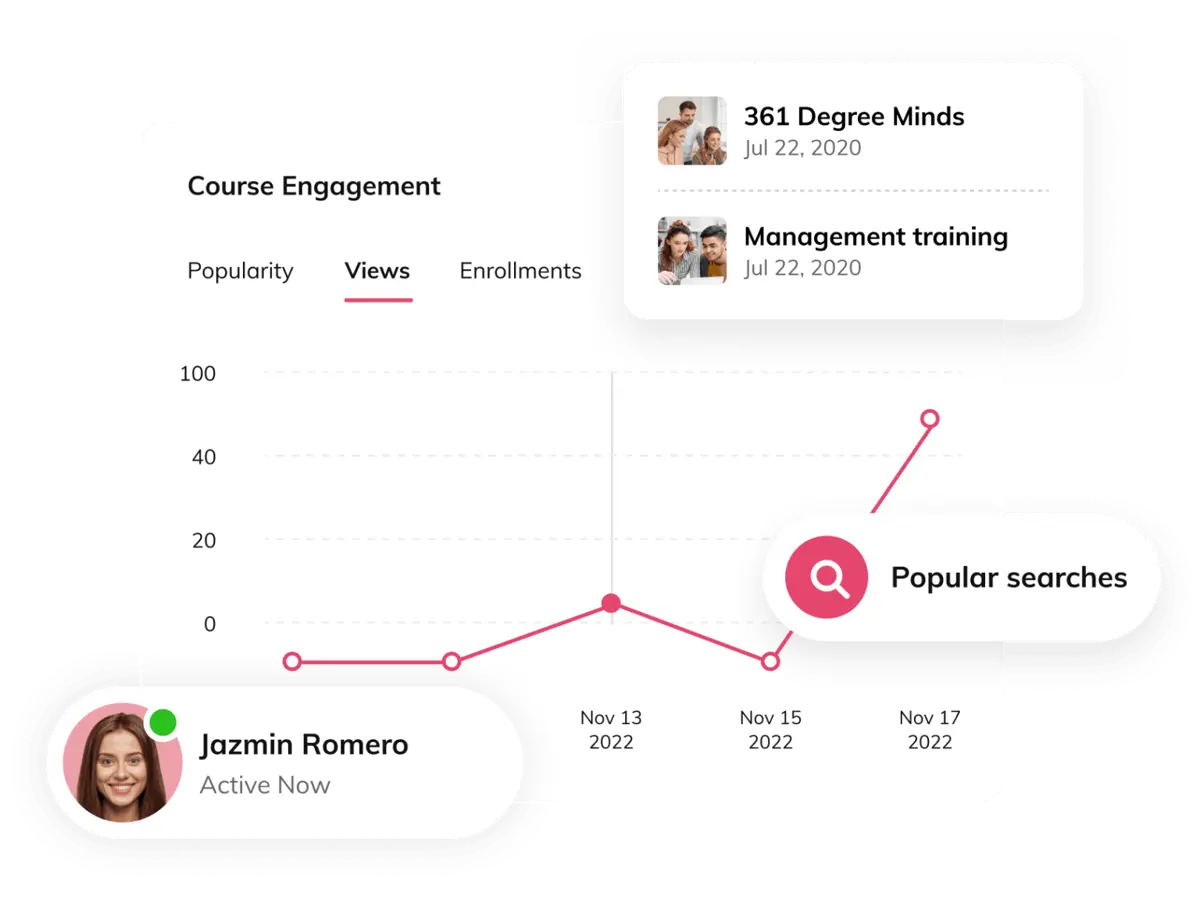
The reporting feature of an LMS is not just for monitoring the learners’ progress. It is also used to gain insight into how well the LMS is utilized in the company. When looking into Auzmor Learn vs TalentLMS, we can see that Auzmor Learn has a slight advantage based on the comprehensive features that it offers.
Auzmor Learn lets users generate reports for all types of training and look into the data based on various factors such as time spent, completion rate, overall engagement, and user behavior. Managers can look into how employees perceive the training and its effectiveness. Trainers can gain insight into learners’ competencies and identify any skill gaps. Automated reporting can also be set to see the status of each course and make necessary changes.
Reporting features in TalentLMS look simpler. Instructors can track the progress of learners in real time, and they can create scheduled and custom reports. There are also dynamic dashboards and training infographics to be able to visualize the data. All of these can be exported to Excel.
Security
There is always a concern about security for cloud-based LMSs, as they can be compromised. It is important to look into the security features of an LMS and check how they ensure that your data is safe. In taking a closer look at Auzmor Learn vs TalentLMS security features, both platforms come out strong. They have Single Sign-On (SSO) and password authentication to prevent any unauthorized access. Auzmor Learn also has data encryption to protect user data.
TalentLMS has additional security measures such as SSL encryption and the use of automated tools to regularly review the software for any vulnerabilities. The platform is hosted on Amazon Web Services (AWS), wherein its servers use the same encryption as the one used by the US government.
E-commerce
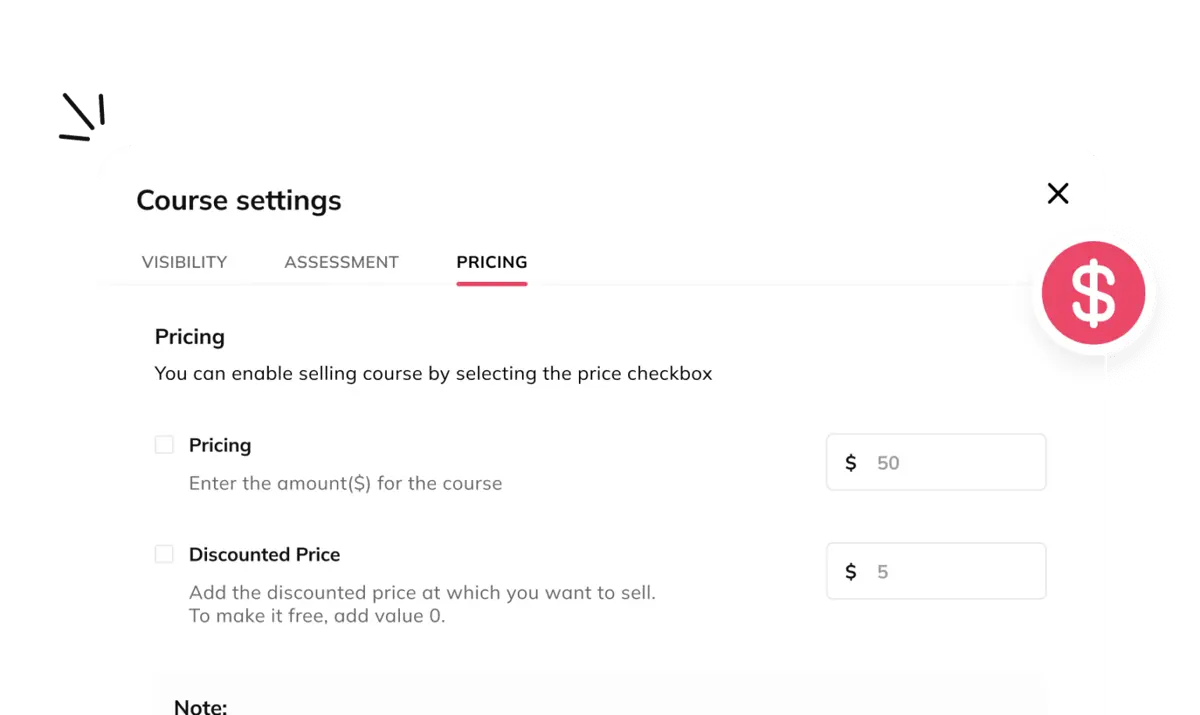
An LMS with e-commerce features lets companies maximize their investment by selling courses on the platform. When it comes to Auzmor Learn vs TalentLMS, both have similar features. Users can sell individual courses on both platforms. In Auzmor Learn, you can create course bundles and packages while in TalentLMS, you can offer subscriptions, discounts, and coupons.
Auzmor Learn also has a smart pricing feature, which enables users to set the right price for their courses based on factors such as course content, target audience, and competition. The platform comes with a customizable storefront so that the company can place its own logo and brand colors. There are also payment integrations into the platform to be able to receive payments from customers conveniently.
One can also customize their storefront using TalentLMS, including branding and communication emails. The platform supports major payment processors such as PayPal and Stripe. Users can generate enterprise-ready reports that provide insights into sales, revenue, and consumer behavior.
Auzmor Learn vs TalentLMS Pricing
An LMS gives companies the ability to upskill their employees, foster relationships with their partners, and generate additional income through reselling courses. With all of these comprehensive features, an LMS can be a considerable investment.
For those who are looking for the best free learning management system, both Auzmor Learn and TalentLMS have free versions with basic features. In TalentLMS, the free version comes with up to 10 courses and unlimited email support, and up to five users can be added.
Comparing the Auzmor Learn vs TalentLMS pricing, we can see that TalentLMS has a wider variety of packages that depend on the number of users. Packages can start from $69 per month with up to 40 users and can be as much as $459 per month with up to 1000 users. For those that need more than 1000 users, they can request a quote for TalentLMS’ enterprise package.
As for Auzmor Learn, pricing may vary depending on the business needs. They offer a one-time purchased license and subscription fee. One can contact them for more details and for a detailed quotation.
Choosing the Right LMS for Your Organization's Needs
Deciding between an LMS like Auzmor Learn and TalentLMS often depends on your organization’s specific learning requirements, budget, and scalability goals. However, if neither of these options fully meets your needs, exploring alternatives might open doors to other effective solutions. Several businesses and institutions seek the best open source LMS for greater customization and cost efficiency.
When selecting an LMS, evaluate these factors:
- Learning Objectives Alignment: Ensure the LMS supports your training goals, whether it's employee upskilling, customer education, or partner training.
- Customizability and Scalability: For organizations with unique workflows or plans for expansion, customizable platforms like open-source systems might be a better fit.
- Budget Considerations: Factor in the total cost of ownership, including licensing fees, implementation, and ongoing maintenance.
- Integration Needs: Check if the LMS seamlessly integrates with other tools such as HR systems or CRM platforms.
- User Experience: A user-friendly interface for both learners and administrators can significantly impact adoption rates and training outcomes.
- Support and Maintenance: Assess the level of technical support offered, as well as the ease of implementation.
Additionally, businesses interested in selling online courses can benefit from robust e-commerce functionality, such as secure payment integrations and customizable storefronts, offered by both Auzmor Learn and TalentLMS. Based on your operational focus, adopting a solution tailored to your goals ensures optimal long-term growth and success.
Auzmor Learn Pros and Cons
Auzmor Learn is one of the most reputable SaaS LMS systems in the market today. While it has many useful features, it is also important to look into some of its disadvantages that may be crucial to some companies.
Pros
- Easy navigation: While using the platform for this Auzmor Learn vs TalentLMS guide, we found that Auzmor Learn is quite easy to use. The interface is intuitive, and one can easily find the features they need.
- Customizable: The platform can be customized to create learning paths, courses, and lessons. The storefront can also be changed to match branding colors.
- Great support: Based on user feedback, Auzmor Learn has excellent customer service, and concerns and requests are promptly addressed.
Cons
- Mobile app: While Auzmor Learn is available on mobile, its app has limited features and needs improvement.
- Limited languages supported: It supports fewer languages compared to other LMSs.
How Do Integration Capabilities Impact LMS Performance?
Effective LMS platforms extend beyond training management by integrating seamlessly with other core business systems. Robust integrations enable automated data exchange, streamline workflows, and enhance overall operational efficiency. For example, synchronizing your LMS with billing software ensures that financial transactions, enrollment fees, and revenue reporting occur without manual intervention, reducing administrative overhead and potential errors. Additionally, modern LMS solutions offer API support and customizable connectors that allow organizations to align the platform with HR, CRM, and other essential systems. Prioritizing comprehensive integration capabilities not only simplifies backend operations but also facilitates real-time analytics, empowering decision makers to optimize both learning outcomes and business performance.
TalentLMS Pros and Cons
TalentLMS is a great option for businesses that need an LMS for their training needs. It can be a significant investment, so one must look into its pros and cons before deciding whether it is the right LMS or considering TalentLMS alternatives.
Pros
- Easy content creation: The platform’s drag-and-drop feature makes it very easy to create content and add various media. Quizzes and assessments can be added as well as custom certifications.
- Extensive integrations: TalentLMS has several integrations with video conferencing apps, HRIS, CRM, and more. Some of the most used applications include Zoom, Zapier, and Salesforce.
- Simpler interface: It has a simpler interface which makes it less intimidating to use and encourages more employees to use it often.
Cons
- Expensive: Compared to other LMSs, the learning management system price of TalentLMS is relatively expensive. Its pricing model is also dependent on the number of users, which might not be applicable for some companies.
- Limited features: Some features such as automated grading and exam scheduling are not possible in the platform. Its reporting features are also not as extensive.
Verdict – Auzmor Learn vs TalentLMS: Which software is better?
In this Auzmor Learn vs TalentLMS matchup, we compared the basic features of the LMSs as well as the pricing models that they offer. Both LMSs are pretty much equal, but we do see that Auzmor Learn has a slight edge over TalentLMS.
Auzmor Learn is a relatively new LMS compared to TalentLMS but has had better reviews thanks to its responsive customer service. It serves clients’ requirements better, and its updates and roadmaps show that they consider their clients’ requests. The platform is also easier to set up and administer.
Large enterprises can still benefit from TalentLMS, as it provides more flexible pricing options compared to Auzmor Learn. The free version requires no credit card, and one can upgrade at any time. Its e-commerce option is also more comprehensive, with a built-in shopping cart and shopping cart plugin options.
Key Insights
- User-Friendly Interface: Both Auzmor Learn and TalentLMS offer intuitive and user-friendly interfaces. Auzmor Learn is particularly praised for its easy navigation and customization capabilities, while TalentLMS features a simple drag-and-drop content creation tool.
- Content Creation and Delivery: Auzmor Learn supports various content delivery methods, including blended learning, self-paced courses, and instructor-led training. TalentLMS excels in creating and sharing online courses, especially for remote teams, with video conferencing and messaging built-in.
- Scalability and Flexibility: Both platforms are highly scalable, suitable for businesses of all sizes. Auzmor Learn can cater to the specific training needs of an organization through customizable learning paths, while TalentLMS offers flexible pricing plans and integration capabilities.
- Reporting and Analytics: Auzmor Learn provides comprehensive reporting features that include real-time tracking, automated reporting, and detailed insights into user behavior and engagement. TalentLMS offers dynamic dashboards, custom reports, and training infographics.
- Security Features: Both platforms prioritize security with features such as Single Sign-On (SSO) and password authentication. TalentLMS also includes SSL encryption and regular software reviews for vulnerabilities, hosted on Amazon Web Services (AWS).
- E-commerce Capabilities: Both LMSs support selling courses online. Auzmor Learn offers smart pricing, customizable storefronts, and payment integrations. TalentLMS provides subscription options, discounts, coupons, and supports major payment processors like PayPal and Stripe.
How to Transition Smoothly to a New LMS
Switching learning management systems can be a significant decision, and proper planning is essential to ensure a smooth transition. Here are steps to facilitate moving from your current LMS to Auzmor Learn or TalentLMS:
- Define Training Goals and LMS Requirements: Establish clear objectives for your new LMS, including specific features like content delivery options, reporting, and e-commerce capabilities. Consider whether you need extensive integrations or scalable pricing, especially if planning for future growth.
- Evaluate and Test the New Platform: Run a pilot program with a sample user group to assess the new LMS’s features, interface, and functionality. Collect feedback to ensure the platform meets your business needs for training, ease of use, and user engagement.
- Plan Data Migration and Content Organization: Organize existing data, such as courses, user profiles, and progress records, for easy transfer to the new LMS. Take the opportunity to streamline and update content, ensuring an improved learning experience for users in the new system.
- Configure and Customize the LMS: Customize the LMS to reflect your brand’s identity, including course content, reporting dashboards, and security protocols. This personalization enhances familiarity and comfort among users while promoting a seamless training experience.
- Offer Training and Onboarding: Schedule training sessions for administrators and users to introduce the LMS’s new features, especially those unique to TalentLMS or Auzmor Learn, such as mobile access, e-commerce, and customizable learning paths.
- Monitor Feedback and Optimize: Gather feedback from users after the transition to make any necessary adjustments. Continue monitoring user engagement and training effectiveness to optimize the learning experience over time.
Other Things You Should Know About Auzmor Learn vs TalentLMS
Auzmor Learn is a cloud-based learning management system (LMS) that helps businesses and organizations manage, track, and deliver training to employees. It offers course creation tools, a vast content library, and features to enhance employee engagement and training efficiency.
Auzmor Learn is suitable for businesses of all sizes aiming to develop their employees' skills and foster a culture of learning. It is also ideal for companies looking to sell courses and conduct training programs for partners and customers.
Key benefits include an intuitive user interface, efficient training management, scalability, customization options, enhanced employee engagement, and accessibility across devices.
TalentLMS is a cloud-based LMS designed to create and share online courses with remote teams. It is used by over 70,000 teams worldwide and offers features such as video conferencing, customizable courses, and integration with various applications.
TalentLMS is used by businesses of all sizes for employee training, customer education, and partner training. It is especially suitable for growing companies with remote teams due to its scalability and flexible pricing plans.
Key benefits include full customizability, scalability, cost-effectiveness with a free-to-start option, extensive integration capabilities, and responsive support and guidance.
Auzmor Learn offers blended learning, self-paced courses, instructor-led training, and social collaboration. TalentLMS excels in facilitating remote training with video conferencing, messaging, and offline work capabilities.
Auzmor Learn provides comprehensive reporting features with real-time tracking, automated reporting, and detailed insights. TalentLMS offers dynamic dashboards, custom reports, and training infographics that can be exported to Excel.
Both platforms use Single Sign-On (SSO) and password authentication. TalentLMS also includes SSL encryption, automated software reviews for vulnerabilities, and is hosted on Amazon Web Services (AWS).
Both LMSs support selling courses online. Auzmor Learn offers smart pricing, customizable storefronts, and payment integrations. TalentLMS provides subscription options, discounts, coupons, and supports major payment processors like PayPal and Stripe.
TalentLMS may be more cost-effective for small businesses due to its free version and flexible pricing plans. However, Auzmor Learn also offers scalable solutions, and pricing can be customized based on business needs.
Both platforms can accommodate large enterprises, but TalentLMS offers more flexible pricing options and extensive integrations, making it a strong choice for larger organizations. Auzmor Learn, with its excellent customer service and easy setup, is also a viable option for large businesses.


