
Kenyt.AI Review 2027: Pricing, Features, Pros & Cons, Ratings & More

Kenyt.AI: Top AI Software
4 / 5
Featured AI Software Alternatives for Kenyt.AI

Custom
No
regulatory compliance, automation, cloud access
Editor's Take
NetSuite ERP is a comprehensive cloud-based enterprise resource planning (ERP) software designed to streamline business processes for organizations of all sizes. Key features include financial management, order management, inventory control, and procurement. It also offers advanced analytics and real-time reporting, making it ideal for decision-making. Pros include scalability, extensive customization, and seamless integration with other NetSuite modules like CRM and eCommerce. However, it can have a steep learning curve, and pricing may be high for smaller businesses. NetSuite ERP is best suited for growing companies needing a robust, all-in-one platform to manage complex operations across multiple departments.
Expert Score
In evaluating SaaS software, a comprehensive and structured methodology ensures a fair and accurate comparison across key metrics. This approach focuses on the most critical aspects that affect user experience, functionality, and business value. The following metrics—general features, cost, customer service, integrations, and mobile support—are evaluated to provide a holistic view of each software solution’s strengths and weaknesses. These metrics are selected based on their direct impact on software usability, scalability, and long-term effectiveness for businesses.
1. General Features - scoring weight 40%
This metric evaluates the core functionalities and tools the software offers. It involves assessing the comprehensiveness of the features, their relevance to the target users, and the ease of use. This is important because robust and well-designed features determine the software's overall utility and efficiency in solving user problems.
2. Cost - scoring weight 15%
Cost analysis focuses on pricing models, value for money, and scalability. It's crucial to evaluate whether the software’s features justify its price, considering different plans for small and large organizations. This is vital for businesses to ensure they invest in cost-effective solutions that fit their budget.
3. Customer Service - scoring weight 15%
This evaluates the responsiveness, quality, and availability of customer support, including channels like chat, email, or phone. Good customer service is essential for troubleshooting and ensuring smooth software usage, which reduces downtime and frustration for users.
4. Integrations - scoring weight 15%
This examines how well the software integrates with third-party tools (e.g., CRM, payment systems, collaboration apps). Seamless integrations are key for creating a unified workflow and enhancing productivity by connecting multiple systems, which is crucial for operational efficiency.
5. Mobile Support - scoring weight 15%
Mobile support assesses the software’s functionality and performance on mobile devices, including apps and mobile web versions. With increasing remote work and on-the-go usage, strong mobile support is critical to ensure users can access and utilize the software effectively, regardless of location.

By quote
Demo available
payment reminders, customizable workflows, analytics
Editor's Take
Gaviti is a specialized accounts receivable (AR) software designed to streamline and optimize the invoice collection process. Tailored for finance teams, Gaviti automates the entire AR workflow, from invoice generation to payment collection, helping businesses reduce late payments and improve cash flow. Its user-friendly platform provides real-time visibility into payment statuses and collection activities, enabling teams to track, manage, and prioritize outstanding invoices effectively.
Key features include automated payment reminders, customizable workflows, and detailed analytics for tracking AR performance. Gaviti also integrates seamlessly with existing accounting and ERP systems, allowing for smooth data synchronization and improved efficiency in managing receivables.
With its focus on improving the efficiency of AR processes and reducing the payment cycle, Gaviti is ideal for businesses looking to enhance their cash flow management and reduce operational bottlenecks in collections.
Expert Score
In evaluating SaaS software, a comprehensive and structured methodology ensures a fair and accurate comparison across key metrics. This approach focuses on the most critical aspects that affect user experience, functionality, and business value. The following metrics—general features, cost, customer service, integrations, and mobile support—are evaluated to provide a holistic view of each software solution’s strengths and weaknesses. These metrics are selected based on their direct impact on software usability, scalability, and long-term effectiveness for businesses.
1. General Features - scoring weight 40%
This metric evaluates the core functionalities and tools the software offers. It involves assessing the comprehensiveness of the features, their relevance to the target users, and the ease of use. This is important because robust and well-designed features determine the software's overall utility and efficiency in solving user problems.
2. Cost - scoring weight 15%
Cost analysis focuses on pricing models, value for money, and scalability. It's crucial to evaluate whether the software’s features justify its price, considering different plans for small and large organizations. This is vital for businesses to ensure they invest in cost-effective solutions that fit their budget.
3. Customer Service - scoring weight 15%
This evaluates the responsiveness, quality, and availability of customer support, including channels like chat, email, or phone. Good customer service is essential for troubleshooting and ensuring smooth software usage, which reduces downtime and frustration for users.
4. Integrations - scoring weight 15%
This examines how well the software integrates with third-party tools (e.g., CRM, payment systems, collaboration apps). Seamless integrations are key for creating a unified workflow and enhancing productivity by connecting multiple systems, which is crucial for operational efficiency.
5. Mobile Support - scoring weight 15%
Mobile support assesses the software’s functionality and performance on mobile devices, including apps and mobile web versions. With increasing remote work and on-the-go usage, strong mobile support is critical to ensure users can access and utilize the software effectively, regardless of location.

Custom
No
Payroll processing, HR management, analytics
Editor's Take
Paylocity is a comprehensive cloud-based software solution designed to streamline and enhance human resource and payroll management for businesses of all sizes. As an all-in-one platform, it caters to the evolving needs of HR professionals by offering a suite of tools that cover payroll processing, benefits administration, talent management, workforce management, and employee engagement. Its user-friendly interface and automation capabilities aim to reduce manual tasks, ensuring greater accuracy and efficiency in day-to-day operations.
One of Paylocity's standout features is its ability to integrate seamlessly with other software systems, providing businesses with the flexibility to customize their workflows. Its payroll processing tool is particularly robust, offering automated tax filing, compliance management, and real-time reporting to minimize errors and save time. Additionally, its talent management module supports recruitment, onboarding, performance tracking, and employee development, making it a valuable tool for organizations focused on growth and retention.
Employee engagement is a key focus of Paylocity, reflected in its modern tools like peer recognition, surveys, and an intuitive self-service portal. These features foster better communication and collaboration, helping businesses build a more connected and motivated workforce. The platform also offers advanced analytics and reporting capabilities, enabling HR teams to make data-driven decisions to support strategic initiatives.
Paylocity is known for its customer support and commitment to innovation, regularly introducing new features to stay ahead of market trends. While the platform is designed for scalability, some smaller businesses may find the breadth of its features overwhelming or more suitable for mid-sized and larger organizations. Nevertheless, Paylocity remains a leading choice for businesses seeking a comprehensive, integrated, and customizable solution for managing HR and payroll functions.
Expert Score
In evaluating SaaS software, a comprehensive and structured methodology ensures a fair and accurate comparison across key metrics. This approach focuses on the most critical aspects that affect user experience, functionality, and business value. The following metrics—general features, cost, customer service, integrations, and mobile support—are evaluated to provide a holistic view of each software solution’s strengths and weaknesses. These metrics are selected based on their direct impact on software usability, scalability, and long-term effectiveness for businesses.
1. General Features - scoring weight 40%
This metric evaluates the core functionalities and tools the software offers. It involves assessing the comprehensiveness of the features, their relevance to the target users, and the ease of use. This is important because robust and well-designed features determine the software’s overall utility and efficiency in solving user problems.
2. Cost - scoring weight 15%
Cost analysis focuses on pricing models, value for money, and scalability. It’s crucial to evaluate whether the software’s features justify its price, considering different plans for small and large organizations. This is vital for businesses to ensure they invest in cost-effective solutions that fit their budget.
3. Customer Service - scoring weight 15%
This evaluates the responsiveness, quality, and availability of customer support, including channels like chat, email, or phone. Good customer service is essential for troubleshooting and ensuring smooth software usage, which reduces downtime and frustration for users.
4. Integrations - scoring weight 15%
This examines how well the software integrates with third-party tools (e.g., CRM, payment systems, collaboration apps). Seamless integrations are key for creating a unified workflow and enhancing productivity by connecting multiple systems, which is crucial for operational efficiency.
5. Mobile Support - scoring weight 15%
Mobile support assesses the software’s functionality and performance on mobile devices, including apps and mobile web versions. With increasing remote work and on-the-go usage, strong mobile support is critical to ensure users can access and utilize the software effectively, regardless of location.
Kenyt.AI Review
What is Kenyt.AI?
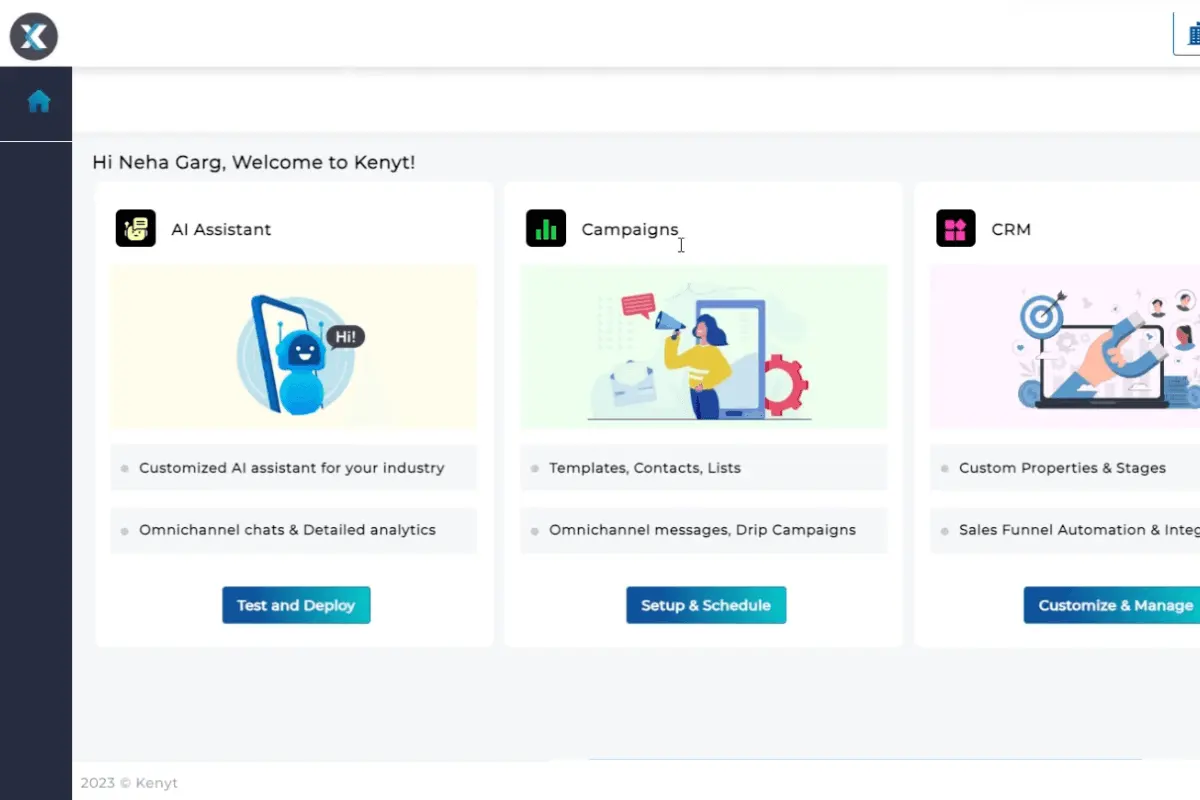
Kenyt.AI is a conversational AI platform that enhances customer and employee engagement through intelligent automation. It offers a no-code interface so businesses can build and deploy chatbots and voicebots across various channels. It also provides a self-serve option for users to create custom chatbots with easy-to-follow training materials.
With a focus on omnichannel engagement, Kenyt.AI supports messaging apps, websites, and social media. Its AI-powered capabilities include natural language processing and machine learning for improved customer experiences. Overall, Kenyt.AI’s intuitive interface and powerful AI make it a versatile tool for growth by improving customer interaction, streamlining workflows, and enhancing overall business efficiency.
Featured AI Software Products
Custom
No
regulatory compliance, automation, cloud access
Editor's Take
NetSuite ERP is a comprehensive cloud-based enterprise resource planning (ERP) software designed to streamline business processes for organizations of all sizes. Key features include financial management, order management, inventory control, and procurement. It also offers advanced analytics and real-time reporting, making it ideal for decision-making. Pros include scalability, extensive customization, and seamless integration with other NetSuite modules like CRM and eCommerce. However, it can have a steep learning curve, and pricing may be high for smaller businesses. NetSuite ERP is best suited for growing companies needing a robust, all-in-one platform to manage complex operations across multiple departments.
Expert Score
In evaluating SaaS software, a comprehensive and structured methodology ensures a fair and accurate comparison across key metrics. This approach focuses on the most critical aspects that affect user experience, functionality, and business value. The following metrics—general features, cost, customer service, integrations, and mobile support—are evaluated to provide a holistic view of each software solution’s strengths and weaknesses. These metrics are selected based on their direct impact on software usability, scalability, and long-term effectiveness for businesses.
1. General Features - scoring weight 40%
This metric evaluates the core functionalities and tools the software offers. It involves assessing the comprehensiveness of the features, their relevance to the target users, and the ease of use. This is important because robust and well-designed features determine the software's overall utility and efficiency in solving user problems.
2. Cost - scoring weight 15%
Cost analysis focuses on pricing models, value for money, and scalability. It's crucial to evaluate whether the software’s features justify its price, considering different plans for small and large organizations. This is vital for businesses to ensure they invest in cost-effective solutions that fit their budget.
3. Customer Service - scoring weight 15%
This evaluates the responsiveness, quality, and availability of customer support, including channels like chat, email, or phone. Good customer service is essential for troubleshooting and ensuring smooth software usage, which reduces downtime and frustration for users.
4. Integrations - scoring weight 15%
This examines how well the software integrates with third-party tools (e.g., CRM, payment systems, collaboration apps). Seamless integrations are key for creating a unified workflow and enhancing productivity by connecting multiple systems, which is crucial for operational efficiency.
5. Mobile Support - scoring weight 15%
Mobile support assesses the software’s functionality and performance on mobile devices, including apps and mobile web versions. With increasing remote work and on-the-go usage, strong mobile support is critical to ensure users can access and utilize the software effectively, regardless of location.
By quote
Demo available
payment reminders, customizable workflows, analytics
Editor's Take
Gaviti is a specialized accounts receivable (AR) software designed to streamline and optimize the invoice collection process. Tailored for finance teams, Gaviti automates the entire AR workflow, from invoice generation to payment collection, helping businesses reduce late payments and improve cash flow. Its user-friendly platform provides real-time visibility into payment statuses and collection activities, enabling teams to track, manage, and prioritize outstanding invoices effectively.
Key features include automated payment reminders, customizable workflows, and detailed analytics for tracking AR performance. Gaviti also integrates seamlessly with existing accounting and ERP systems, allowing for smooth data synchronization and improved efficiency in managing receivables.
With its focus on improving the efficiency of AR processes and reducing the payment cycle, Gaviti is ideal for businesses looking to enhance their cash flow management and reduce operational bottlenecks in collections.
Expert Score
In evaluating SaaS software, a comprehensive and structured methodology ensures a fair and accurate comparison across key metrics. This approach focuses on the most critical aspects that affect user experience, functionality, and business value. The following metrics—general features, cost, customer service, integrations, and mobile support—are evaluated to provide a holistic view of each software solution’s strengths and weaknesses. These metrics are selected based on their direct impact on software usability, scalability, and long-term effectiveness for businesses.
1. General Features - scoring weight 40%
This metric evaluates the core functionalities and tools the software offers. It involves assessing the comprehensiveness of the features, their relevance to the target users, and the ease of use. This is important because robust and well-designed features determine the software's overall utility and efficiency in solving user problems.
2. Cost - scoring weight 15%
Cost analysis focuses on pricing models, value for money, and scalability. It's crucial to evaluate whether the software’s features justify its price, considering different plans for small and large organizations. This is vital for businesses to ensure they invest in cost-effective solutions that fit their budget.
3. Customer Service - scoring weight 15%
This evaluates the responsiveness, quality, and availability of customer support, including channels like chat, email, or phone. Good customer service is essential for troubleshooting and ensuring smooth software usage, which reduces downtime and frustration for users.
4. Integrations - scoring weight 15%
This examines how well the software integrates with third-party tools (e.g., CRM, payment systems, collaboration apps). Seamless integrations are key for creating a unified workflow and enhancing productivity by connecting multiple systems, which is crucial for operational efficiency.
5. Mobile Support - scoring weight 15%
Mobile support assesses the software’s functionality and performance on mobile devices, including apps and mobile web versions. With increasing remote work and on-the-go usage, strong mobile support is critical to ensure users can access and utilize the software effectively, regardless of location.
Custom
No
Payroll processing, HR management, analytics
Editor's Take
Paylocity is a comprehensive cloud-based software solution designed to streamline and enhance human resource and payroll management for businesses of all sizes. As an all-in-one platform, it caters to the evolving needs of HR professionals by offering a suite of tools that cover payroll processing, benefits administration, talent management, workforce management, and employee engagement. Its user-friendly interface and automation capabilities aim to reduce manual tasks, ensuring greater accuracy and efficiency in day-to-day operations.
One of Paylocity's standout features is its ability to integrate seamlessly with other software systems, providing businesses with the flexibility to customize their workflows. Its payroll processing tool is particularly robust, offering automated tax filing, compliance management, and real-time reporting to minimize errors and save time. Additionally, its talent management module supports recruitment, onboarding, performance tracking, and employee development, making it a valuable tool for organizations focused on growth and retention.
Employee engagement is a key focus of Paylocity, reflected in its modern tools like peer recognition, surveys, and an intuitive self-service portal. These features foster better communication and collaboration, helping businesses build a more connected and motivated workforce. The platform also offers advanced analytics and reporting capabilities, enabling HR teams to make data-driven decisions to support strategic initiatives.
Paylocity is known for its customer support and commitment to innovation, regularly introducing new features to stay ahead of market trends. While the platform is designed for scalability, some smaller businesses may find the breadth of its features overwhelming or more suitable for mid-sized and larger organizations. Nevertheless, Paylocity remains a leading choice for businesses seeking a comprehensive, integrated, and customizable solution for managing HR and payroll functions.
Expert Score
In evaluating SaaS software, a comprehensive and structured methodology ensures a fair and accurate comparison across key metrics. This approach focuses on the most critical aspects that affect user experience, functionality, and business value. The following metrics—general features, cost, customer service, integrations, and mobile support—are evaluated to provide a holistic view of each software solution’s strengths and weaknesses. These metrics are selected based on their direct impact on software usability, scalability, and long-term effectiveness for businesses.
1. General Features - scoring weight 40%
This metric evaluates the core functionalities and tools the software offers. It involves assessing the comprehensiveness of the features, their relevance to the target users, and the ease of use. This is important because robust and well-designed features determine the software’s overall utility and efficiency in solving user problems.
2. Cost - scoring weight 15%
Cost analysis focuses on pricing models, value for money, and scalability. It’s crucial to evaluate whether the software’s features justify its price, considering different plans for small and large organizations. This is vital for businesses to ensure they invest in cost-effective solutions that fit their budget.
3. Customer Service - scoring weight 15%
This evaluates the responsiveness, quality, and availability of customer support, including channels like chat, email, or phone. Good customer service is essential for troubleshooting and ensuring smooth software usage, which reduces downtime and frustration for users.
4. Integrations - scoring weight 15%
This examines how well the software integrates with third-party tools (e.g., CRM, payment systems, collaboration apps). Seamless integrations are key for creating a unified workflow and enhancing productivity by connecting multiple systems, which is crucial for operational efficiency.
5. Mobile Support - scoring weight 15%
Mobile support assesses the software’s functionality and performance on mobile devices, including apps and mobile web versions. With increasing remote work and on-the-go usage, strong mobile support is critical to ensure users can access and utilize the software effectively, regardless of location.


$15 per month, free plan is available
14 days
Editor's Take
Zoho Books is a versatile, cloud-based accounting software designed to meet the financial needs of small to medium-sized businesses. Part of the comprehensive Zoho suite, it offers end-to-end tools for managing core accounting functions, from invoicing and expense tracking to bank reconciliation and tax compliance. Zoho Books stands out for its user-friendly interface and integration capabilities, especially for businesses already using other Zoho applications like Zoho CRM, Zoho Inventory, or Zoho Projects. This seamless connectivity makes Zoho Books an attractive option for businesses aiming to centralize and streamline their financial operations.
Zoho Books simplifies invoicing with customizable templates and automated payment reminders, helping businesses accelerate cash flow and keep track of payments in real time. Expense tracking and bank reconciliation tools make it easy to monitor spending and match financial records accurately, enhancing visibility into cash flow. For companies managing multiple projects, Zoho Books also includes project-based accounting features, allowing users to log billable hours, track project-specific expenses, and generate dedicated reports.
With built-in tax compliance tools, Zoho Books supports tax tracking and automated calculations for various jurisdictions, including GST and VAT, which helps businesses stay compliant with local regulations. The platform also integrates with popular third-party tools like PayPal and Stripe, broadening its versatility for managing payments and transactions.
For businesses that rely on inventory, Zoho Books includes inventory management capabilities, supporting low-stock alerts, stock movement tracking, and inventory valuation. With robust reporting features, Zoho Books provides insights into profits, expenses, and taxes, empowering businesses to make data-driven financial decisions and remain compliant.
Overall, Zoho Books is a well-rounded solution that streamlines accounting for small and growing businesses, combining essential accounting functions with the flexibility to grow alongside a business’s needs.
Expert Score
In evaluating SaaS software, a comprehensive and structured methodology ensures a fair and accurate comparison across key metrics. This approach focuses on the most critical aspects that affect user experience, functionality, and business value. The following metrics—general features, cost, customer service, integrations, and mobile support—are evaluated to provide a holistic view of each software solution’s strengths and weaknesses. These metrics are selected based on their direct impact on software usability, scalability, and long-term effectiveness for businesses.
1. General Features - scoring weight 40%
This metric evaluates the core functionalities and tools the software offers. It involves assessing the comprehensiveness of the features, their relevance to the target users, and the ease of use. This is important because robust and well-designed features determine the software’s overall utility and efficiency in solving user problems.
2. Cost - scoring weight 15%
Cost analysis focuses on pricing models, value for money, and scalability. It’s crucial to evaluate whether the software’s features justify its price, considering different plans for small and large organizations. This is vital for businesses to ensure they invest in cost-effective solutions that fit their budget.
3. Customer Service - scoring weight 15%
This evaluates the responsiveness, quality, and availability of customer support, including channels like chat, email, or phone. Good customer service is essential for troubleshooting and ensuring smooth software usage, which reduces downtime and frustration for users.
4. Integrations - scoring weight 15%
This examines how well the software integrates with third-party tools (e.g., CRM, payment systems, collaboration apps). Seamless integrations are key for creating a unified workflow and enhancing productivity by connecting multiple systems, which is crucial for operational efficiency.
5. Mobile Support - scoring weight 15%
Mobile support assesses the software’s functionality and performance on mobile devices, including apps and mobile web versions. With increasing remote work and on-the-go usage, strong mobile support is critical to ensure users can access and utilize the software effectively, regardless of location.
How much does Kenyt.AI cost?
Kenyt.AI: Top AI Software
4 / 5
In this section of our Kenyt.AI review, we will discuss the Kenyt.AI pricing plans. The platform offers a 30-day free trial, freemium access, and paid plans divided into two categories. Interested users can pay the Kenyt.AI pricing options monthly, quarterly, half-yearly, or annually.
Self-serve Plans Customer AI
Starter - $0/month
- 100 chat quota/month
- Additional $0.08/chat
- 1 Bot
- 10 ChatGPT answers/month
- Multi-lingual Support at $5/month
Growth - $50/month
- Everything in Starter+
- 750 chat quota/month
- Additional $0.06/chat
Professional - $100/month
- Everything in Growth+
- 2500 chat quota/month
- Additional $0.04/chat
Enterprise - $200/month
- Everything in Professional+
- 10000 chat quota/month
- Additional $0.02/chat
Managed Plans Customer AI
Starter - $75/month
- 250 chat quota/month
- Additional $0.08/chat
- 1 Bot
- 10 ChatGPT answers/month
- Multi-lingual Support at $5/month
Growth - $125/month
- Everything in Starter+
- 750 chat quota/month
- Additional $0.06/chat
Professional - $200/month
- Everything in Growth+
- 2500 chat quota/month
- Additional $0.04/chat
Enterprise - $350/month
- Everything in Professional+
- 10000 chat quota/month
- Additional $0.02/chat
Kenyt.AI Pros
- Streamlined Integration Across Channels. While doing this Kenyt.AI review, we found that the platform’s omnichannel capabilities allow businesses to engage customers seamlessly on various platforms. Whether through social media, websites, or mobile apps, it ensures a consistent experience, which is essential for businesses with a broad customer base.
- Increased Lead Generation. With its intelligent workflows, Kenyt.AI can capture up to three times more leads compared to traditional methods. This is especially beneficial for businesses that rely heavily on lead generation from their digital channels.
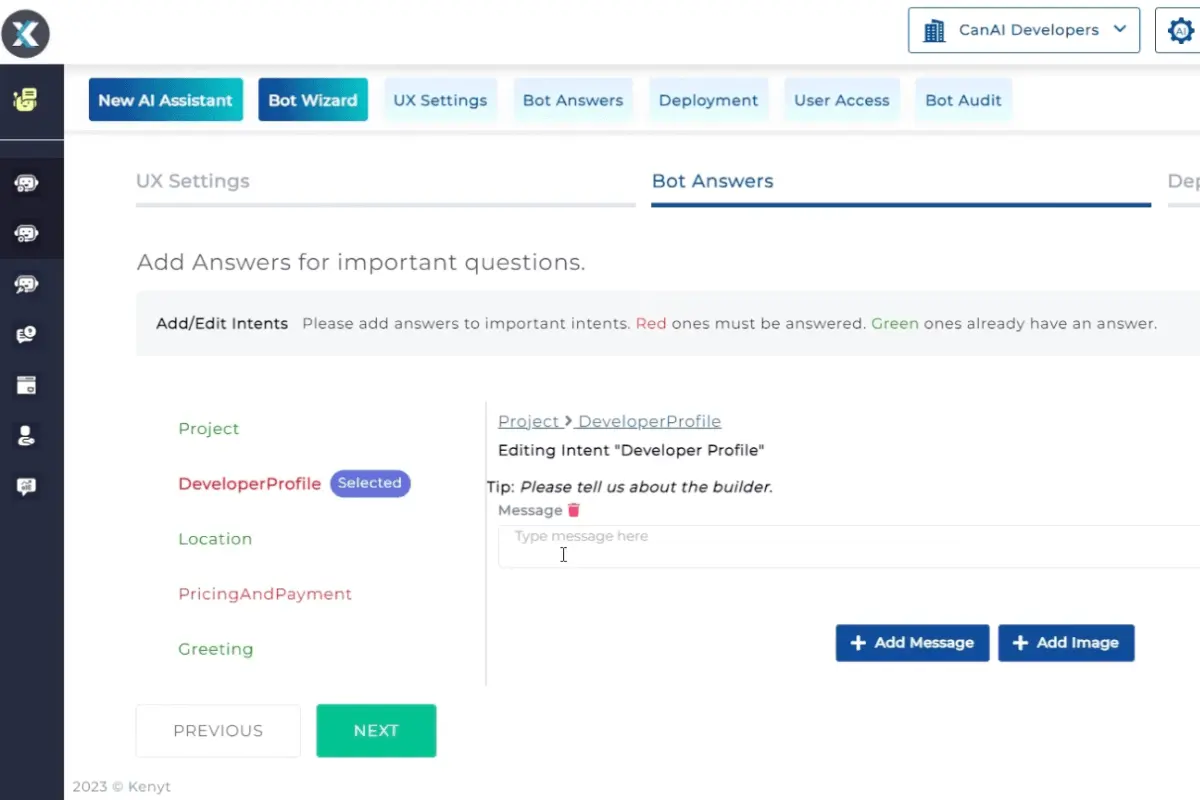
- Efficient Self-Serve Setup. Kenyt.AI has a self-serve portal that gives businesses full control over their chatbot creation. Companies can easily set up bots tailored to their specific needs without waiting for external assistance.
- Multilingual Capabilities. Kenyt.AI supports a variety of languages, so it is ideal for international businesses. By speaking the customer’s language, it fosters better communication and enhances engagement across borders.
- Proven Sales Impact. Kenyt.AI can boost sales conversions. It helps businesses increase revenue by automating the customer journey and eliminating friction points during the sales process.
Kenyt.AI Cons
- Limited Customization for Advanced Users. Kenyt.AI offers a straightforward chatbot setup but can feel restrictive for businesses needing highly customized bots. Advanced users may find themselves needing more flexibility to develop complex flows and features.
- Dependency on Kenyt.AI for Major Customizations. Our analysis for this Kenyt.AI review made us discover that many significant customizations, such as changing workflows or adjusting Kenyt.AI integrations, require support from the platform’s team. This dependency can be a downside for businesses looking for complete autonomy in their operations.
- Limited Chatbot Bubble Options. Kenyt.AI provides a few pre-set chatbot bubble designs, but businesses looking for a wider selection may find the choices lacking. Customization in the appearance of chat interfaces is limited, which could hinder branding consistency for some companies.
Kenyt.AI Core Features
Kenyt.AI: Top AI Software
4 / 5
Kenyt.AI offers a powerful suite of AI-driven features designed to elevate customer engagement across various touchpoints. In this section, we will discuss the key Kenyt.AI features. Also, take note of the insights on Kenyt.AI pros and cons from this Kenyt.AI review to give you a well-rounded understanding of its capabilities.
- No-Code Platform. Kenyt.AI allows businesses to create and deploy chatbots without coding skills. This feature simplifies the process for non-technical users for quick setup and customizations.
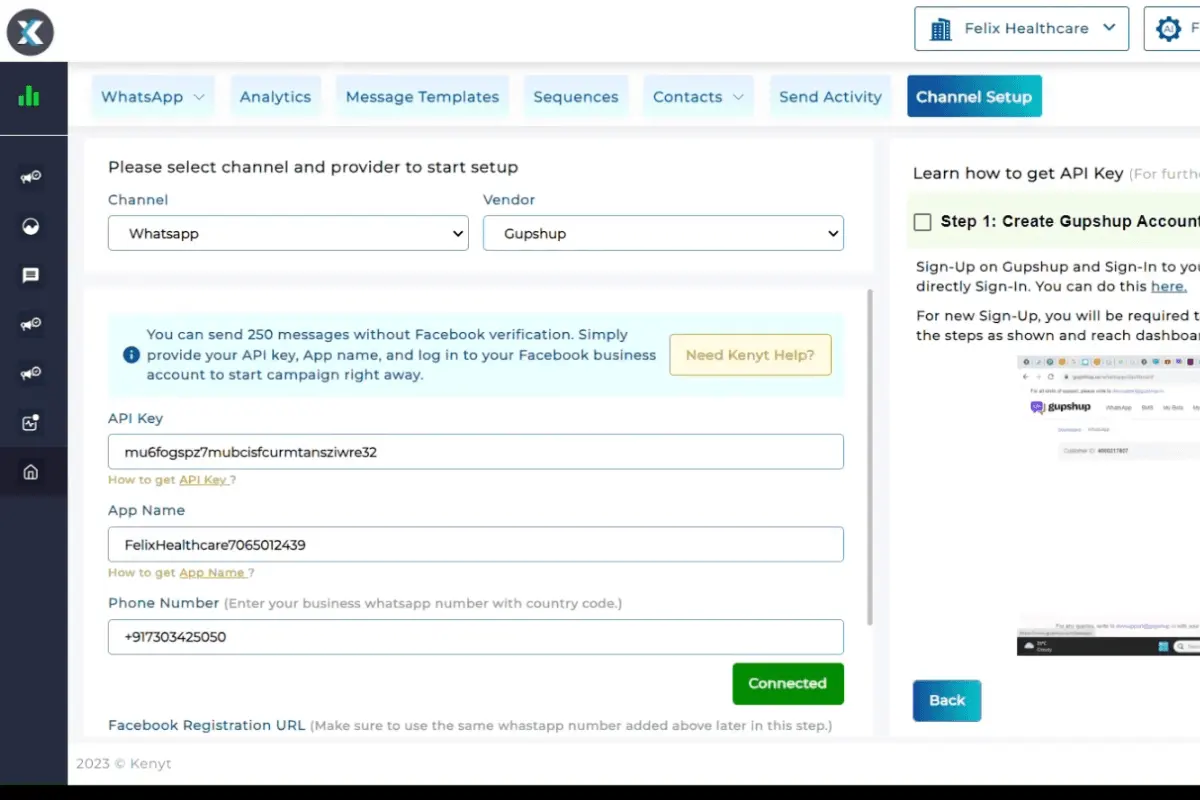
- Omnichannel Engagement. The platform supports multiple messaging channels like websites, WhatsApp, Facebook Messenger, and more. It ensures that businesses can engage with customers wherever they are.
- Advanced AI Engine. Kenyt.AI's engine boasts a 95% accuracy rate in processing natural language. This ensures conversations are smooth and precise.
- Workflow Automation. Doing this Kenyt.AI review led us to understand that with the platform, businesses can automate key workflows. With Kenyt.AI, users can automate booking appointments or processing payments, using pre-designed templates.
- Multilingual Support. Kenyt.AI supports a wide range of languages, from English to Arabic and Japanese. This enables global businesses to engage with diverse customer bases effectively.
- Lead Capture Optimization. Kenyt.AI's chatbots are designed to capture leads more efficiently. With optimized conversation flows, businesses can gather more leads from existing traffic.
- Self-Serve Portal. Our Kenyt.AI review shares that the platform provides a portal where businesses can build their own chatbots. The self-service feature is designed with an intuitive interface that simplifies bot creation for anyone, regardless of technical expertise.
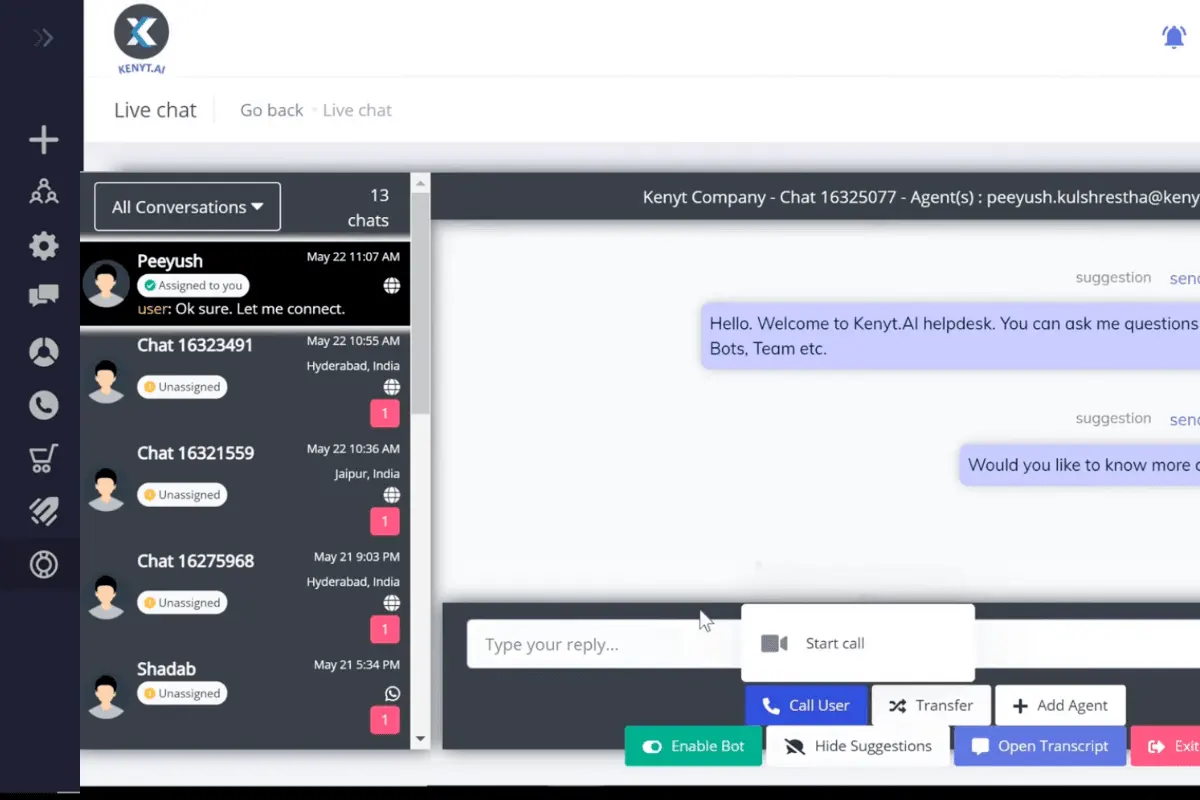
- Customer Support Automation. The platform integrates automated responses for common customer queries. This reduces response time and provides consistent support.
- Analytics and Reporting. Kenyt.AI provides in-depth analytics on chatbot performance, including engagement rates and response effectiveness.
Benefits of Using Kenyt.AI
Kenyt.AI offers numerous advantages to businesses looking to improve customer engagement and streamline operations. This section will highlight the key benefits of using Kenyt.AI, as discussed in our Kenyt.AI review, to help you understand its real-world impact on business performance.
Higher Sales Conversion
The platform has been proven to increase sales conversions by up to 50% through automated conversations. This feature enables customers to receive personalized product recommendations in real time. This can move them closer to purchasing by simplifying their decision-making process.
Cost-Effective Customer Support
By analyzing data for this Kenyt.AI review, we learned that the platform’s chatbots automate routine customer inquiries to reduce the need for a large customer support team. A healthcare provider can free up support staff for more complex cases with the tools’ AI provision of faster responses to appointment queries.
Improved Customer Experience
With the high accuracy rate of Kenyt.AI’s AI engine, customers experience smoother and more relevant interactions. A visitor to a restaurant's website could book a table instantly via a chatbot. This can improve their overall experience.
Enhanced Operational Efficiency
Kenyt.AI automates repetitive tasks, such as appointment bookings or order processing. Our Kenyt.AI review confirms that this allows employees to focus on more strategic initiatives. This could benefit a real estate company by allowing agents to spend more time closing deals rather than handling administrative tasks.
Increased Lead Quality
By using optimized conversation flows, Kenyt.AI not only captures more leads but also ensures they are qualified. A real estate company can qualify leads by asking the right questions upfront. This ensures sales teams focus on the most promising opportunities.
Scalable Solutions for Growing Businesses
While researching for this Kenyt.AI review, we can say that the platform can grow with your business by offering scalable AI solutions that adapt as your customer engagement needs evolve. A fast-growing e-commerce store can expand its chatbot functionality across multiple platforms as it increases its product offering. This way, there will be consistent service as it scales.
What business types use Kenyt.AI?
Kenyt.AI is great for businesses of various sizes, including small, mid-sized, and large enterprises, particularly those in customer-centric industries. Its no-code platform and robust AI capabilities make it well-suited for businesses that want to enhance customer engagement without requiring heavy technical expertise. Industries such as eCommerce, healthcare, education, real estate, and restaurants benefit from Kenyt.AI’s conversational bots for lead capture, sales conversion, and customer support. The platform’s multilingual support and omnichannel reach make it a perfect choice for businesses with global or diverse customer bases.
Similar to what other Kenyt.AI reviews found, we learned that the platform may not be the best fit for businesses in highly specialized or niche industries that require extremely custom solutions or advanced AI integrations. Companies in highly technical fields, such as complex manufacturing or aerospace, may find Kenyt.AI’s workflows and chatbot templates too generalized to address their unique needs. Moreover, very small businesses or startups with minimal customer interaction may not fully leverage the platform’s capabilities, making it an overinvestment for those without substantial customer engagement requirements.
Frequently Asked Questions (FAQs)
Kenyt.AI in 2026 stands out with its user-friendly deployment, advanced natural language processing, customizable chatbots, and comprehensive analytics dashboard. These features enhance customer experience, enabling seamless integration across various platforms while providing valuable insights into consumer behavior and interactions. **Question** What are Kenyt.AI's pricing plans for 2026, and what features do they include? **Answer** Kenyt.AI offers tiered pricing plans in 2026, ranging from basic to enterprise. The basic plan includes chatbot deployment and basic analytics, while advanced tiers offer features like multi-channel support, enhanced customization, and detailed reporting for enterprise-level needs. **Question** What are the pros and cons of using Kenyt.AI in 2026? **Answer** In 2026, Kenyt.AI's pros include easy integration, robust customer support, and advanced analytics. However, its cons might involve a steep learning curve for advanced features and initial setup complexities for large enterprises. Overall, it provides significant value through powerful automation tools. **Question** How is Kenyt.AI rated by users for its performance and usability in 2026? **Answer** In 2026, users rate Kenyt.AI highly for its intuitive design, performance, and responsive customer service. Its usability is praised for reducing operational overhead through automation. While some users pointed out areas for improvement in feature depth, overall satisfaction remains commendable.
Kenyt.AI aids abandoned cart recovery by utilizing advanced chatbots to remind customers of their left-behind items. Through personalized messaging and timely follow-ups, Kenyt.AI re-engages customers, offering incentives like discounts to encourage them to complete their purchases, effectively enhancing eCommerce sales.
Kenyt.AI enhances the customer journey by providing seamless engagement across multiple channels, such as websites, social media, and messaging platforms. The AI-driven chatbots guide customers through personalized experiences, from product discovery to post-purchase support. Its omnichannel support ensures customers receive consistent interactions, regardless of their chosen platform.


