
7 Best Word Cloud Generator Tools for School and Work for 2027

Co-Founder and Chief Data Scientist
7 Best Word Cloud Generator Tools for School and Work for 2027 Table of Contents
List of Word Cloud Generator Tools
Top Word Cloud Generators
Word cloud generator tools are not as widely used today, having reached peak popularity sometime after 2015 (Temple, 2019). However, word clouds still serve a wide variety of purposes, so one can still find many of these tools online. For one, these tools make it easy to visualize text.
This article explores the features of the best word cloud generator so you can figure out which tool can best help you create the word clouds you need. To test the usability of these tools, we generated word clouds from popular speeches and poems. We’ve also considered additional functions such as input options, file format outputs, and sharing options.
A popular visual representation tool for textual data, a word cloud is commonly used for visualizing free-form text or for depicting keyword data on web pages (Ahuja & Shakeel, 2017). Word clouds can be used for a variety of purposes. In business, one can make word clouds out of client or employee surveys like performance review comments as an aid for analytics. In politics, it can be used to analyze recurring themes in a speech (Boost Labs, 2014). In the academe, it is commonly used as a teaching tool for helping develop students’ vocabulary (Peachey, 2020).
Originally, word cloud generating software apps were meant to help enhance the visual quality of websites, slide show presentations, online posters, etc. (Filatova, 2016). Later on, they became known for providing users with a quick and intuitive appreciation of textual content, especially with the emergence of Big Data. Thus, word clouds have become one of the most widely-used statistical tools for conducting visual analysis (Silva e Silva & Assunção, 2018). Thus, there have been studies conducted that delved into the impact of word clouds and the use of some of the best educational apps for kids on student skills and their effectiveness as a research tool.
To find out if word clouds impact critical thinking and engagement, researchers from the University of Central Florida conducted a survey of undergraduate students in a large public university in the United States. One group of students was asked to analyze two famous speeches using word clouds, while another used linear analysis. The findings showed that students using the word cloud had higher scores in engagement and critical thinking than those using linear analysis. A significant number of students from the word cloud group (71%) said that the speech activity promoted classmate interaction. In contrast, only 52% of students from the linear analysis group had the same response (deNoyelles & Reyes-Foster, 2015).
Attitudes of Students Towards a Word Cloud Speech Activity

Another study explored the viability of word clouds as a research tool. A group of students from The Chinese University of Hong Kong was asked whether or not they would use ebooks for learning. The researchers used a variety of instruments, such as questionnaires, interviews, focus-group meetings, and more to gather student comments. A smaller group of students then used ebooks for 12 weeks and kept an online diary of their experience. Word clouds of their journal entries were then generated via Wordle. The researchers found that the word clouds roughly validated the survey results they had done earlier.
In addition, it gave them insights into the underlying reasons why students like or do not like ebooks. They concluded by saying that word clouds are helpful tools for conducting preliminary analysis and validating previous findings. However, they cautioned that it has limitations, including the simplistic treatment of word forms and insufficient information about the context in which the words were used (McNaught & Lam, 2010).
The path paved by word cloud generators has helped in the development of similar technologies that many organizations currently use. For instance, an entrepreneur can sometimes rely on an AI company name generator when establishing a business.
Top Word Cloud Generators
1. Wordart
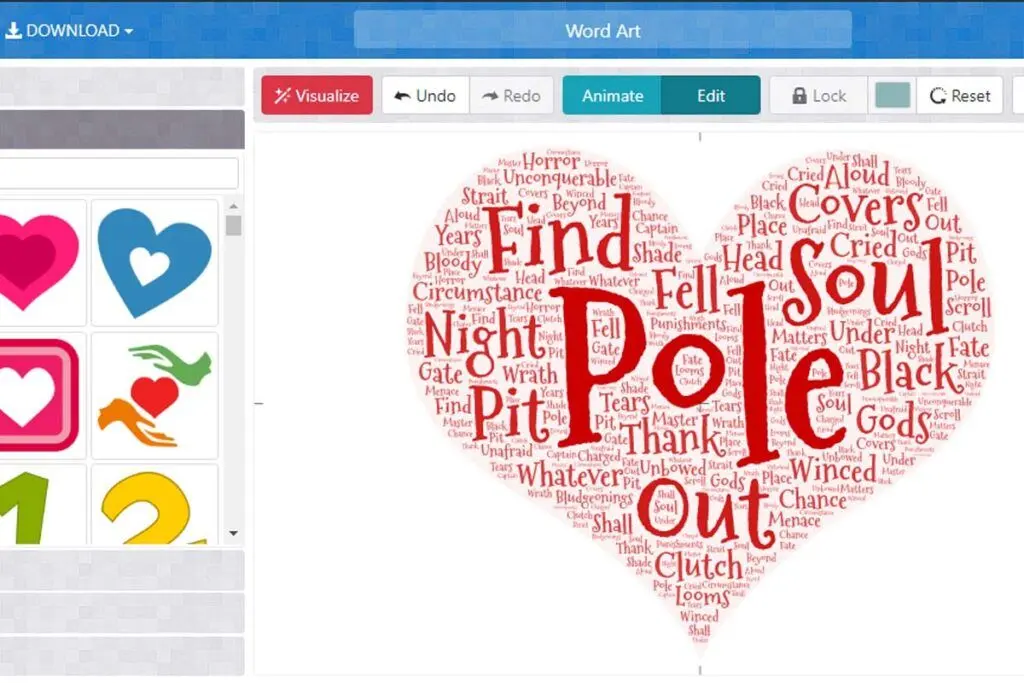
Wordart is an online word cloud maker that promises to help you make wonderful designs even without graphic design knowledge. It features an interface with collapsible formatting and design options and a workspace for your word cloud. Aside from copy and pasting text, you can input them in CSV format or pull words from a URL. You can make the font size of any word you choose bigger or smaller.
There are also a wide variety of shapes and fonts to choose from. It has filtering options to make searching for your preferred font or shape much quicker. The word art generator also allows users to add their own shapes and fonts. It’s even possible to add icons and emojis to your word cloud. Once done, you can share your design on Facebook, Twitter, or email. You can also embed it on a webpage. Word clouds can be downloaded as a PNG, JPEG, SVG, PDF, HTML, or CSV file.
2. WordClouds
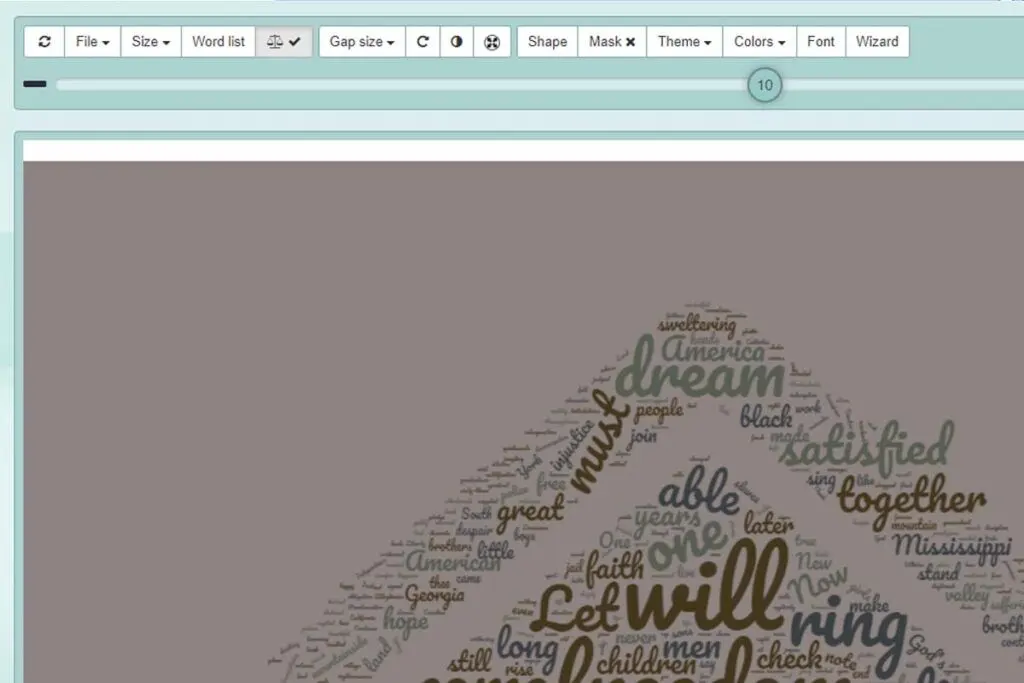
WordClouds is a free word cloud generator with a variety of customization options to make your word cloud one of a kind. It can pull words from a PDF file aside from text files, CSV files, URLs, or from the site’s copy and paste text box. You can control how the words appear by setting the gap size between words and their direction.
Meanwhile, you can make font sizes bigger or smaller with an easy-to-use slider that applies changes in real-time. It’s also possible to add links to the words. Word clouds can be formed into fun shapes, letters, or from an uploaded image. A color picker lets you apply a solid or gradient image to your background.
You can also make your own background out of a custom image. Choose from pre-set dimensions for your word cloud or set your own custom size. Once you’re done, you can download it as a JPG, PNG, or PDF file with an option to save it in high-definition (HD). In just a few clicks, you can share your word cloud art on Facebook, Twitter, or Pinterest.
You can also print your word cloud on a poster, framed print, or canvas. WordClouds has a partnership with CanvasPop, which allows you to order word cloud prints online. While it has a robust set of features, the user experience is not as smooth as other tools. With the way the workspace is laid out, you will have to scroll up and down to view the controls and your word cloud. This can be inconvenient when making lots of changes to your design. Overall, this is one of the best word cloud creator available today.
3. WordIt Out
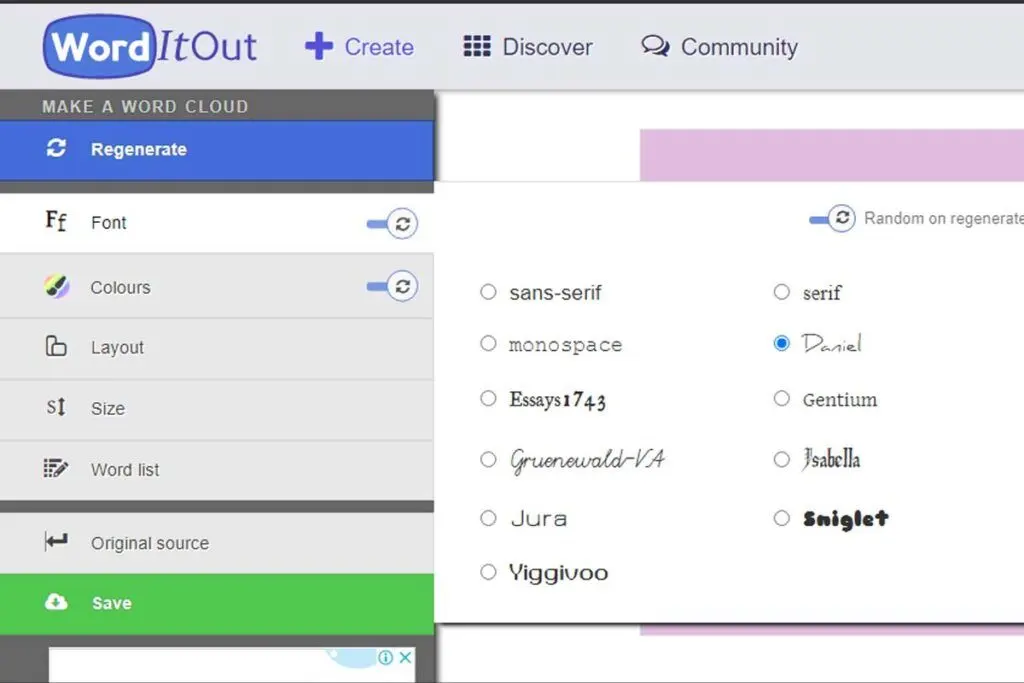
WordIt Out is another tool for creating word cloud art not only for academic purposes but also for personal use. This word cloud generator has a minimalist interface that you can quickly learn. To start with, you can make a word cloud by copy and pasting text or a spreadsheet after you have run your content through a plagiarism checker software. You can also create a word cloud without any words filtered. Like most word collage maker platforms, you can set the words into any font or color you like.
WordIt Out offers options for color variation, color blending methods, and number color limits, which other free tools do not have. You can also choose layout options, however, these are limited to selecting the orientation, aspect ratio, and word placement at the center. You can then save your word cloud with private or public access but you would have to provide your email address to get the design. If you want to keep a memento of your design, you can use Zazzle to have it professionally printed on a T-shirt, mug, or other surfaces.
4. ABCya!
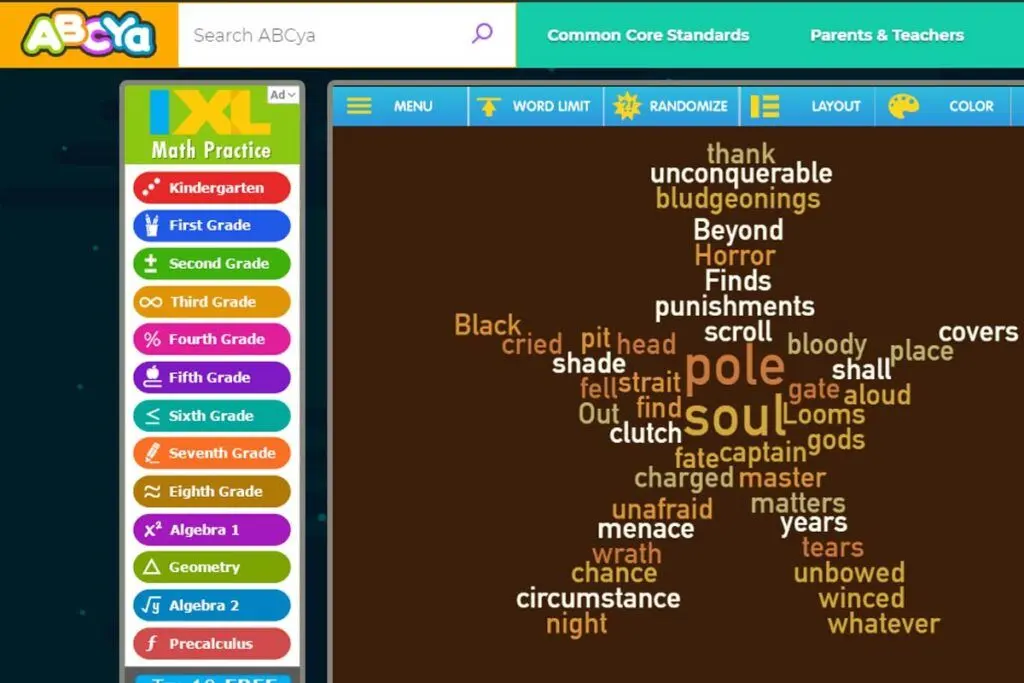
ABCya! is a word cloud generator for students from pre-K to sixth grade. The site features an easy to use and engaging interface that makes generating word clouds feel like play. You simply have to paste your copy in the text box and click Create to make your own word cloud. Once you input your text, you can use different buttons to add effects to your cloud. You can set word limits of 10 to 1,000 words for your cloud. The flexibility of this word bubble generator is great for creating word clouds for academic purposes, such as when brainstorming ideas for different types of abstract research papers.
Meanwhile, the randomize button will spontaneously change your cloud to other fonts, font colors, and shapes. On the other hand, the Layout button lets you pick from 10 different shapes. You can choose colors and fonts, though these are limited to 12 options, each with the free online tool. The word cloud you generated can be saved as a PNG file or printed as a PDF file. With the free plan, you can favorite up to three word clouds. With a Premium account, you can add unlimited favorites, view your word cloud in full screen, and more. A Premium Family plan starts at $5.83 per month billed annually, while a Premium Classroom account costs $25 per month.
5. TagCrowd
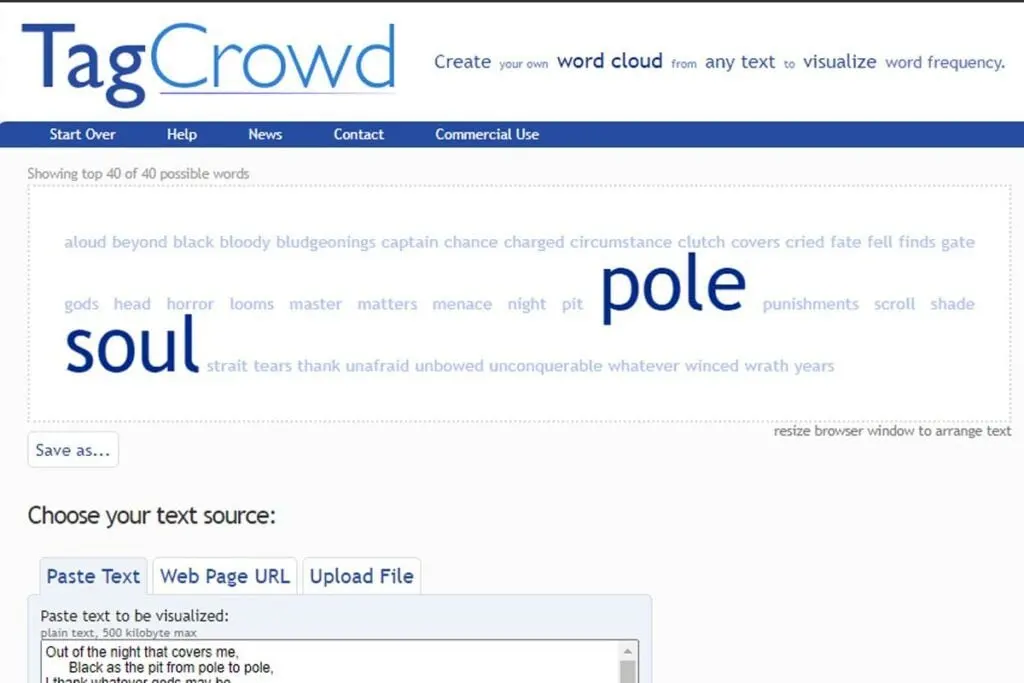
TagCrowd is another straightforward web app that helps you make word clouds for academic and business use. It allows students, for example, to easily generate tag clouds from any textual content through a simple copy-and-paste process (Mckee-Waddell, 2015).
The interface is rather simple if not outdated and offers a few options for text customization. Aside from pasting text or a web page URL to the site, you can also upload a plain text file within a 5 MB file size to generate a word cluster. This word map generator sets itself apart from different providers by having support for 15 languages.
It also offers some options to ensure the word cloud comes up exactly as you like. For instance, you can set a range for the number of words that will be shown or specify the minimum frequency for the least recurring words. You can also group together similar English words and exclude certain words from the cloud. With these features, this word cloud generator can come in handy for students looking to explore different types of writing.
The amount of text customization options are offset by the lack of options for the text layout. For instance, the only way to rearrange the text is to resize your browser window.
6. Monkeylearn WordCloud Generator
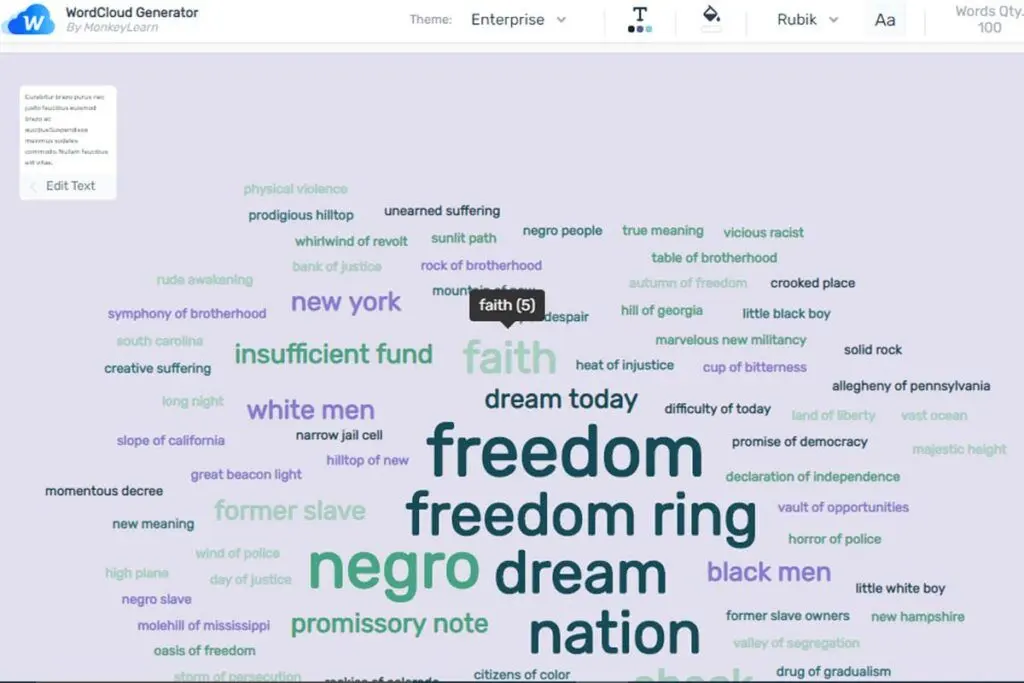
Monkeylearn WordCloud Generator is an easy-to-use tool with a neat and minimal user interface. Like most word cloud generators, it allows you to copy and paste text in a text box or upload a text file. However, what makes it different is that it also generates a list of the most relevant or frequently used words. You can see exactly how many times a word has been used in the cloud with a relevance score beside it.
MonkeyLearn offers a decent amount of customization tools. Dropper tools allow you to customize the text or background color to any hue you want. There are also dropdown options for themes and fonts, though the choices are rather limited. On the other hand, slider tools for changing the word quantity makes it easy to apply real-time changes to your word cloud. Once finished, you can download your word cloud as an SVG, PNG, or CSV file.
7. Jason Davies Word Cloud
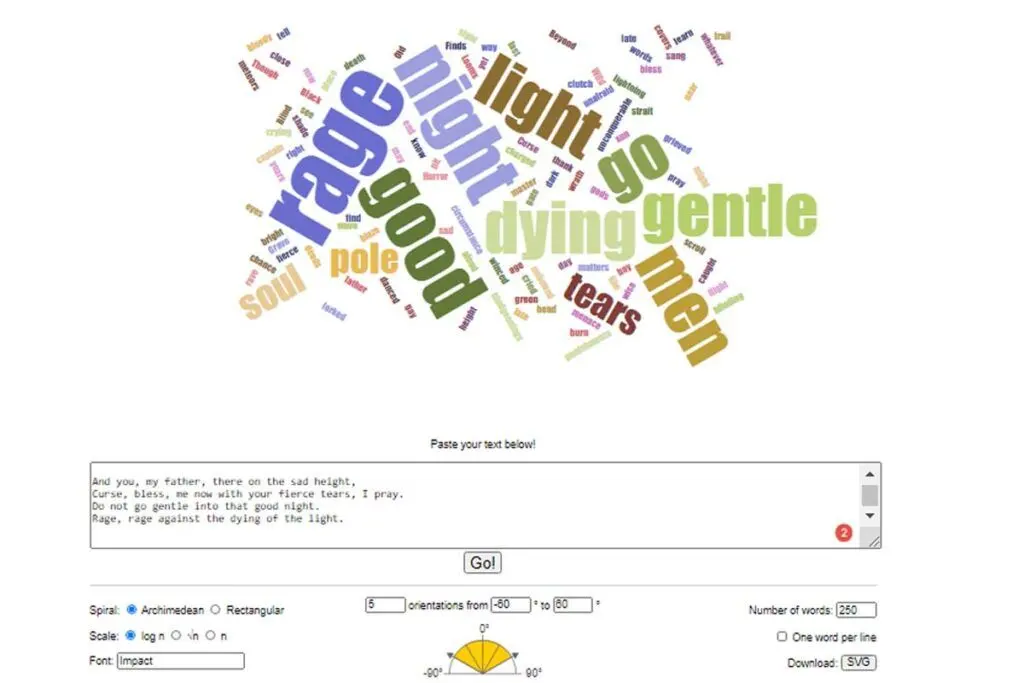
Jason Davies Word Cloud is a JavaScript-based tool that lets you visualize text data with a fuss-free interface. Unlike other word cloud app solutions that mainly focus on aesthetics, this version focuses on the mathematics behind word placement. For example, you can choose between Archimedian or rectangular layouts. Scale choices include log n, sqrt n, or n. You can control the orientation by changing the number and degrees from text boxes. One of the few non-mathematical options is the text-based field for putting in the font you like.
However, this is limited to commonly used fonts like Arial, Times New Roman, and the like. You can likewise control the number of words in your word cloud through a text box. On the other hand, a checkbox lets you display phrases or sentences in one line. The Jason Davis Word Cloud tool only allows for one method of generating a word cloud. You can only copy and paste text to a text box, unlike other word cloud tools that can import text from a PDF, CSV, or Word file. There are also no options to change the color or shape of the words.
8. AhaSlides
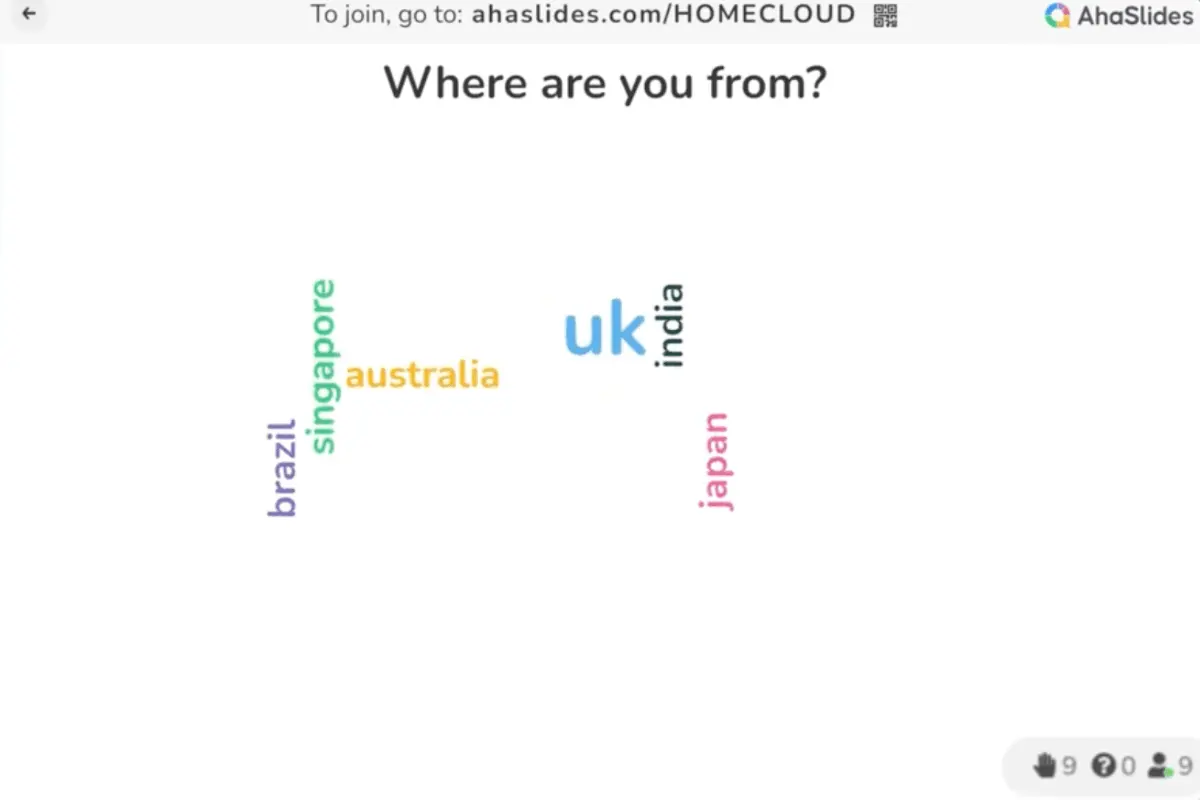
AhaSlides' Live Word Cloud Generator redefines audience engagement by prioritizing real-time interaction and dynamic content visualization over mere visual appeal. With AhaSlide, participants can instantly contribute responses from their devices to form a visually striking word cloud in live sessions. This intuitive approach, which is facilitated by effortless access via unique link codes or QR codes, enhances participation in presentations across classrooms, workshops, and virtual meetings. It also ensures accessibility without complex setups or additional software installations for smooth communication and collaboration.
Moreover, AhaSlides empowers presenters with extensive customization capabilities like personalizing word clouds with custom backgrounds, fonts, and colors. This improves the visual impact of data-driven discussions so that presentations are more compelling and memorable across various settings such as education, business, and events. Furthermore, AhaSlides promotes inclusive discussions and deepens understanding of lesson content by transforming audience feedback into actionable insights. With real-time updates, AhaSlides presenters can instantly visualize audience sentiments and feedback. This makes AhaSlides essential for workshops, conferences, and business meetings where quick insights support decision-making and collaboration are crucial.
How can word clouds be customized For specific use cases?
While word clouds are versatile tools, customizing them for specific purposes can enhance their effectiveness. Here are ways to tailor word clouds for different contexts:
- Adjusting font sizes and colors: Use color coding or font size variations to emphasize key terms or categories, enhancing focus on important words.
- Selecting appropriate shapes: Shapes can add context; for instance, a heart shape for customer feedback or a light bulb for brainstorming ideas adds visual relevance.
- Choosing relevant stop words: Filtering out common words (e.g., “the,” “and”) ensures that the most meaningful terms stand out, improving readability.
- Modifying word orientation: Varying the word orientation (horizontal, vertical, or angled) can create a dynamic, visually appealing design that grabs attention.
- Using thematic colors: Applying colors that align with branding or presentation themes ensures consistency and makes the word cloud more visually cohesive.
- Embedding interactive features: Some word cloud generators offer clickable words, allowing users to explore data more deeply by linking to related content or additional information.
Customizing word clouds this way allows users to tailor visuals to their goals, making them more impactful and engaging.
Using Survey Software to Enhance Word Cloud Analysis
Integrating survey software options with word cloud tools can significantly enhance the depth and accuracy of insights drawn from textual data. Surveys are an excellent way to gather structured responses, which can then be analyzed and visualized using word clouds. Here's how combining these technologies can improve your workflow:
1. Collecting Targeted Data for Word Clouds
Survey software can help capture specific, qualitative input from respondents. For instance, feedback on product satisfaction, customer service, or event experiences can be easily gathered and later processed into a word cloud for an at-a-glance summary of key themes.
- Example: A survey asking customers, "What do you value most about our service?" can generate text responses that, when visualized in a word cloud, highlight common sentiments like "reliability," "quality," or "speed."
2. Filtering Responses for Relevance
Most survey software options allow users to segment responses by demographics, geography, or other criteria. This ensures that only relevant data is fed into the word cloud generator, leading to a more focused visualization.
- Use Case: Filtering feedback by location can help visualize regional preferences or concerns in a business's offerings.
3. Enhancing Context with Metadata
Survey platforms often tag responses with metadata, such as timestamps, locations, or user demographics. Pairing this metadata with word clouds provides richer insights, enabling businesses to correlate word frequency with contextual factors.
- Use Case: Analyzing survey results by age group could reveal that younger audiences frequently mention "affordability," while older users highlight "durability."
4. Highlighting Trends Over Time
Regular surveys paired with word clouds can track changes in sentiment or priorities over time. This is especially useful for monitoring the effectiveness of new initiatives or products.
- Example: Quarterly customer satisfaction surveys can show whether terms like "improvement" or "frustration" increase or decrease in prominence.
5. Improving Visual Storytelling in Presentations
Survey results visualized as word clouds can enhance reports and presentations by transforming raw data into an engaging, digestible format. Key themes stand out instantly, making it easier for stakeholders to grasp insights.
How can word clouds improve visitor management experiences?
Organizations serving a high volume of visitors can benefit from leveraging real-time textual insights to refine operational flows. Analyzing open-ended feedback collected from reception areas or event check-ins generates a word cloud that highlights emerging visitor concerns and preferences. This visual summary enables decision makers to swiftly adjust visitor onboarding processes, improve service touchpoints, and address recurring issues. Integrating these visual cues with modern visitor management software further streamlines daily operations, ensuring that frontline teams are better equipped to enhance overall visitor satisfaction.
Key Insights
- Visualization of Text Data: Word cloud generators are valuable tools for visualizing textual data, making it easier to identify prominent themes and keywords within a body of text.
- Diverse Applications: Word clouds are used in various fields such as business, politics, and education to analyze data from surveys, speeches, and student activities.
- Engagement and Critical Thinking: Studies show that using word clouds can enhance student engagement and critical thinking compared to traditional linear analysis methods.
- Customization and Usability: The top word cloud generators offer varying levels of customization in terms of shapes, fonts, colors, and input methods, making them suitable for different user needs.
- Integration with Other Tools: Many word cloud generators can pull data from URLs, PDFs, and CSV files, and offer options to download or share the generated word clouds in various formats.
- Educational Value: Word cloud tools are especially beneficial in educational settings, helping students improve their vocabulary and engage more interactively with text analysis.
References:
- Ahuja, V., & Shakeel, M. (2017). Twitter presence of Jet Airways-deriving customer insights using netnography and wordclouds. Procedia Computer Science, 122, 17-24. https://doi.org/10.1016/j.procs.2017.11.336
- Boost Labs. (2014, September 8). Word clouds & the value of simple visualizations. Boost Labs.
- Denoyelles, Aimee & Reyes-Foster, Beatriz. (2015). Using word clouds in online discussions to support critical thinking and engagement. Online Learning Journal, 19. http://dx.doi.org/10.24059/olj.v19i4.528
- Filatova, O. (2016). More than a word cloud. TESOL Journal, 7 (2), 438-448. https://doi.org/10.1002/tesj.251
- Mckee-Waddell, S. (2015). Digital literacy: Bridging the gap with digital writing tools. Delta Kappa Gamma Bulletin, 82 (1), 26-31. Proquest
- McNaught, C., & Lam, P. (2010). Using Wordle as a supplementary research tool. The Qualitative Report, 15 (3), 630-643. https://nsuworks.nova.edu/tqr/vol15/iss3/8
- Peachey, N. (2020, March 19). Tech tools for teachers: Word clouds. Macmillan Education.
- Silva e Silva, L.G., & Assunção, R.M. (2018). COWORDS: a probabilistic model for multiple word clouds. Journal of Applied Statistics, 45 (15), 2697-2717. https://doi.org/10.1080/02664763.2018.1435633
- Temple, S. (2019, May 13). Word clouds are lame. Towards Data Science.
Other Things You Should Know About The Best Word Cloud Generator Tools for School and Work
The top word cloud generators for school and work in 2026 include WordClouds.com for its user-friendly interface, Tagxedo for custom shapes, WordArt.com for advanced style options, WordItOut for phrase highlighting, ABCya for educational games, TagCrowd for simplicity, and Jason Davies' word cloud for unique layouts.
Word clouds can be used in education to enhance vocabulary development, promote engagement and critical thinking, and provide a visual summary of textual data. They can be integrated into classroom activities to make learning more interactive and visually appealing.
When choosing a word cloud generator for school and work in 2026, consider tools with intuitive interfaces, customizable designs, and support for multiple languages. Additionally, look for generators offering diverse export formats, real-time collaboration capabilities, and integration with educational and productivity platforms to enhance utility.
Yes, several free word cloud generators are available, including Wordart, WordClouds, Word It Out, ABCya!, TagCrowd, MonkeyLearn WordCloud Generator, and Jason Davies Word Cloud. These tools offer various features and customization options to suit different needs.
Yes, word clouds can be used for academic research to provide a visual summary of qualitative data, validate survey results, and identify key themes in research findings. However, they should be used as a supplementary tool alongside more comprehensive analysis methods.
Some word cloud generators, like TagCrowd, support multiple languages and can generate word clouds from text in various languages. Users should check the language support of the specific tool they are using to ensure it meets their needs.
Word clouds can typically be exported in various formats such as PNG, JPEG, SVG, PDF, and CSV. This allows users to easily share and incorporate word clouds into presentations, reports, and other documents.


