
SAP Sales Cloud vs Zoho CRM – 2027 Comparison

Co-Founder and Chief Data Scientist
SAP Sales Cloud vs Zoho CRM Comparison Table of Contents
- What is SAP Sales Cloud?
- Who is SAP Sales Cloud for?
- Key Benefits of SAP Sales Cloud
- What is Zoho CRM?
- Who is Zoho CRM for?
- Key Benefits of Zoho CRM
- Who are SAP Sales Cloud and Zoho CRM best for?
- SAP Sales Cloud vs Zoho CRM Feature Comparison
- SAP Sales Cloud vs Zoho CRM Pricing
- SAP Sales Cloud Pros and Cons
- Zoho CRM Pros and Cons
- How do SAP Sales Cloud and Zoho CRM support sales team collaboration and productivity?
- Integration Capabilities of SAP Sales Cloud and Zoho CRM
- Verdict – SAP Sales Cloud vs Zoho CRM: Which software is better?
- How do SAP Sales Cloud and Zoho CRM ensure data security and compliance?
What is SAP Sales Cloud?
SAP Sales Cloud is a comprehensive customer relationship management (CRM) solution designed to streamline and enhance sales processes. It offers a complete suite of tools and functionalities that empower businesses to manage their sales activities efficiently. At its core, SAP Sales Cloud focuses on optimizing sales performance, driving revenue growth, and fostering more robust customer relationships. It integrates various sales functions, from lead management and opportunity tracking to sales forecasting and performance analytics, all within a unified platform.
One of the key features of SAP Sales Cloud is its ability to centralize customer data, providing a 360-degree view of customer interactions and preferences. This holistic view enables sales teams to personalize their approaches, tailor offerings, and deliver customers a more engaging and relevant experience. Moreover, the platform leverages advanced analytics and AI-driven insights to provide valuable intelligence, aiding sales representatives in making informed decisions and prioritizing their efforts effectively.
SAP Sales Cloud emphasizes collaboration and mobility, enabling teams to work seamlessly across channels and devices. Through its user-friendly interface and mobile accessibility, sales professionals can access critical information on the go, collaborate with team members, and respond promptly to customer needs.
Featured CRM Software Products

$9 to $150/user/month
Yes, up to 2 users
E-signature software, call transcription, conversation routing
Editor's Take
HubSpot CRM is a powerful customer relationship management platform designed to help businesses manage their sales, marketing, and customer service efforts in one centralized place. Its user-friendly interface allows teams to track leads, monitor customer interactions, and automate sales pipelines. With built-in tools for email marketing, contact management, and analytics, HubSpot CRM provides deep insights into customer behavior and sales performance. The platform also supports seamless collaboration between marketing and sales teams through real-time updates and integrations with tools like Gmail, Outlook, and Slack. Additionally, its automation features help reduce manual tasks, enabling teams to focus on building relationships and closing deals. HubSpot CRM is scalable, making it ideal for businesses of all sizes, from startups to large enterprises.
Expert Score
In evaluating SaaS software, a comprehensive and structured methodology ensures a fair and accurate comparison across key metrics. This approach focuses on the most critical aspects that affect user experience, functionality, and business value. The following metrics—general features, cost, customer service, integrations, and mobile support—are evaluated to provide a holistic view of each software solution’s strengths and weaknesses. These metrics are selected based on their direct impact on software usability, scalability, and long-term effectiveness for businesses.
1. General Features - scoring weight 40%
This metric evaluates the core functionalities and tools the software offers. It involves assessing the comprehensiveness of the features, their relevance to the target users, and the ease of use. This is important because robust and well-designed features determine the software's overall utility and efficiency in solving user problems.
2. Cost - scoring weight 15%
Cost analysis focuses on pricing models, value for money, and scalability. It's crucial to evaluate whether the software’s features justify its price, considering different plans for small and large organizations. This is vital for businesses to ensure they invest in cost-effective solutions that fit their budget.
3. Customer Service - scoring weight 15%
This evaluates the responsiveness, quality, and availability of customer support, including channels like chat, email, or phone. Good customer service is essential for troubleshooting and ensuring smooth software usage, which reduces downtime and frustration for users.
4. Integrations - scoring weight 15%
This examines how well the software integrates with third-party tools (e.g., CRM, payment systems, collaboration apps). Seamless integrations are key for creating a unified workflow and enhancing productivity by connecting multiple systems, which is crucial for operational efficiency.
5. Mobile Support - scoring weight 15%
Mobile support assesses the software’s functionality and performance on mobile devices, including apps and mobile web versions. With increasing remote work and on-the-go usage, strong mobile support is critical to ensure users can access and utilize the software effectively, regardless of location.

Custom
No
Sales automation, customer service, marketing
Editor's Take
NetSuite CRM is a comprehensive customer relationship management solution designed to support businesses in managing their entire customer lifecycle. It offers a full suite of tools for sales automation, customer service, marketing, and partner management, helping teams improve efficiency and build stronger customer relationships. With real-time visibility into customer interactions, NetSuite CRM enables businesses to track leads, manage opportunities, and forecast sales accurately. Its built-in analytics and reporting features provide deep insights into sales performance and customer behavior. NetSuite CRM integrates seamlessly with NetSuite’s enterprise resource planning (ERP) system, offering a unified platform for managing business operations. This scalability and flexibility make it ideal for growing businesses and enterprises seeking an all-in-one solution for customer relationship management.
Expert Score
In evaluating SaaS software, a comprehensive and structured methodology ensures a fair and accurate comparison across key metrics. This approach focuses on the most critical aspects that affect user experience, functionality, and business value. The following metrics—general features, cost, customer service, integrations, and mobile support—are evaluated to provide a holistic view of each software solution’s strengths and weaknesses. These metrics are selected based on their direct impact on software usability, scalability, and long-term effectiveness for businesses.
1. General Features - scoring weight 40%
This metric evaluates the core functionalities and tools the software offers. It involves assessing the comprehensiveness of the features, their relevance to the target users, and the ease of use. This is important because robust and well-designed features determine the software's overall utility and efficiency in solving user problems.
2. Cost - scoring weight 15%
Cost analysis focuses on pricing models, value for money, and scalability. It's crucial to evaluate whether the software’s features justify its price, considering different plans for small and large organizations. This is vital for businesses to ensure they invest in cost-effective solutions that fit their budget.
3. Customer Service - scoring weight 15%
This evaluates the responsiveness, quality, and availability of customer support, including channels like chat, email, or phone. Good customer service is essential for troubleshooting and ensuring smooth software usage, which reduces downtime and frustration for users.
4. Integrations - scoring weight 15%
This examines how well the software integrates with third-party tools (e.g., CRM, payment systems, collaboration apps). Seamless integrations are key for creating a unified workflow and enhancing productivity by connecting multiple systems, which is crucial for operational efficiency.
5. Mobile Support - scoring weight 15%
Mobile support assesses the software’s functionality and performance on mobile devices, including apps and mobile web versions. With increasing remote work and on-the-go usage, strong mobile support is critical to ensure users can access and utilize the software effectively, regardless of location.

$25 per user per month
14 days
marketing automation, sales automation, no code customization
Editor's Take
CRM Creatio is a comprehensive customer relationship management (CRM) solution designed to streamline and enhance business processes across sales, marketing, and customer service functions. Known for its low-code platform, Creatio allows businesses to customize and automate workflows without requiring extensive technical expertise. This adaptability makes it particularly appealing to organizations seeking to align the software with their specific needs.
The platform's marketing module provides tools for multi-channel campaign management, lead generation, and personalized customer engagement. Its sales module offers functionality for pipeline management, opportunity tracking, and analytics to help teams close deals more efficiently. Additionally, the customer service module supports case management, service level agreement (SLA) monitoring, and omnichannel communication, enabling businesses to provide exceptional customer support.
Creatio stands out with its intuitive interface, robust analytics, and AI-powered tools that provide actionable insights. The low-code development tools allow non-technical users to create applications and automate processes, reducing the dependency on IT teams. Integration capabilities with other software platforms and APIs enhance its utility, making it a versatile choice for businesses of all sizes.
Overall, CRM Creatio is a powerful solution that combines user-friendly design with advanced customization and automation features. Its adaptability and low-code foundation position it as a strong contender for organizations looking to optimize customer relationship management processes while maintaining flexibility for growth and innovation.
Expert Score
In evaluating SaaS software, a comprehensive and structured methodology ensures a fair and accurate comparison across key metrics. This approach focuses on the most critical aspects that affect user experience, functionality, and business value. The following metrics—general features, cost, customer service, integrations, and mobile support—are evaluated to provide a holistic view of each software solution’s strengths and weaknesses. These metrics are selected based on their direct impact on software usability, scalability, and long-term effectiveness for businesses.
1. General Features - scoring weight 40%
This metric evaluates the core functionalities and tools the software offers. It involves assessing the comprehensiveness of the features, their relevance to the target users, and the ease of use. This is important because robust and well-designed features determine the software's overall utility and efficiency in solving user problems.
2. Cost - scoring weight 15%
Cost analysis focuses on pricing models, value for money, and scalability. It's crucial to evaluate whether the software’s features justify its price, considering different plans for small and large organizations. This is vital for businesses to ensure they invest in cost-effective solutions that fit their budget.
3. Customer Service - scoring weight 15%
This evaluates the responsiveness, quality, and availability of customer support, including channels like chat, email, or phone. Good customer service is essential for troubleshooting and ensuring smooth software usage, which reduces downtime and frustration for users.
4. Integrations - scoring weight 15%
This examines how well the software integrates with third-party tools (e.g., CRM, payment systems, collaboration apps). Seamless integrations are key for creating a unified workflow and enhancing productivity by connecting multiple systems, which is crucial for operational efficiency.
5. Mobile Support - scoring weight 15%
Mobile support assesses the software’s functionality and performance on mobile devices, including apps and mobile web versions. With increasing remote work and on-the-go usage, strong mobile support is critical to ensure users can access and utilize the software effectively, regardless of location.

$8/per user/per month
Yes
customizable dashboards, automated follow-ups, advanced analytics
Editor's Take
monday.com Sales CRM is a customizable platform designed to streamline sales processes, enhance team collaboration, and improve pipeline visibility. Its intuitive interface enables users to manage leads, track deals, and automate repetitive tasks with ease. The CRM integrates seamlessly with popular tools like Gmail, Slack, and HubSpot, ensuring a centralized workflow. Features like customizable dashboards, automated follow-ups, and advanced analytics help sales teams stay organized and focused on closing deals. With scalability in mind, monday.com caters to businesses of all sizes, offering flexible pricing plans and robust customer support. It’s an excellent choice for teams seeking efficiency and adaptability.
Expert Score
In evaluating SaaS software, a comprehensive and structured methodology ensures a fair and accurate comparison across key metrics. This approach focuses on the most critical aspects that affect user experience, functionality, and business value. The following metrics—general features, cost, customer service, integrations, and mobile support—are evaluated to provide a holistic view of each software solution’s strengths and weaknesses. These metrics are selected based on their direct impact on software usability, scalability, and long-term effectiveness for businesses.
1. General Features - scoring weight 40%
This metric evaluates the core functionalities and tools the software offers. It involves assessing the comprehensiveness of the features, their relevance to the target users, and the ease of use. This is important because robust and well-designed features determine the software’s overall utility and efficiency in solving user problems.
2. Cost - scoring weight 15%
Cost analysis focuses on pricing models, value for money, and scalability. It’s crucial to evaluate whether the software’s features justify its price, considering different plans for small and large organizations. This is vital for businesses to ensure they invest in cost-effective solutions that fit their budget.
3. Customer Service - scoring weight 15%
This evaluates the responsiveness, quality, and availability of customer support, including channels like chat, email, or phone. Good customer service is essential for troubleshooting and ensuring smooth software usage, which reduces downtime and frustration for users.
4. Integrations - scoring weight 15%
This examines how well the software integrates with third-party tools (e.g., CRM, payment systems, collaboration apps). Seamless integrations are key for creating a unified workflow and enhancing productivity by connecting multiple systems, which is crucial for operational efficiency.
5. Mobile Support - scoring weight 15%
Mobile support assesses the software’s functionality and performance on mobile devices, including apps and mobile web versions. With increasing remote work and on-the-go usage, strong mobile support is critical to ensure users can access and utilize the software effectively, regardless of location.

$7 per user per month billed annually
15 days
lead generation, sales pipeline management, workflow automation
Editor's Take
Zoho CRM is a flexible and comprehensive customer relationship management platform designed to help businesses manage and grow their customer relationships effectively. With tools for lead generation, sales pipeline management, workflow automation, and analytics, Zoho CRM is suitable for businesses of all sizes across a variety of industries.
Zoho CRM enables teams to streamline sales processes by capturing leads from multiple channels, tracking interactions, and managing every stage of the sales cycle. The platform offers customizable dashboards and reports, providing insights into sales performance and customer behaviors to help make data-driven decisions. With powerful automation features, Zoho CRM allows businesses to set up workflows for routine tasks like follow-ups, lead scoring, and email notifications, reducing manual work and enhancing productivity. The platform integrates with popular tools, including the Zoho suite, Microsoft 365, and G Suite, enabling a seamless connection across teams.
For businesses aiming to improve customer engagement, close deals faster, and enhance team collaboration, Zoho CRM delivers a scalable, user-friendly solution to drive sales and customer satisfaction.
Expert Score
In evaluating SaaS software, a comprehensive and structured methodology ensures a fair and accurate comparison across key metrics. This approach focuses on the most critical aspects that affect user experience, functionality, and business value. The following metrics—general features, cost, customer service, integrations, and mobile support—are evaluated to provide a holistic view of each software solution’s strengths and weaknesses. These metrics are selected based on their direct impact on software usability, scalability, and long-term effectiveness for businesses.
1. General Features - scoring weight 40%
This metric evaluates the core functionalities and tools the software offers. It involves assessing the comprehensiveness of the features, their relevance to the target users, and the ease of use. This is important because robust and well-designed features determine the software's overall utility and efficiency in solving user problems.
2. Cost - scoring weight 15%
Cost analysis focuses on pricing models, value for money, and scalability. It's crucial to evaluate whether the software’s features justify its price, considering different plans for small and large organizations. This is vital for businesses to ensure they invest in cost-effective solutions that fit their budget.
3. Customer Service - scoring weight 15%
This evaluates the responsiveness, quality, and availability of customer support, including channels like chat, email, or phone. Good customer service is essential for troubleshooting and ensuring smooth software usage, which reduces downtime and frustration for users.
4. Integrations - scoring weight 15%
This examines how well the software integrates with third-party tools (e.g., CRM, payment systems, collaboration apps). Seamless integrations are key for creating a unified workflow and enhancing productivity by connecting multiple systems, which is crucial for operational efficiency.
5. Mobile Support - scoring weight 15%
Mobile support assesses the software’s functionality and performance on mobile devices, including apps and mobile web versions. With increasing remote work and on-the-go usage, strong mobile support is critical to ensure users can access and utilize the software effectively, regardless of location.

By quote
Yes
Lead Management, Contact Management, Workflow Automation
Editor's Take
Salesforce CRM is a leading customer relationship management platform known for its robust functionality, scalability, and extensive customization options, making it suitable for businesses of all sizes, from startups to large enterprises. Built to streamline sales, marketing, customer service, and analytics, Salesforce CRM empowers teams to manage customer interactions, optimize workflows, and drive growth from a single, cloud-based platform.
Salesforce CRM provides a complete view of customer data, enabling teams to track interactions, manage leads, and automate tasks throughout the sales pipeline. With powerful tools for reporting and analytics, Salesforce offers insights into sales performance, customer trends, and campaign effectiveness, allowing teams to make data-driven decisions. The platform’s automation capabilities reduce manual workloads with customizable workflows, automated follow-ups, and lead scoring, ensuring a smooth customer journey. Integrations with thousands of third-party applications, along with its own suite of services, make Salesforce a highly adaptable solution for businesses looking to connect their CRM with other tools.
For organizations focused on enhancing customer engagement, improving team efficiency, and scaling their operations, Salesforce CRM delivers a powerful and versatile solution tailored to support long-term business growth.
Expert Score
In evaluating SaaS software, a comprehensive and structured methodology ensures a fair and accurate comparison across key metrics. This approach focuses on the most critical aspects that affect user experience, functionality, and business value. The following metrics—general features, cost, customer service, integrations, and mobile support—are evaluated to provide a holistic view of each software solution’s strengths and weaknesses. These metrics are selected based on their direct impact on software usability, scalability, and long-term effectiveness for businesses.
1. General Features - scoring weight 40%
This metric evaluates the core functionalities and tools the software offers. It involves assessing the comprehensiveness of the features, their relevance to the target users, and the ease of use. This is important because robust and well-designed features determine the software's overall utility and efficiency in solving user problems.
2. Cost - scoring weight 15%
Cost analysis focuses on pricing models, value for money, and scalability. It's crucial to evaluate whether the software’s features justify its price, considering different plans for small and large organizations. This is vital for businesses to ensure they invest in cost-effective solutions that fit their budget.
3. Customer Service - scoring weight 15%
This evaluates the responsiveness, quality, and availability of customer support, including channels like chat, email, or phone. Good customer service is essential for troubleshooting and ensuring smooth software usage, which reduces downtime and frustration for users.
4. Integrations - scoring weight 15%
This examines how well the software integrates with third-party tools (e.g., CRM, payment systems, collaboration apps). Seamless integrations are key for creating a unified workflow and enhancing productivity by connecting multiple systems, which is crucial for operational efficiency.
5. Mobile Support - scoring weight 15%
Mobile support assesses the software’s functionality and performance on mobile devices, including apps and mobile web versions. With increasing remote work and on-the-go usage, strong mobile support is critical to ensure users can access and utilize the software effectively, regardless of location.
Who is SAP Sales Cloud for?
In our comparison between SAP Sales Cloud vs Zoho CRM, we found that SAP Sales Cloud is tailored for medium to large enterprises seeking an all-encompassing CRM solution across various industries. It caters to businesses with complex sales processes, diverse product lines, and extensive customer bases. The platform is ideal for companies aiming to consolidate their sales operations, leverage actionable insights from data analytics, and enhance collaboration among sales teams. With its scalability and flexibility, SAP Sales Cloud is particularly suitable for organizations that require a high degree of customization and integration capabilities within their existing business systems.
Key Benefits of SAP Sales Cloud
SAP Sales Cloud offers many advantages that streamline sales processes, foster customer engagement, and drive business growth. Here are some of its key benefits:
- Comprehensive sales functionality. SAP Sales Cloud provides end-to-end sales capabilities, from lead generation to deal closure and post-sales service. This comprehensive suite encompasses features such as sales automation, opportunity management, quote and order management, and payroll software for payroll service providers. By consolidating these functions within a single platform, businesses can streamline their sales processes, reduce manual efforts, and ensure a consistent customer experience throughout the sales journey.
- Data-driven insights and analytics. One of the standout features of SAP Sales Cloud is its robust analytics and reporting tools. It leverages advanced analytics to derive actionable insights from vast sales data. Users can generate detailed reports, forecasts, and dashboards, enabling informed decision-making. These insights empower sales teams to identify trends, predict customer behavior, and optimize strategies to improve sales performance and drive revenue growth.
- Enhanced customer engagement. Personalization and customer-centricity are at the core of SAP Sales Cloud. The platform enables businesses to deliver personalized experiences by leveraging customer data and insights. It facilitates targeted marketing campaigns, recommends relevant products or services, and assists sales teams in understanding customer preferences. This tailored approach fosters stronger customer relationships, leading to increased satisfaction and loyalty.
What is Zoho CRM?
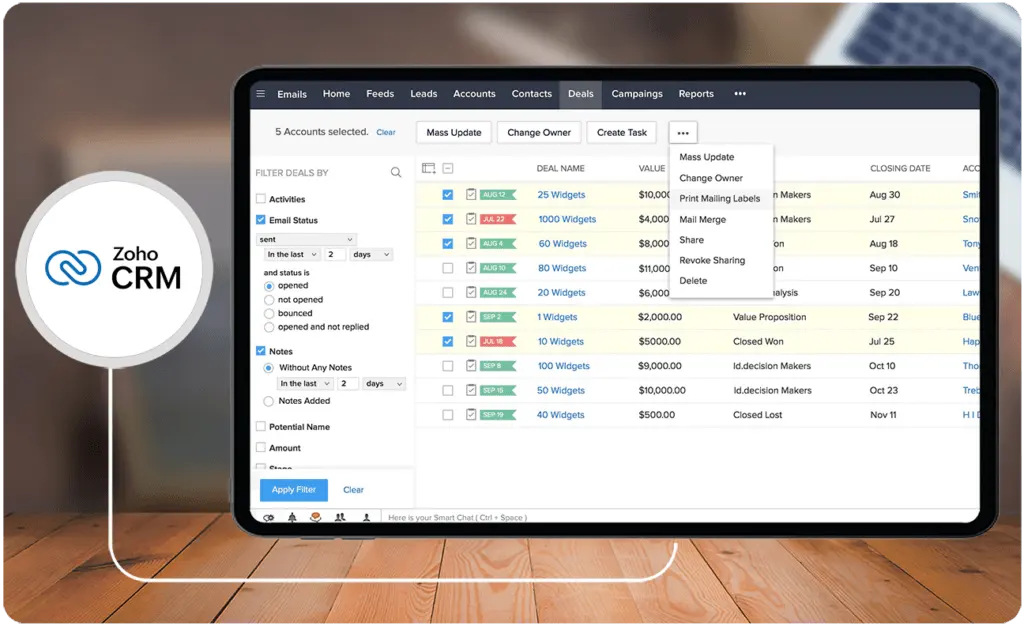
Zoho CRM is a robust and customizable CRM platform designed to empower businesses of various sizes across industries. It streamlines sales processes, improves customer interactions, and boosts overall productivity. It offers many features, including lead management, contact management, sales pipeline tracking, email marketing, analytics, and more.
One of the defining aspects of Zoho CRM is its scalability and flexibility. It caters to the diverse needs of businesses by providing customizable modules and workflows. This adaptability allows companies to tailor the CRM to their specific requirements, ensuring a personalized approach to managing customer relationships. Additionally, Zoho CRM integrates with various third-party applications and tools, enhancing its functionality and providing a more seamless experience for users.
Another standout feature of Zoho CRM is its emphasis on automation and artificial intelligence. The platform leverages AI to automate routine tasks, analyze data, and provide actionable insights. This automation saves sales teams time and helps identify trends, predict customer behavior, and optimize sales strategies. With its intuitive interface and extensive functionalities, Zoho CRM is a comprehensive solution for businesses seeking to elevate their sales and customer management processes.
Who is Zoho CRM for?
Zoho CRM caters to a broad spectrum of businesses, ranging from startups to small and medium enterprises. Its user-friendly interface and affordable pricing make it accessible to companies looking to enhance their sales efficiency and customer relationships without the complexity often associated with larger CRM solutions. Startups and growing businesses, in particular, find Zoho CRM appealing due to its ease of use and scalability. Additionally, its customizable modules allow businesses to tailor the CRM to suit their specific requirements, making it suitable for diverse industries and business models.
Key Benefits of Zoho CRM
Our SAP Sales Cloud vs Zoho CRM comparison revealed that Zoho CRM provides a comprehensive suite of tools spanning sales automation, marketing, customer support, and analytics, offering an all-encompassing solution for managing customers. Here are a few standout advantages it brings to the table:
- User-friendly interface and customization. Zoho CRM boasts an intuitive and user-friendly interface that allows for easy adoption and navigation. Its customizable modules empower businesses to tailor the CRM according to their specific needs, ensuring flexibility and adaptability. This feature makes it accessible to businesses without extensive technical expertise, enabling them to configure the CRM to align with their unique sales processes and workflows.
- Integration capabilities. The CRM solution integrates seamlessly with various third-party applications, such as ERP systems and your organization's construction management app, expanding its functionality and compatibility with other business tools. This integration capability enhances its versatility, allowing businesses to connect Zoho CRM with email marketing tools, accounting software, productivity suites, and more. This interoperability streamlines operations and data flow across different platforms, optimizing efficiency and productivity.
- Automation and workflow management. Zoho CRM offers robust automation features that enable businesses to automate repetitive tasks and streamline workflows. From lead management to follow-up actions, the platform automates processes, saving time and reducing manual effort. Workflow automation ensures consistency and efficiency in sales processes, enabling teams to focus on high-value tasks, thereby improving overall productivity.
Who are SAP Sales Cloud and Zoho CRM best for?
SAP Sales Cloud is more tailored for larger enterprises with stringent compliance needs and global operations that require a comprehensive and integrated CRM solution. It caters exceptionally well to large enterprises with complex sales processes, multiple product lines, and extensive customer bases. Its robust functionalities, scalability, and integration capabilities align with the needs of these organizations.
On the other hand, Zoho CRM caters well to smaller businesses, startups, and organizations emphasizing affordability, simplicity, and flexibility in their CRM implementation. Industries or businesses requiring quick deployment and adoption benefit from Zoho CRM's simplicity and ease of use. It suits organizations prioritizing swift setup without extensive training or IT support.
SAP Sales Cloud vs Zoho CRM Feature Comparison
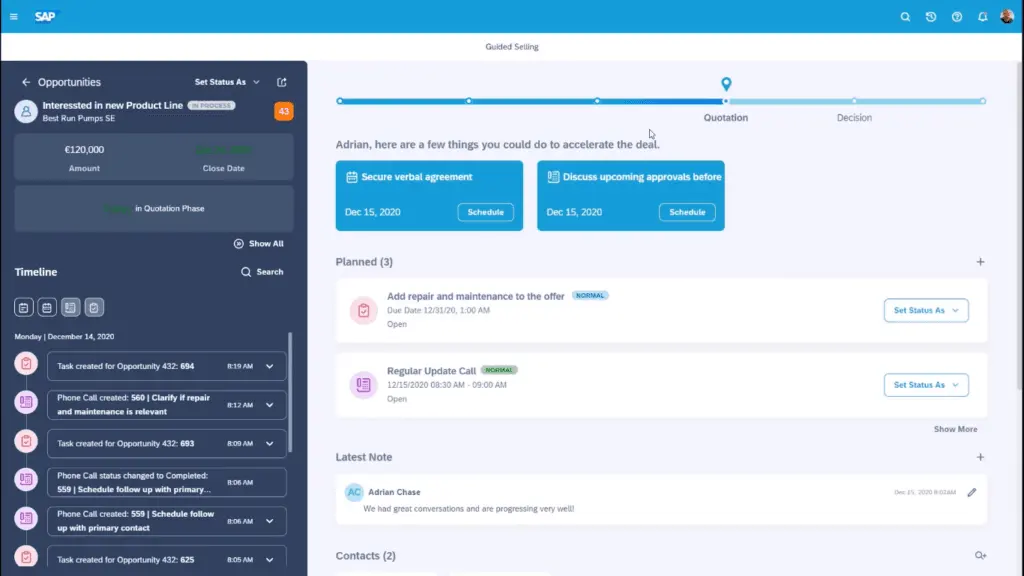
In the realm of customer relationship management (CRM) solutions, the choice between SAP Sales Cloud and Zoho CRM often arises, each offering unique features catering to diverse business needs. When considering the ideal CRM platform, weighing their functionalities becomes pivotal to align with specific organizational requirements. Here is a more detailed feature comparison of SAP Sales Cloud vs Zoho CRM.
Sales Automation
SAP Sales Cloud vs Zoho CRM present distinct approaches to sales automation. SAP Sales Cloud offers a comprehensive suite of sales automation tools catering to large enterprises, emphasizing intricate workflow customization and advanced AI-driven insights. Its strength lies in the complexity it accommodates, allowing businesses to create highly tailored automated workflows spanning the entire sales cycle. Leveraging predictive analytics, it empowers sales teams to forecast trends, anticipate customer behavior, and make informed decisions.
In contrast, Zoho CRM provides a user-friendly interface for sales automation, focusing on ease of use and simplicity. It offers decent automation capabilities suitable for small to mid-sized businesses, enabling users to streamline processes and automate routine tasks without complex configurations. While not as intricate as SAP Sales Cloud, Zoho CRM excels in delivering accessible automation features and intuitive tools for campaign management and team collaboration.
Ultimately, the choice between SAP Sales Cloud vs Zoho CRM in terms of sales automation hinges on the complexity of sales processes and the size of the business. SAP Sales Cloud is tailored for enterprises with intricate workflows and a need for advanced AI-driven insights. At the same time, Zoho CRM serves smaller businesses seeking straightforward yet effective sales automation solutions. Considerations include the level of customization required, the sophistication of analytics needed, and the organization's readiness for a more intricate or user-friendly system.
Pipeline Management
SAP Sales Cloud vs Zoho CRM differ in their approaches to pipeline management, catering to distinct business needs. SAP Sales Cloud stands out with its robust and highly customizable pipeline management capabilities, specifically designed for larger enterprises with intricate sales processes.
Also, it offers a detailed and flexible view of the sales pipeline, allowing for extensive customization and configuration to align with specific business requirements. This level of customization enables precise forecasting, strategic planning, and a granular understanding of the sales pipeline's health. Leveraging its integration within the SAP ecosystem, Sales Cloud seamlessly integrates data from various sources, providing a unified view for comprehensive pipeline analysis and management.
Conversely, Zoho CRM provides a more streamlined approach to pipeline management suitable for small to mid-sized businesses. It offers efficient pipeline tracking tools, enabling companies to monitor deals as they progress through different stages. It also provides insights into the overall pipeline health, aiding in sales forecasting and identifying potential bottlenecks.
Additionally, Zoho CRM's user-friendly interface simplifies pipeline management tasks, facilitating easier navigation and utilization for businesses with less complex sales processes. While it may lack the depth of customization and scalability seen in SAP Sales Cloud, Zoho CRM remains a solid choice for organizations seeking a straightforward and effective pipeline management solution.
Omnichannel Engagement
When it comes to SAP Sales Cloud vs Zoho CRM's omnichannel engagement capabilities, the former integrates various communication channels within its robust ecosystem. SAP Sales Cloud offers seamless interaction with customers across multiple touchpoints, ensuring consistency and personalization throughout the customer journey. Furthermore, its integration capabilities within the SAP ecosystem provide users with a unified platform that integrates data from various sources, enabling businesses to engage with customers effectively through email, social media, mobile, and other channels. As well, considering SAP Sales Cloud alternatives may be beneficial to find a solution that aligns more closely with specific business requirements.
On the other hand, Zoho CRM provides multichannel communication options for businesses aiming to enhance customer engagement. Although not as deeply integrated or comprehensive as SAP Sales Cloud, Zoho CRM offers tools to manage interactions across different channels within a centralized platform. It facilitates communication through email, social media, and other channels to consolidate customer interactions for efficient engagement. Zoho CRM's user-friendly interface streamlines interaction tracking and management, allowing businesses to maintain a level of consistency in communication and customer engagement across various touchpoints.
Sales Campaigns
SAP Sales Cloud provides an integrated suite of tools designed to create, execute, and precisely monitor targeted sales campaigns. It allows for the seamless design and execution of campaigns across various channels. Its integration within the SAP ecosystem facilitates comprehensive campaign management, enabling businesses to effectively align sales strategies and track campaign performance. With tools for campaign planning, execution, and analysis, Sales Cloud empowers enterprises to create personalized and targeted campaigns, fostering engagement and driving sales.
Likewise, Zoho CRM offers campaign management features suitable for businesses seeking user-friendly tools to manage sales campaigns. It provides practical campaign management functionalities, enabling users to design, execute, and track campaigns across different channels. Zoho CRM's straightforward interface simplifies campaign creation and management tasks, facilitating campaign tracking and analysis for businesses looking for a more accessible approach to campaign management.
Reporting and Analytics
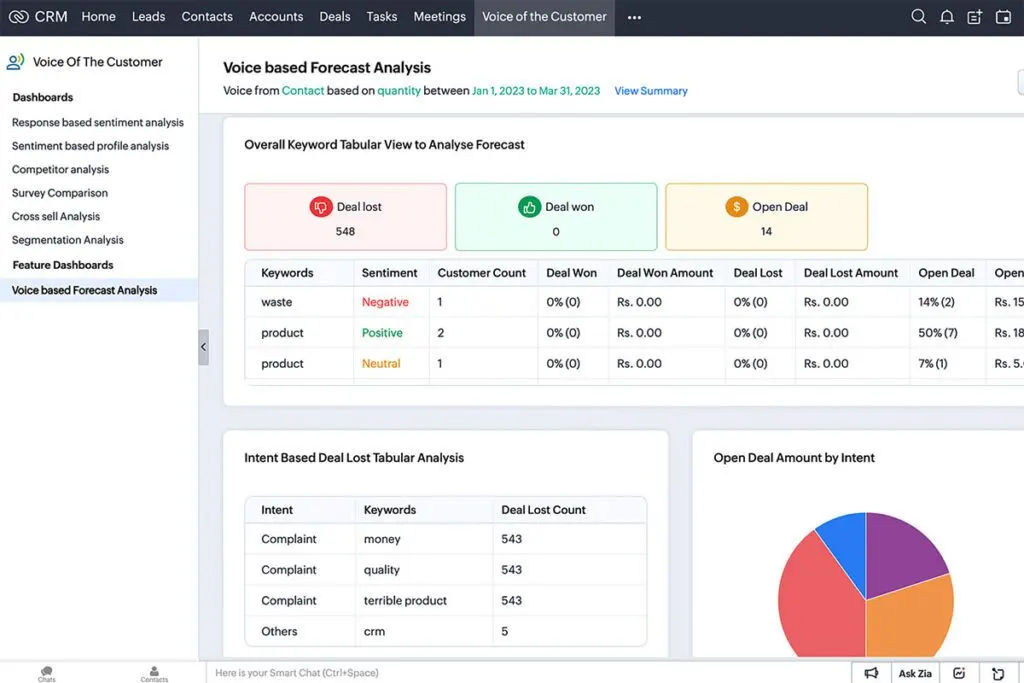
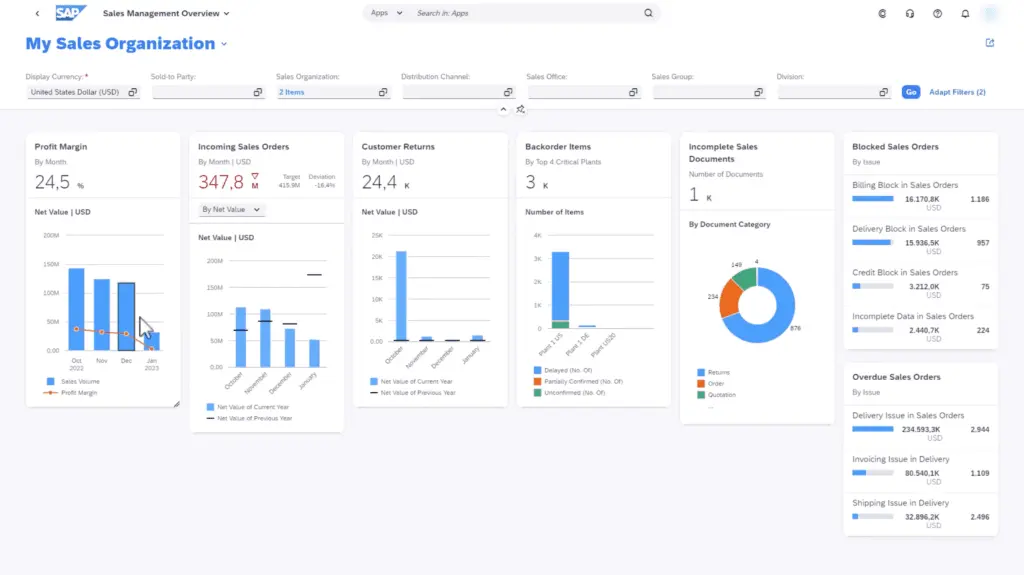
With a focus on data-driven decision-making, SAP Sales Cloud stands out with its advanced reporting and analytics capabilities. It empowers users with comprehensive analytics tools, including predictive analytics, allowing for insightful forecasts and trend analysis. Meanwhile, Zoho CRM provides robust reporting functionalities with customizable dashboards and reports, catering to businesses seeking detailed insights into sales performance without the complexity of advanced analytics.
SAP Sales Cloud vs Zoho CRM Pricing
The pricing for SAP Sales Cloud vs Zoho CRM can vary based on the specific features and editions you're interested in. SAP Sales Cloud typically offers various pricing tiers based on the functionalities and scale of your business needs. Zoho CRM, on the other hand, also provides different editions with varying features and pricing structures.
SAP Sales Cloud usually offers a range of modules like Sales, Service, Marketing, etc., and the pricing can be higher due to its enterprise-grade capabilities. Zoho CRM, on the contrary, has multiple editions (like Standard, Professional, Enterprise. and Ultimate) catering to different business sizes with a range of features.
While the specific SAP Sales Cloud vs Zoho CRM pricing may change over time and can depend on factors like the number of users, required features, add-ons, or any promotional offers, Zoho CRM generally tends to have more accessible pricing compared to SAP Sales Cloud, making it more appealing for smaller or mid-sized businesses. SAP Sales Cloud may be more suitable for larger enterprises looking for a comprehensive CRM solution with advanced functionalities. But you may still want to look at Zoho CRM alternatives for solutions that best fit your budget.
SAP Sales Cloud Pros and Cons
SAP Sales Cloud is a comprehensive and powerful CRM solution tailored for enterprises seeking a robust suite of functionalities and integration within the SAP ecosystem. Here are some of its pros and cons:
SAP Sales Cloud Pros
- Holistic functionality. At the core of SAP Sales Cloud lies a robust ensemble of tools encompassing sales, service, marketing, and more. This breadth allows for a comprehensive approach to managing customer relationships, providing a unified platform for various business functions.
- Scalability. Tailored for large enterprises, SAP Sales Cloud offers scalability in both features and capacity. Its adaptability allows businesses to expand and evolve their CRM systems with their growth.
- Integration prowess. One of its crowning glories is its seamless integration capabilities within the SAP ecosystem. For enterprises already immersed in SAP products, Sales Cloud becomes a linchpin, fostering a cohesive environment that streamlines operations.
- Advanced analytics. The platform boasts sophisticated analytics and reporting tools, serving a platter of actionable insights. These analytics empower businesses with valuable data-driven decision-making capabilities, contributing to refined strategies and improved performance.
SAP Sales Cloud Cons
- Complexity dilemma. The expansive nature of SAP Sales Cloud can be a double-edged sword. While it caters magnificently to large enterprises, it may overwhelm smaller businesses seeking simpler CRM solutions. Its complexity demands a steeper learning curve and a dedicated team for optimal utilization.
- Implementation challenges. Deploying SAP Sales Cloud isn’t a walk in the park. Its implementation and customization demand time, skilled professionals, and financial resources, potentially elongating the deployment timeline and increasing overall expenses.
- User interface quandary. Despite its prowess, some users find the user interface less intuitive compared to other CRM solutions. This necessitates training sessions to ensure users can navigate the system efficiently, which could further add to the costs and time investment.
Zoho CRM Pros and Cons
Like SAP Sales CLoud, Zoho CRM comes with its own set of advantages and limitations. Here are more details on the pros and cons of Zoho CRM:
Pros
- Affordability. Zoho CRM emerges as an enticing option, especially for small to mid-sized businesses, owing to its cost-effectiveness. With various pricing tiers, it provides accessible entry points into CRM solutions without burdening budgets.
- User-friendly interface. The hallmark of Zoho CRM lies in its intuitive interface. Navigating through its features requires minimal training, allowing users to swiftly acclimate themselves and leverage its functionalities effectively.
- Customization flexibility. Businesses revel in the customization options offered by Zoho CRM. It facilitates tailoring the CRM system to suit specific business needs without delving into complexities, empowering users to personalize workflows and fields effortlessly.
Cons
- Scalability constraints. While a beacon for small to mid-sized businesses, Zoho CRM might struggle to accommodate the intricate demands of larger enterprises. Its limitations in scalability could pose challenges for companies experiencing rapid growth or requiring advanced functionalities.
- Advanced features gap. Compared to high-end CRM systems, Zoho CRM might fall short in offering certain enterprise-level features. Businesses with complex requirements might find certain functionalities missing or less comprehensive.
How do SAP Sales Cloud and Zoho CRM support sales team collaboration and productivity?
Both SAP Sales Cloud and Zoho CRM offer features that enhance collaboration and productivity among sales teams. However, the depth and customization of these features vary, making each solution suitable for different business sizes and needs. Here’s an overview of how each CRM supports team collaboration and boosts productivity:
Shared Access to Customer Information
- SAP Sales Cloud: Provides centralized customer information accessible across teams. Sales representatives can easily access customer data, order history, and communication records, allowing for more informed interactions and seamless collaboration.
- Zoho CRM: Also offers a centralized view of customer information and history. Zoho CRM allows team members to access records and updates, ensuring that everyone is informed about client status and recent activities, promoting better team coordination.
Collaboration Tools
- SAP Sales Cloud: Integrates with SAP’s broader suite, enabling real-time communication between departments like marketing, sales, and customer service. This CRM includes features like collaborative forecasting, where teams can align sales predictions with real-time data.
- Zoho CRM: Includes a built-in chat function and real-time notifications that keep team members connected. It also integrates with third-party collaboration tools like Slack, allowing seamless communication and updates.
Task and Workflow Management
- SAP Sales Cloud: Offers customizable workflows that support complex sales processes. It allows teams to assign tasks, set reminders, and monitor progress, all within the CRM, making it easier to manage large, collaborative projects.
- Zoho CRM: Provides a more simplified task management system suitable for small to mid-sized teams. Zoho CRM users can assign tasks, set reminders, and create checklists, which help maintain an organized workflow and ensure accountability.
Mobile Accessibility for Field Sales
- SAP Sales Cloud: Delivers a robust mobile app that enables sales teams to access customer data, update records, and collaborate on the go, catering well to remote or field sales teams.
- Zoho CRM: Also offers a mobile app with features like voice notes, notifications, and task management, helping sales reps stay productive and connected from anywhere.
Integrated Calendar and Scheduling
- SAP Sales Cloud: Includes scheduling tools that allow teams to sync calendars, plan meetings, and view each other's availability, optimizing time management for complex sales cycles.
- Zoho CRM: Features an integrated calendar and scheduling assistant, allowing team members to book meetings, set up reminders, and manage schedules efficiently, which is beneficial for smaller sales teams.
Integration Capabilities of SAP Sales Cloud and Zoho CRM
When evaluating CRM software, integration capabilities play a pivotal role in enhancing overall productivity and operational cohesion. Both SAP Sales Cloud and Zoho CRM offer integration features, but they differ significantly in their scope and execution.
SAP Sales Cloud sets itself apart with its seamless integration within the SAP ecosystem, tying together ERP, supply chain management, and business intelligence systems. This interconnected framework allows enterprises to unify their operations, providing a consolidated view of customer interactions, order processing, and financial data. For instance, SAP Sales Cloud’s synergy with tools like SAP S/4HANA ensures precision in real-time reporting and analytics, enabling users to harvest actionable insights and coordinate cross-departmental workflows effortlessly. Such deep-rooted integration makes SAP Sales Cloud an ideal choice for enterprises leveraging ERP systems to manage multifaceted business processes.
Conversely, Zoho CRM adopts a universalist approach by offering integrations with a wide array of third-party applications, including popular tools like G Suite, Microsoft 365, and Slack. While its ecosystem lacks the inherent complexity and enterprise-grade connectivity of SAP, Zoho CRM ensures adaptability for smaller businesses relying on diverse tools for routine operations. For growing organizations, Zoho CRM’s accessible API and marketplace of apps provide the flexibility to tailor the software to specific operational needs.
In summary, while SAP Sales Cloud focuses on deep integration within enterprise-grade solutions, Zoho CRM emphasizes versatility and cross-platform compatibility. The right choice ultimately depends on whether your business prioritizes holistic enterprise management or requires agility and customization to fit into an existing tech stack.
How do SAP Sales Cloud and Zoho CRM ensure data security and compliance?
Both platforms implement robust security frameworks that align with industry standards and regulatory requirements. SAP Sales Cloud leverages the extensive SAP security ecosystem to enforce measures such as role-based access control, multi-factor authentication, and advanced data encryption, ensuring enterprise-grade data governance and compliance with global protocols. In parallel, Zoho CRM incorporates scalable security practices tailored for smaller organizations, including periodic audits and secure access management, to protect sensitive customer information. These structured approaches support organizations operating in regulated industries, enabling seamless integration with other digital tools such as estimating software without compromising security or compliance.
Verdict – SAP Sales Cloud vs Zoho CRM: Which software is better?
SAP Sales Cloud outshines Zoho CRM to deliver advanced sales management features tailored to enterprise-level needs. Its comprehensive suite encompasses various functionalities crucial for intricate sales management, including robust lead management, opportunity tracking, advanced forecasting, and sophisticated analytics.
These features provide a holistic view of the sales pipeline, empowering sales teams with valuable insights to make informed decisions, forecast accurately, and optimize sales strategies for better outcomes. Moreover, SAP Sales Cloud's scalability ensures that as the sales processes evolve or expand, the system can adapt seamlessly, accommodating the changing demands of large enterprises.
While Zoho CRM offers commendable sales management capabilities, SAP Sales Cloud's depth of features, including its advanced forecasting, tailored analytics, and scalability options, cater more comprehensively to the complex needs of enterprise-level sales management. Our SAP Sales Cloud vs Zoho CRM analysis also revealed that SAP Sales Cloud's integration within the SAP ecosystem further enhances its capabilities, creating a cohesive environment for sales teams to leverage a robust suite of tools that streamline processes, boost productivity, and drive sales growth. For enterprises seeking a sophisticated, scalable, and feature-rich sales management solution, SAP Sales Cloud presents a more tailored and comprehensive offering compared to Zoho CRM.
Key Insights
- Comprehensive Sales Functionality:
- SAP Sales Cloud: Provides end-to-end sales capabilities from lead generation to deal closure and post-sales service. This includes sales automation, opportunity management, quote and order management, and integration with payroll software for service providers.
- Zoho CRM: Offers a wide range of features including lead management, contact management, sales pipeline tracking, email marketing, analytics, and more, emphasizing customization and scalability for businesses of all sizes.
- Data-Driven Insights and Analytics:
- SAP Sales Cloud: Leverages advanced analytics to provide actionable insights from vast sales data, enabling detailed reporting, forecasting, and dashboard creation. This helps sales teams identify trends, predict customer behavior, and optimize strategies.
- Zoho CRM: Emphasizes automation and artificial intelligence to automate tasks, analyze data, and provide actionable insights, helping businesses identify trends, predict customer behavior, and optimize sales strategies.
- Enhanced Customer Engagement:
- SAP Sales Cloud: Enables businesses to deliver personalized experiences using customer data and insights. This includes targeted marketing campaigns and recommendations, fostering stronger customer relationships and loyalty.
- Zoho CRM: Focuses on providing a customizable and flexible platform that allows businesses to tailor the CRM to their specific needs, ensuring a personalized approach to managing customer relationships.
- Integration Capabilities:
- SAP Sales Cloud: Integrates seamlessly within the SAP ecosystem, providing a unified platform for various business functions and enhancing the overall customer relationship management process.
- Zoho CRM: Integrates with various third-party applications and tools, such as email marketing tools, accounting software, and productivity suites, enhancing its functionality and providing a more seamless experience for users.
- Target Audience:
- SAP Sales Cloud: Tailored for medium to large enterprises with complex sales processes, diverse product lines, and extensive customer bases. It is ideal for businesses seeking a comprehensive and integrated CRM solution with a high degree of customization and integration capabilities.
- Zoho CRM: Suited for startups, small, and medium enterprises that need an affordable, user-friendly, and scalable CRM solution. It is particularly appealing for businesses looking to enhance sales efficiency and customer relationships without the complexity of larger CRM solutions.
Other Things You Should Know About SAP Sales Cloud – Zoho CRM Comparison
Yes, SAP Sales Cloud is a Customer Relationship Management (CRM) solution. It is designed to manage and optimize customer relationships and sales processes, offering functionalities for sales, service, marketing, and customer engagement.
SAP is a company that offers a wide range of enterprise resource planning (ERP) software solutions, managing various aspects of a business like finance, supply chain, and human resources. CRM, on the other hand, is a category of software solutions focused specifically on managing and nurturing customer relationships, including sales, marketing, customer service, and support activities.
Zoho CRM may have scalability issues for larger enterprises with complex operational requirements. It may lack some advanced functionalities needed by expansive businesses. Additionally, it relies on stable internet connectivity, which can be a challenge in offline environments or regions with unreliable internet access.
SAP C4C (Cloud for Customer) is a cloud-based CRM solution designed for sales, service, and marketing functionalities, offering flexibility and accessibility from anywhere with an internet connection. It integrates well with other SAP solutions, providing a holistic view of customer data. CRM, as a broader category, includes various CRM systems, including solutions like SAP Sales Cloud.
SAP Sales Cloud is used by medium to large enterprises with complex sales processes and extensive customer bases, looking for a comprehensive and integrated CRM solution. Zoho CRM is used by startups, small, and medium enterprises that need an affordable, user-friendly, and scalable CRM solution for enhancing sales efficiency and customer relationships.
The key benefits of SAP Sales Cloud include comprehensive sales functionality, data-driven insights and analytics, enhanced customer engagement, and seamless integration within the SAP ecosystem. These features help streamline sales processes, foster customer engagement, and drive business growth.
Zoho CRM enhances customer engagement by providing a customizable platform that allows businesses to tailor the CRM to their specific needs. It supports personalized interactions through automation and AI-driven insights, helping businesses build stronger customer relationships.
SAP Sales Cloud typically offers various pricing tiers based on functionalities and business needs, often at a higher price point due to its enterprise-grade capabilities. Zoho CRM provides different editions with varying features and more accessible pricing, making it appealing for smaller or mid-sized businesses.


